
Reading and writing to Excel 2007 or Excel 2010 from C# - Part I: Primer

[Note: See the series index for a list of all parts in this series.]

Over the past week I have been learning about the complexity of working with Excel 2007 native file format - XLSX or as it is known correctly, SpreadsheetXL. There is three ways to work with it, firstly build your own parser - just too much work for me or second use OpenXML SDK format which Microsoft provides. The current version, at time of writing that was version 1, of the SDK is not great: there is very little (if any) benefit of using it over the third method. There is a V2 SDK currently in beta which looks brilliant and frankly when released would be the recommend route.

The third way, which is the way I chose is the uses new features introduced in the .NET Framework 3.0.

What is a XLSX file? A XLSX file is actually just a ZIP file which contains a number of XML files in it.

image

This means all you need to do is open the XLSX file as a ZIP file, get the right XML files (or parts as they are referred to) out of it and parse those.

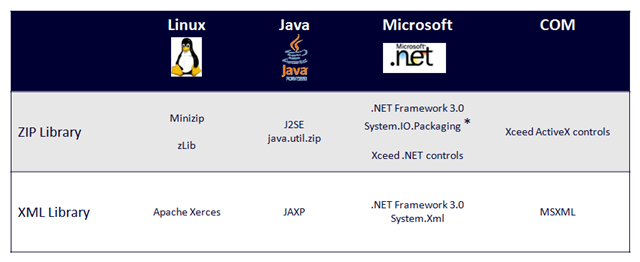
If you are thinking this is a .NET only solutionthe chart below is from Doug Mahugh which shows a number of ways across a number of technologies/OS’s to do the same thing. This series will focus on the .NET way.
image

What is nice about using System.IO.Packaging to read the file over the direct ZIP options, is that there are some helper methods to make it easier when working with any of the new formats (docx, xlsx etc...)

image

good article

http://totaldotnet.com

Hi,

I use a tool for creating an Excel Spreadsheet with C#, it can reading and writing to excel 2007 or excel 2010 from c#
http://www.e-iceblue.com/Introduce/excel-for-net-introduce.html

Spire.XLS

[...] good starting point is a series of great articles from rmaclean’s blog which couldn’t explain better how to work with the xlsx Excel 2007 native [...]

[...] part 1 for the premise and for a list of all [...]

[...] part 1 for the premise and for a list of all [...]

[...] part 1 for the premise and for a list of all [...]

Hi, There is alternative way to handle Excel files in C#. You could try some 3rd party component like GemBox spreadsheet component which is free for commercial use if you need less then 150 rows and 5 sheets. http://www.gemboxsoftware.com/GBSpreadsheet.htm Filip
Agree, there are a number of quality 3rd party controls and Microsoft is releasing v2 of the openxml toolkit which also makes it very easy to use.
looking forward to the rest of this series for sure!

Comment viewing options

Select your preferred way to display the comments and click "Save settings" to activate your changes.

Post new comment

The content of this field is kept private and will not be shown publicly. If you have a Gravatar account associated with the e-mail address you provide, it will be used to display your avatar.
  • Web page addresses and e-mail addresses turn into links automatically.
  • Allowed HTML tags: <em> <strong> <cite> <code> <ul> <ol> <li> <dl> <dt> <dd>
  • Lines and paragraphs break automatically.
  • Syntax highlight code surrounded by the <pre class="brush: lang">...</pre> tags, where lang is one of the following language brushes: as3, applescript, bash, csharp, coldfusion, cpp, css, delphi, diff, erlang, groovy, jscript, java, javafx, perl, php, plain, powershell, python, ruby, sass, scala, sql, vb, xml.

More information about formatting options