
Telkom is using a man-in-the-middle attack to change your websites
Part 2 is here, click that now (it will open in another window) so you can continue the fun when you are finished here
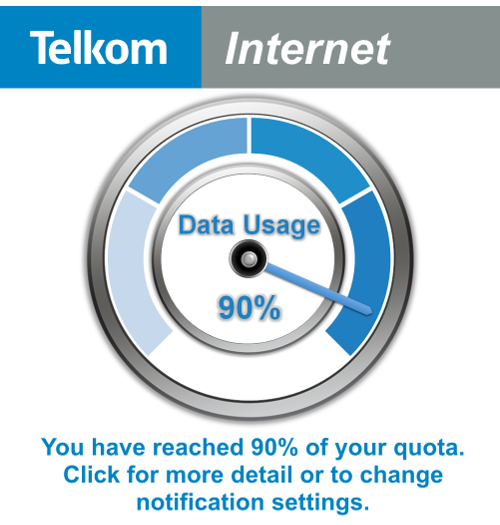
The following image is a screen shot I took of a webpage in Chrome. If you view that same website, you will get a different experience because Telkom is using the same techniques as a man-in-the-middle attack to edit the code which the website uses, to serve Telkom’s own content.

The important bit which has been added, is the piece in the lower right hand corner of the page, which Telkom has added to the website without the permission of the website owner or the customer of the Telkom ISP account.

Admittedly this is a relatively benign addition, in fact it maybe seen as useful, and I can see it being sold that way to non-technical managers and executives. Do not be fooled though, even this simple addition can cause major issues for you.
Breaking of websites
It is impossible for Telkom to know what this addition will do to every website on the web. I will cover below the technicality of how it works below but in short they are adding JavaScript (the code of the web pages) to each page and that additional code could interfere with the existing code and web pages in unforeseen ways and ultimately can break a web page. The sheer size and complexity of the internet says that it is impossible for them to know for sure that they are not break a single website.
Exposing of security risks
The second issue is that they are exposing users to the potential of massive security risks. They may argue that their code is secure now and that maybe true, however that is a point in time view.
At the moment they are using a JavaScript library (a library being reusable code web devs use to make it easier to build websites) called jQuery and while the version they use has nothing reported regarding security issues, that doesn’t mean that in the future it will still be as secure. If a vulnerability is found in that library or in the additional code they wrote, it could be used to launch an attack against their users. You need to ask yourself, do you trust that the developers at Telkom who built this so much they could not have introduced a security issue? Do you trust that they are that good?
A second issue around the security, is that they need to host their content & systems which do this attack somewhere. If that server/s is compromised – either from an external attack or from a disgruntled employee they could use that for XSS attacks or key sniffing attack! As this “feature” becomes more widely known, you can be assured that those servers will become the target of more attacks because of their value of leveraging them to launching attacks on users will be very big. The reality is that it is just a matter of time before those servers are compromised.
Taking away your freedom to privacy
While it will always be possible for ISPs to see what the traffic you are sending & receiving is, it shouldn’t be easily accessible to the staff and people at the ISP. Having a server that can do this manipulation means that they are enabling a very easy point for someone to capture traffic and see what you are doing on the internet in such a way that it will be hidden from you.
While I am sure they will tell you they take security very seriously and that they do not allow that type of access to employees what is stopping an executive at a later stage from using this to prevent adverts from MTN showing up or causing web pages that support EFF or the DA to not load at all? Nothing and they have that power to do that, without oversight and without your permission. Do you trust Telkom enough to not abuse that?
Telkom doing this is violating a founding principal of the Internet: Net neutrality
Performance
Finally, and this is last because it is the least of the issues, they are making you download more 84.8Kb of extra code (see here for the data) and ~120Kb of extra images plus the manipulation of the web page slows down rendering. In short, they are making the web slower for you and helping use more of your bandwidth. They are also adding in extra servers and network hops which add even more performance concerns.
Technical details
How are they able to do this? From my testing they only do this to HTTP traffic, not HTTPS traffic, as that traffic is encrypted. While the encryption should help, it is not impossible to silently break and inject content as shown with the recent Lenono Superfish disaster which is basically the same thing as Telkom is doing except on an ISP level. It isn't easy or likely reasonable for them to do that, and I am not implying they are, just that they could and maybe motivated to add this to secure websites.
The first step in understanding this attack, is that Telkom is not changing the HTML (i.e. the web page) that is sent to your machine, that remains untouched (you can see the HTML for the above page at the time I got that injection of HTML here). So where is the new content coming from? Telkom is very cleverly intercepting certain calls and redirecting them, so that unless you are actively looking for this, it appears transparent to the website and the user! What they are doing is watching for JavaScript files to be requested, and then appending additional code into those files. The additional code being jQuery 2.0.1 and then their own JavaScript which then is used to manipulate the web page.
To explain this it might help to know what a normal process of getting a file looks like:

- You web browser requests a file that is needed for the website to load the web page
- It hits the Telkom proxy, which is meant to help speed up the Internet by providing content to you from a closer location. They may not have a proxy, many ISPs do this so that they can provide a pure & secure experience.
- If the proxy doesn’t have the content, it should ask the web server for it.
- The web server provides the content to the proxy.
- The proxy returns it to the browser unaltered.
The way this attack works is as follows:
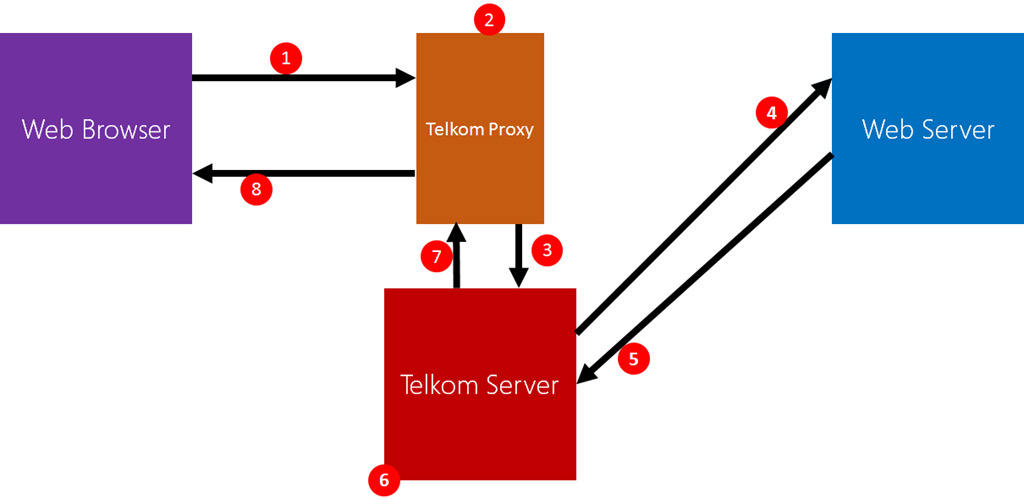
- You web browser requests a file that is needed for the website to load
- It hits the Telkom proxy, which now checks to see if it is JavaScript or not that is requested.
- If it is JavaScript, the request is changed to another server to handle.
- That server then requests the original JavaScript from the website.
- And the website provides it.
- The Telkom server now appends its content to the JavaScript.
- The resulting modified code is sent back to the proxy
- The proxy returns the request to the browser.
Disclaimer: This is a rough view of it and without inside knowledge I cannot guarantee it is exactly like that. It maybe that there are changes but the principal will be the same.
If you sniff the traffic you can pick up the manipulation as the URLs for the JavaScript is being requested is being changed and you get URL’s that look like this:
http://196.25.211.41/n/50fc073bb429a4eb303a6420235e9381.js?q=Pb4KQL0xYJ…
http://196.25.211.41/n/50fc073bb429a4eb303a6420235e9381.js?q=RRNoU9x7uZ…
If we break down that URL, it is the server portion and a JavaScript file that Telkom generates [http://196.25.211.41/n/50fc073bb429a4eb303a6420235e9381.js]. The URL has two parameters, one a unique ID [q=Pb4KQL0xYJ%2F53kOn%2FSnvQA%3D%3D%7C1435397545%7C02dfd5fbe207b80c1859ed08333cd16d] to prevent caching (I assume) and the second the original file it is changing [url=http%3A%2F%2Fajax.googleapis.com%2Fajax%2Flibs%2Fjquery%2F1.7.1%2Fjquery.min.js].
Note: these URLs do not work outside the Telkom ADSL network.
FAQ
Are you sure your OS / Browser isn’t attacked? Are you sure this is Telkom?
In the image above it is Chrome on Windows 10. I have been able to reproduce this on my Windows Phone and also using Microsoft’s new Edge browser. This is on the network layer

And here is it again on the jQuery website using Microsoft Edge:

How are they showing content without changing the HTML?
JavaScript has the ability to edit and inject HTML. Here is the HTML for a page that is attacked and below is an image of the HTML which the browser has rendered. The differ because the HTML has been injected using JavaScript:

How can you be sure that this isn’t an agreement with the web site owner?
Because they are doing this everywhere. I was able to easily reproduce this with the programming site, StackOverflow (see image below). In this case they manipulated the jQuery JavaScript which that website uses. This is a great case because they load all their content from a CDN and you can compare what you got to the CDN and it shows a difference. StackOverflow will confirm they have never agreed to this.


Do you have examples of the JavaScript?
Yup. Here is the modified Modernizer from the PowerBase website: http://pastebin.com/1p4m5LnM
Here is the modified jQuery from StackOverflow: http://pastebin.com/XXY6b3n7
I am on Telkom ADSL and I am not seeing this, you are wrong!
- You need to have Telkom as your ADSL & ISP. If I switch my ISP to FNB, for example, this doesn’t happen.
- Second it doesn’t happen on HTTPS, or at least I’ve never seen it. StackOverflow is a good example where it would always happen on HTTP, but when I switched to HTTPS (they support both) it stopped.
- It isn’t constant. I first picked this up a few days ago and then it stopped until the weekend.
- It also doesn’t happen on every website. I am assuming there is some requirements in regards to the JavaScript that they need to be able append to it.
What can I do to protect myself?
You can’t block those servers as that will break the websites where Telkom is injecting content into. Telkom has a web page which allows you to opt-out. I haven't been able to confirm it works yet but I will be keeping an eye out for it. Another possible tool to help protect you, you could use the HTTPS Everywhere extension to increase the amount of websites you access with HTTPS, thus lowering the amount of this type of nonsense.
Ultimately, you need to trust your ISP. They can see your data and manipulate it. You need to trust they won't. If they show they are unwilling to live up to the principals of the Internet or violate your trust, you only option is to change ISPs.
What if Telkom lets me opt-out, that is good enough right?
Opting out means that they will still have this system. The system will just check the database to see if you get the original files or the modified files. You still are slowed down for the check (versus performance of compared no check at all because this system is taken out). In the best case (i.e. just a DB lookup and then a redirect), once opted out that performance difference will be so marginal it doesn't matter. In the worst case, they could still direct you through the same (potentially vulnerable servers) and you could get a lot more overhead due to that, bad code etc....
The only approach which introduces no further security issues, no violation of net neutrality and no performance impact is for Telkom not to do this at all.
Updates
As I am totally happy to admit when I am wrong, any updates will be listed here
12h05 10 July 2015 - I wrote many ISPs do not use proxies by mistake. I meant many do, but only for performance reasons. Not for changing of content and added more info & clarification on the HTTPS breaking.
15h00 29 June 2015 - it was pointed out to me it isn't just the JS you download, it is the MASSIVE image too. So rather than 80ish Kb it is almost 200Kb in total! I've updated the article to reflect that.
15h30 29 June 2015 - Added points reflecting that this is a violation of net neutrality and the HTTPS everywhere extension which might help some people.
18h25 20 June 2015 - Added information about opt-out option. Added information around performance and how it may or maybe impacted by opt-in out. All of that had some rewording to the "What can I do to protect myself?" section.
Stripping background images from PDFs
Sometimes I get a PDF I want to print, but there is a background image or colour which will eat too much ink & I would like to remove it. The example I am going to use is the rules reference for Tales of Arabian Nights from The Esoteric Order of Gamers, which has a very bold parchment background.

This is a fairly simple job, you just need the right tools and that tool is the FREE (and open source) Inkscape. Once you have it downloaded and installed, browse to your file and open it – being a PDF you will be presented with a dialog asking you to convert it. You need to do a page at a time, so select the page at the top.

Once you hit OK, it will import it and you can then select the background image and delete it. You’ll note that some of the text is the wrong font & that is because I do not have the right font installed. Often you will have clean up like this, and adding back logos, to do but that is up to you in regards to how much you want to polish it.
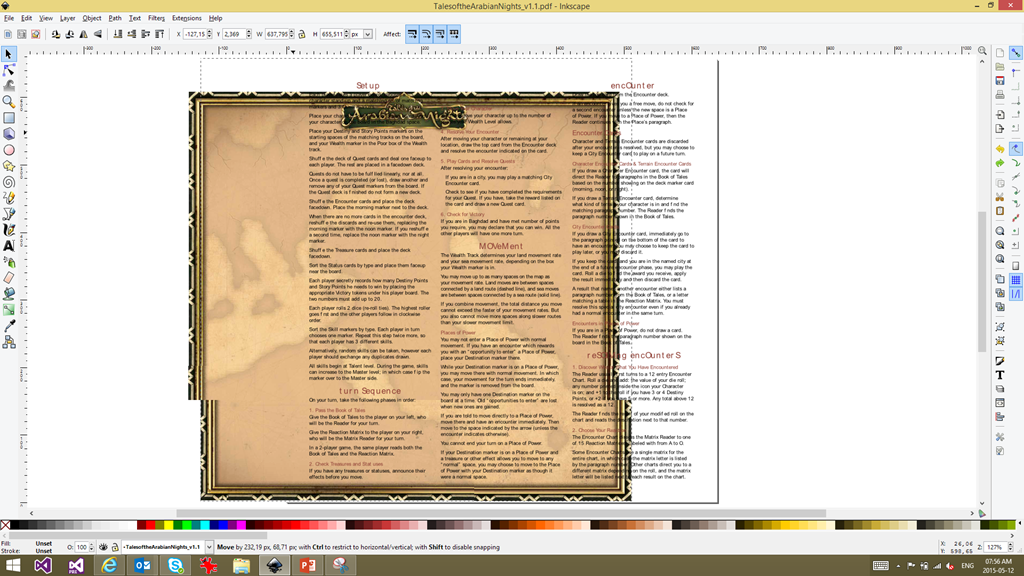
Once done user File –> Save As to save back to a PDF. The biggest pain is that you need to do this page by page and in the end you’ll have numerous files (one for each page), but since the goal is to print it – it isn’t a big pain.
Here is the before and after for another one I did:


Architect
IT is a very new industry compared to other industries and as such there is still a lot of things that are influx as we learn & mature as an industry. One of those items is job titles. It may seem weird that something as core as a job title is influx but in my view it is because we do not yet have universal standards and, sometimes (to a much lesser degree), we are breaking new ground and new job titles need to be constructed to match the new role.
The job title Architect, though seems to have a nearly universal usage in the IT industry to denote an expert or leader in a specific area. In fact, my current job title is Technology Architect. There are problems though with the usage of the title Architect in IT and I want to share some of the issues I see with the usage.
Architectural Profession Act of 2000
In South Africa there is a piece of legislation called the Architectural Profession Act of 2000, which just defines the rules and controlling bodies for architects – not in the IT space but in the building/construction space. One of the sections of that legislation (section 18) specifies that certain titles may only be used by registered (with the architectural council) professionals, those titles are:
- Professional Architect
- Professional Senior Architectural Technologist
- Professional Architectural Technologist
- Professional Architectural Draughtsperson
- Candidate Architect
- Candidate Senior Architectural Technologist
- Candidate Architectural Technologist
- Candidate Architectural Draughtsperson
In short, if you are using any of those titles as an IT person – you are breaking the law.
What an Architect should imply?
We, in IT, use the term Architect to denote some level of senior status on a person – however without a standard or controlling body, anyone can use that title. I remember when I was a much younger developer, thrust into a late project to lead it & I was sold to the customer as an “architect”. Why was that title applied to me? It was not because of my skills or experience. It was to show the customer that I knew what I was doing and, more importantly for the sales guy, so the company could charge more for my time.
When you look at the building/consulting space, if you want to be a professional architect you need study at a university for 5 years. That gets you to the junior architect level – want to be a senior, expect YEARS of real world experience!
By adopting the same title as another industry, we need to honour their usage of the titles. If we keep abusing the legacy of the title, we will devalue the title in our industry and we will make our industry look far more immature to the rest of the world.
What should an Architect do?
Not only should we be careful about who we apply the term Architect to, but we should only be applying it to those who actually do IT architecture work. That is a very specific area of work with very specific training and tools such as TOGAF or the Zachman Framework. If you are not doing that – you are not doing architectural work in IT and should not be using that title.
This is obvious, but we fail so often like this – imagine if you called a plumber & his truck & business card said electrician… would you trust him to fix your pipes?
Summary
In my view unless you are doing real IT architectural work & have years of experience in IT and the architectural space you shouldn’t use the title. If you are doing the correct work you want to make sure your usage of the title, it clearly separates it from the building/construction realm by having something like software or IT in the title too.
We, the IT industry, needs to do better with titles or we will continue to devalue ourselves in the eyes of our customers and this is a way to get to solving that.
The ungrateful behaviour award
 This week’s award for more ungrateful behaviour goes to Greg Young, who seems to think that being a speaker at an event makes him special. The story is that Greg went to TechEd North America as a speaker, with multiple talks to present. His wife joined him on the day of his first talk, but the organisers wouldn't let her into his talk (to take photos of him) for free. He then cancelled all his talks at TechED NA and also cancelled his talk at TechEd Europe, in response to the on the ground staff not accommodating him.
All that is right
I FULLY agree with him that the TechEd NA people on the ground could've & should've been handled it way better (I would've just let his wife in) and his suggestions on how they could've done it better (find his wife and take to the speakers room/Starbucks for example) are totally correct.
As he said in his post, this was the last in a bad experience for him as a speaker:
- Problems with flights (costs & times)
- Booking for other events that didn't take into account flights etc...
And so on, and you know what? HE IS RIGHT, that was a bad experience, which no one (speaker, delegate or staff) should have to deal with. It seems that TechED NA was badly organised and I believe he is correct in his view that it is caused by it having many parts working independently and those parts not having authority to make things happen without 900 billion meters of red tape. His first three points of issues are spot on and ALL conferences should learn from him.
All that is wrong
If I agree so much with him, why do I have an issue with his behaviour? It is four points:
- Greg says "Speakers are not commodities, they are people who are giving much to help the conference" - I am sorry Greg, but speakers are commodities. We are there to help the conference succeed & serve the audience. Nothing is more important than serving the audience & cancelling your talk shows that you think your situation is more important than that. And if you not willing to do that, tough - you will be replaced... just like a commodity.
- Speaking at an event like TechED NA, plus talking on Channel 9 is an honour & should be approached as such. There are hundreds if not thousands that would put up with a lot more bad experiences to have that opportunity. Wasting it is a slap in the face to the many people that could've & would've done the talk.
- Being a speaker is about planning - talks that fail are mostly due to lack of planning. Greg has a responsibility to ensure his planning, which includes where his family will be during his talk, is done ahead of time with the right people & not with the people on the ground at the last minute. Planning is a corner stone to professional speaking. I am sure someone involved knew his wife was coming (they booked her flights) but that doesn’t mean everyone involved knew (a conference like this is massive, with hundreds of moving parts). I can also see the staff making the assumption that his wife joined him in the city but wouldn’t attend the conference. At the end of the day it is his responsibility to plan with the right people ahead of time to make sure everything works out.
- Now, the most important point of this entire post: Let's assume his only choice was to cancel that talk, as he had to do what is right for his wife and go and tell her (leaving her alone for 2 hours would be rough). I would not see that cancelled talk as an issue, and I would not have written this. The single biggest reason I believe his behaviour is award winningly bad is he cancelled the rest of his talks too! There is no reason other to do that, than to stamp his authority and view of being special. He has even cancelled his talk at a different Microsoft conference?! Who is that hurting? The people that are measured for the success & the staff of TechEd NA & Europe are different! That behaviour is unprofessional and deserving of an award. Cancel the one talk, sort things out with the wife & then go and serve the audience - that is what he should’ve done.
Final Thoughts
I speak at Microsoft events all the time but I have never spoken at TechEd NA. I have never met Greg and only know him from a few tweets, his amazing CodeBetter posts and this story and I think he must be amazingly bright if he gets the chance to speak at TechEd. I am not suggesting otherwise, I am talking about his behaviour in this situation. I am not even suggesting this is his normal behaviour, it may just be him grumpy & irrational from the jetlag & lack of sleep he mentions at the start of the blog post, but in that case rather admit you were wrong & don’t post a blog post like that.
Presentation Dump: End of 2012 & First half of 2013 - POPI, JavaScript, Open Source & .NET 4.5 Async
It has been an entire year since my last presentation dump, so following that tradition – here are some of the talks I gave in the last year that were not immediately available:
Protection of Personal Information Bill (POPI)
Description
A short presentation that focuses on the proposed POPI law, how it impacts businesses, technology, IT depts & the cloud. It was based on a draft so some aspects may have changed.
Thoughts
This was a tough talk for me, because the law isn’t something I spend much time focusing on. I spent a lot of time reading the bill & analysis for it and really was impressed how approachable all of it is. This is definitely a law we need to be aware of, but for most companies (who do things correctly now) it will mean either no changes or a slight update to some documents.
Open Source Licensing
Description
This talk focuses on what open source licensing is, how it should be applied inside & outside companies. It also looks at how Open Source != Free.
Thoughts
This talk looks at how open source licensing works & more importantly how it applies to company projects. Once again a bit of legal focus but very valuable info in it!
JavaScript Toolkit
Description
This presentation provides a quick glance at a number of tools that make development with JavaScript easy, quick & bug free. Loads of tools & ideas in it :)
Thoughts
The JavaScript toolkit talk looks at a LOT of tools and libraries for JavaScript & as I do a lot of this day by day – it was easy to get ready & a lot of fun to present.
How to give a great presentation
Description
This slide deck was used to give students an overview on how to give a great presentation, especially a technical presentation. It covers aspects like purposeful movement, technology, slide creation etc....
Thoughts
This is a talk I gave to some students about how to do a great talk & it pulls a lot of my own learning’s & learning’s from experts like Hanselman into it.
.NET 4.5 Async
Description
A look at some of the complexities of .NET 4.5 Async
Thoughts
The newest talk here which covers the Async keyword. The core focus here was not on the simple scenarios but rather to dive into the more complex scenarios and areas of pain that can occur with this new keyword.
Software Developers Mythology: iPhone Apps are important
Seriously your mobile strategy can exclude iPhone, you don’t need to support that platform – it isn’t really that important.
Before you move to the comment to call me a Microsoft kool-aid guzzling fanboy, let me explain. I see three reasons that fuel the myth that iPhone is an important platform and they are:
- Lies, Damned Lies & Statistics
- The FNB Effect
- Development is hard for these other platforms
Lies, Damned Lies & Statistics
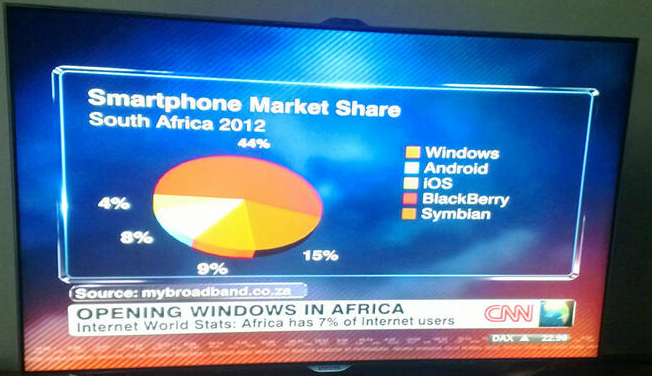 I have been totally guilty of helping this cause of the myth prevail by standing in front of thousands of Windows Phone 7 developers & showing how Gartner & IDC both predicted that Windows Phone would grow to 2nd place behind Android by 2015, pushing ahead of iPhone – which at the time the stats said was the number two smart phone OS.
The truth is, Windows Phone is ALREADY ahead of iPhone. It also leads Android. Really, it does – maybe not world wide or even in your country, but in South Africa it does.
In South Africa the picture is very different, Symbian leads by a massive margin (44%) followed by BlackBerry (15%), then Windows Phone (9%), forth place is Android (8%) and last is iPhone (4%).
The problem is we look at these analysts and international reports and assume they apply to us – they do not and should not influence our understanding of our market.
The FNB Effect
 First National Bank, the bank that launched the first transactional smart phone app in South Africa & changed how we look at banking and did a lot to jump start app developed from companies. What platform did they launch on? iPhone & much (much) later an Android app was launched too – still no Windows Phone, Symbian or Blackberry app (or as I see it 68% of the market). Since there the number of times I have heard competing banks & companies in other industries start their mobile strategy with “FNB has iPhone – our customers expect iPhone”.
Those people are idiots. Their customers do not expect iPhone because FNB had an iPhone app, they expect an app for THEIR phone.
There are two sub-points to also consider with this factor which are vitally important in understanding why FNB’s choice of iPhone worked for them & why it may be right or wrong for your mobile strategy.
Know you customers
This is as much about the FNB effect as it is about statistics – looking at the statistics even for a country is almost completely flawed too. You need to look at what your customers have. To help explain this, let’s compare two companies who both produced an iPhone app:
For Discovery it totally makes sense to have an iPhone. Private health care & life insurance are expensive and really only the top portions of the country can afford it. That is the same market who buys iPhone. You market has iPhone, you build iPhone.
SABC, like so much at the national broadcaster, needs to appeal to the broad population. So they should be looking at the total market share and building based on that. The issue makes less sense when you think that DSTV’s news channels & eTV’s news appeal to the upper LM groups more – so in reality SABC SHOULD be targeting the lower income groups who buy cheap Symbian & Blackberry phones. They didn’t & it is just stupid of them.
In fact they should have a mobi site since that would allow even broader reach – but of course that doesn’t quiet work either…
FNB app isn’t special – their marketing dept. is
The FNB app isn’t special. At best the app idea was a just smart business seeing what the rest of the world is doing & getting on the band wagon first. So why do we care? Because FNB’s marketing dept. is so damn amazing, they made it an important point in many of their adverts. They used it to highlight how far ahead they were & how slow & old their competitors are. They also used it in an aspirational way to appeal to lower income groups: One day I will be rich & own an iPhone. Then I want to be at a bank with an app.
All four of the major banks in South Africa have apps for iPhone now & still we only ever talk about FNB. This isn’t because theirs is the best – but because they sold their app the best. They own the mind share.
A second aspect to this story is FNB have made it ridiculously easy to get an iPhone with them – which firstly pushes up their stats of which platforms are important and secondly re-enforces the marketing stories: Wish your bank had an app? Wish you had a phone that could run an app? Come to FNB, we make it easy to have both.
Development is hard for these other platforms
The final contributing factor to myth that iPhone is the first port of call, is from the prima donna’s involved in these strategies. You may know them as software developers. These folks will tell you that development for Symbian is tougher than milking a rattlesnake & development for Blackberry is tougher than getting a date with Megan Fox. iPhone, Android & Windows Phone development is easy by comparison and so you can get it a lot cheaper/quicker/better.
That is, naturally, complete bull shit. It is easier because these are sexier platforms and because of that
- they don’t want to feel like an idiot when sharing what they do with their friends – who knows? Megan Fox maybe there and who will she date the iPhone dev or the Symbian dev? (I call this embarrassment tax – you pay extra for a developer to be embarrassed)
- they likely have the devices today and understand the platforms already because they played with it in their free time. I am talking about platform & not development. Understanding why something works on a platform is just as important as learning to code for it.
- they like the fact they do not need to learn new languages/tools. Android & Windows Phone developers are especially bad here since it is the top most common development platforms .NET & Java.
In reality Symbian is a marvellously stable & well developed platform with many tools. In fact, if you don’t need a transactional app, they have tools that are completely code-less (i.e. everything is done visually). I haven’t ever worked with Blackberry myself, so I can’t comment on their tools but I have been on projects where someone else did BlackBerry work & I did Windows Phone. In those scenarios we were mostly matched for development performance and any difference was not because of the tooling.
Lastly, with tools like PhoneGap & Worklight getting better all the time, the need to native apps is getting REALLY small – you can easily use web development skills with those tools to create hybrid apps for BlackBerry & Symbian. There seems to be this belief though that if you go hybrid you go all in – which is totally bullshit too. I can totally see a native app built for your premier clients & then using hybrid, which may be a second rate experience, to clean up the rest of the market share platforms have in your customers.
Summary
In reality iPhone maybe the right choice to go for. The issue is there are so many people who do not apply their minds to what they really need. Rather these lazy people who make the decisions or feed information into the decision makers just regurgitate the bullshit that is out their. What I have hoped to highlight is there is no one right strategy but with a bit of thought & investigation you can find the one that is right for you and more importantly, your customers.
Twitter Pro-trick: Refer to companies by stock codes
Twitter is filled with awesome little tricks, and I recently found a very cool one for referring to companies on Twitter. First though, lets see the existing two ways to refer to a company. First you can use the companies Twitter name for example:
I work for @bbdsoftware :)
— Robert MacLean (@rmaclean) November 29, 2012
Or your other option is to use a hashtag
So what is the new awesome trick? If the company has a stock ticker code, for example Microsoft has MSFT & Nokia has NOK then you can prefix that with $ on Twitter, i.e. $MSFT & $NOK.My mother is a happy #Bing user
— Robert MacLean (@rmaclean) November 29, 2012
I am hoping for a $NOK Lumia 920 phone :)
— Robert MacLean (@rmaclean) November 29, 2012
On the Twitter site you will note that $NOK is now a link to a search for all $NOK related items (it doesn't work on the embedded Tweet), which in many cases (like Nokia) can save you a little bit of text. For people monitoring companies social network this is also important as it is an another thing they need to monitor!
This feature is called a CTAG (maybe it isn’t - but that is the the source on the search).
SMS Subscription Service: the scam & how I got my money back
This post is a departure from my usual technology filled posts, it is rather a personal story that affects many people that I think is worth sharing my experience. It is about these SMS subscription services where people signup for a service, and get content via SMS and then get billed monthly for it via there cellphone provider. I was signed up without my knowledge, billed and this is how I found out about this scam industry and got my money back from them.
The Story
It starts
The first indication I had was the odd appearance of “Content Charge” on my July invoice from MTN (my service provider). MTN uses such complicated names for services that it could mean anything but something said I should find out what it is. I called MTN and was told it was for a subscription service! I told the call centre agent that I had never signed up and wanted my money back. Unfortunately MTN couldn’t help me – all they did was cancel it that day and give me the details of who to contact about this.

The interesting thing about this is that to run a subscription service in South Africa you must be a member of WASPA, Wireless Application Service Providers' Association. WASPA has excellent rules about what is allowed and what is not allowed and the company MTN told me to call about a refund is thus a WASPA member – that company is called Opera Interactive. (I am not linking to these companies not because I do not want you to know exactly who they are, but I do not want to give them any search engine love).
I phoned and spoke to their Opera’s call centre (by now the 25th July) and they told me they could not help – as they only do the billing. All they can do is cancel the service and give me the actual companies details. That is right, Opera is not the company they are a middle man and, from what I understand, they let non-WASPA members “pretend” to be them, handle the interaction for billing with the service providers and take a cut of the profit!
Opera then told me to contact Mobmatic who were incredibly rude & told me to email as they do not help on the phone with refunds because, while they have a South African phone number, they are based on the UK - eventually they just hung up up me after I asked to speak to a manager. So I emailed then and then immediately logged a complaint with WASPA.
Lies, damn Lies
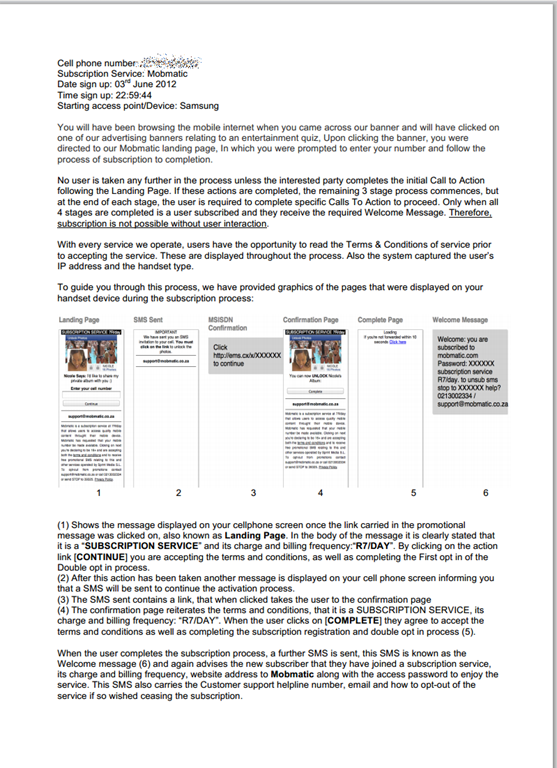
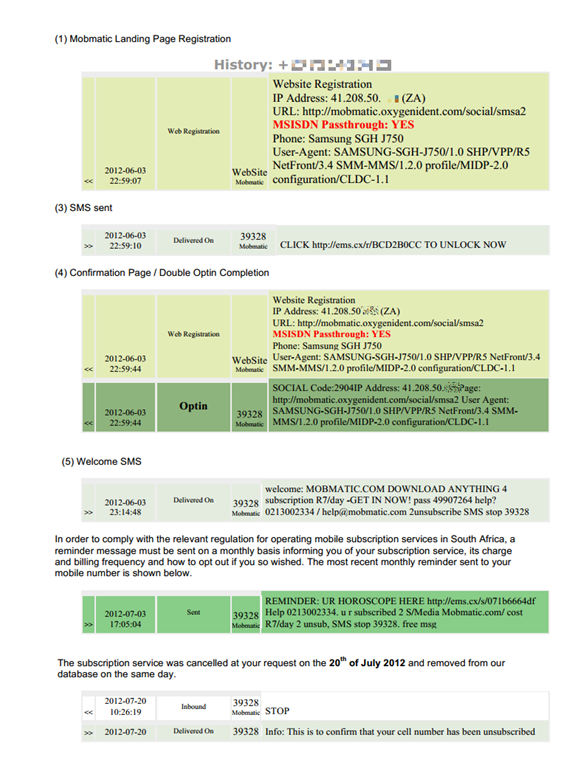
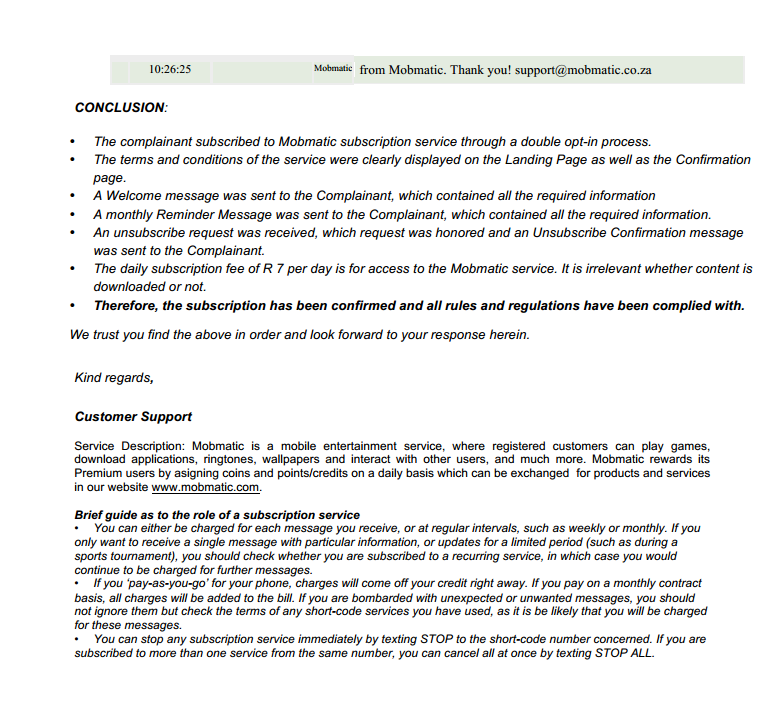
Nothing until the 31st July when Mobmatic emailed me a document (below) as proof I had signed up and told me that they wouldn’t refund me. So I looked over it and checked the details.
- Checked my SMS’s on my phone to see if there were any @ the dates/time specified. There was only one the 3rd July one, but considering I have never signed up I ignored as it seemed like a scam – however the key confirmation signups were not there.
- The phone model & even the browser string features did not match my phone.
I responded again with that info and asked for a refund.
Then nothing, no one responding until the 2nd August when WASPA said it had proof of me signing up from a company called Sprint (note: not Mobmatic), had asked for the service to be cancelled and then closed the case. Despite me asking for a refund, they ignored it – it really felt like WASPA had an automated system. I contacted them back and said I suspected the the “proof” was the same as sent to me and outlined the error in the “proof” and asked for a refund.
The scary part of the WASPA reply was “Since your unsubscribe request was not resolved using the informal process,” – informal?! What is informal about logging requests, getting reference numbers and so on. Just leads more proof that WASPA does it in an automated process.
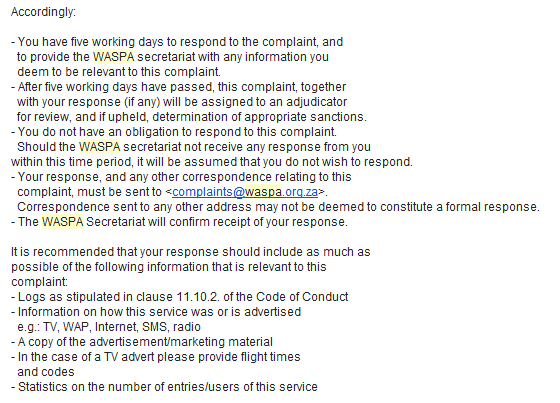
WASPA contact Sprint again with the details I sent them and told them they had to provide a significant data in their response of they would have to go before an adjudicator.
The fight back
Oddly within 3 days of this I was phoned and offered a full refund and told I would be emailed and I could respond with my details. I got the email the next day (below) and it is almost what they said, except for a clause to protect themselves of any legal action if I accepted the refund.

I gave them the details and got my refund! WASPA contacted me a week later to confirm and I held responding for a further 3 days until the money actually arrived in my account (10 full days after I had spoken to them – what is this the 80’s). I told WASPA it is sorted out but urged them to launch an investigation into the companies and structures. That all was a few weeks ago and nothing has happened since.
Final Thoughts
Hopefully this shows you that it is possible to fight these people who are screwing the man in the street around and gives you some idea what to do. The short list of things to remember is:
- Your mobile provider can’t do much – so do not fight with them. Be kind, and get them on your side so you can get as much info as possible.
- Keep a log of all interactions, get names, reference numbers, times etc…
- Once you have tried the direct route with the companies, contact WASPA immediately. While they seem to be a tick the check box type organisation, you will need their help too.
- When you get “proof” go through it in detail. I would have likely just agreed with them that maybe it was a mistake, but the phone model was wrong & the ISP suspicious, gave me confidence that I was correct. These are not simple things to check, so maybe get your favourite geek to help.
- Do not give up – if you are right there is plenty of routes. From speaking to MTN during this, if WASPA fails you can still escalate to the consumer commission which does give you a lot of power to fight them.
While WASPA is a good idea, it seems they are underfunded and employing everything they can to automate the system and deal with the load as much as possible. It is clear in the requirement you need a double opt-in, however the opt-in system does not need to be on the device and thus can be forged – this is just a sign that while the good idea is there, they are not able to keep up to date with techniques that bad companies are using to steal money.
Hopefully you never have this happen to you, and if you do I hope this helps you fight these scammers!
Outlook 2013 Preview: The Case Of The Missing Email
Office 2013 is available in preview and being the fan boy researcher I am, I am running it. In the last week I have had an odd problem – it started when someone told me they had emailed me, but I never got it. I logged a call with the IT desk at work and they were able to find it in OWA (Outlook Web Access), and then suddenly I had it in Outlook too. I am over worked and tired maybe I just missed it – that was the thought I had, so I left it and went on believing I need a holiday.
Then yesterday I was in OWA and saw I had 25 unread while Outlook had 0 – I AM NOT CRAZY.

I logged a call again with the IT desk and got some awesome feedback – it is still too early to say it is fixed but I will update this post as I know more.
Patches
There is a patch already for Outlook 2013 available at: http://support.microsoft.com/kb/2737132
Not sure what it exactly does, but I am sure it is worth applying (blind faith that patches bring magic is a key requirement of a fan boy). It is worth nothing that Windows Update is not pushing this out – so you must manually get it.
Other sources of Help
There is a FANTASTIC page with 29 common issues for Outlook 2013 that is worth reading: http://www.howto-outlook.com/faq/outlook2013newandchanged.htm
One of those on their is about caching, which leads to…
Caching in Outlook 2013 is very different
Prior to 2013 Outlook would grab all the mail from the server and store it locally in an OST file giving you a locally cached copy of all the mail. Starting with Outlook 2013 that has changed, by default only the last 12 months are cached.
To change this to work like it used to:
Click File, then Account Settings ,then Account Settings…

Next double click on your Exchange account.
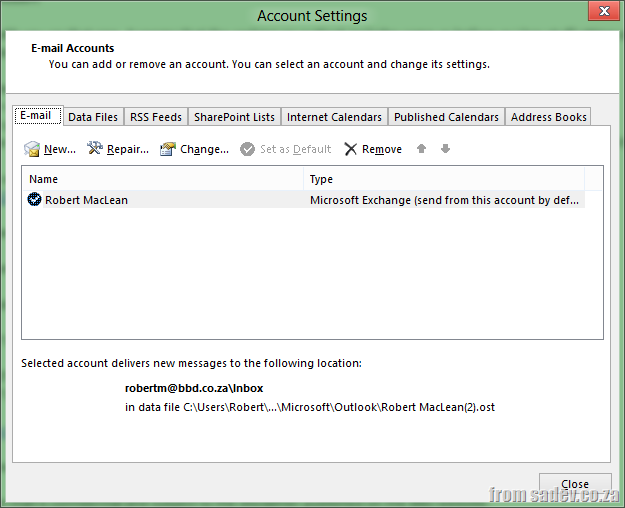
Here you’ll find a “Mail to keep offline” slider.
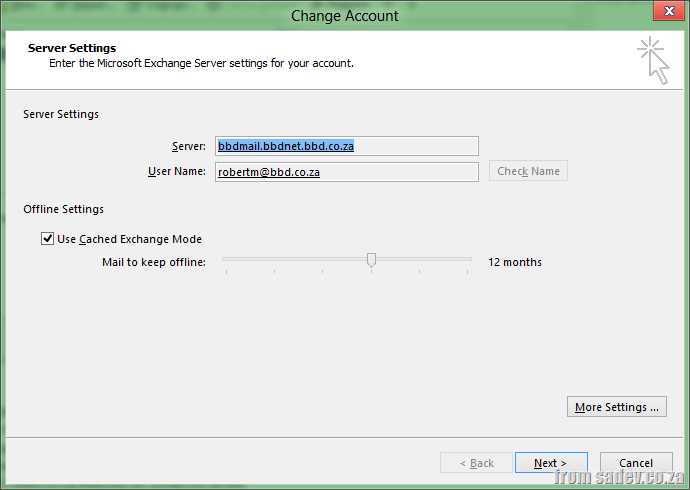
Move that all of the way to the right to select "ALL" and restart your Outlook.

Finally wait for it to update.

It is a preview
The last thing is a personal one – this is a preview, it is not promised to work. I have been so spoilt by great releases from Microsoft in the preview stages (Windows 8 & Visual Studio 2012) that I forget that it is a preview and could be broken. It is important to always have a backup & a way to verify it is working. For me this means I will be checking with OWA daily now.
Who can see my tweets to a friend?
A while ago I wrote a post about an interesting Twitter behaviour – if you start a tweet with an @<username> only people who follow you & that person can see the tweet (if you unsure see the post which explains it). The question I had today was to find out who is in that list – or put who follows us both on Twitter?
Oddly, I could not find anything (besides some tools that cost money) to do this?! So I built my own awesome little tester you can use below:
For the developers among you who want to see how this all works? Check it out on bitbucket: https://bitbucket.org/rmaclean/twittercoalesce
Known issues:
- My website uses an older version of jQuery, and I use a newer one in this code. If the loading gives an error or gets stuck on the screen, try refreshing the page (seems to solve it).
- If you have too many people shared between the two names - it will break. I am looking into how to solve this. If this happens - loading will get stuck :|
- Twitter limits clients to 150 calls per hour. If the rate limit is exceeded the loading will get stuck.