
Presentation Dump - Mid 2011: Windows 7 API CodePack, Development for Nokia, Mercurial, VS Tools, AOP, Multitasking, Cloud
The fact we half way through the year snuck up on me this morning, so it is time again to share some of the presentations I have done in the last 6 months! For those new to the presentation dump, every 6 months or so I share all the slides I can (some I can’t because they contain NDA info, like the one about Microsoft’s Project Double Rainbow) so that you can take these slides and work with them yourself!
So what is included in this dump:
- Windows 7 API Code Pack: This was a very fun session to do since it was showing off a bunch of cool Windows 7 features.
- Development for Nokia: This is maybe one of the best looking slides, but one of the worst timed sessions since shortly after it Nokia announced their move to WP7 so not much could be taken away from this

- Mercurial: This is a difficult session, because the demo’s are so boring (how do you make source control sexy?) – however a ridiculous amount of animation about process made this entertaining to create and present.
- Visual Studio Productivity Tools: This one started off from the idea of answering the question CodeRush vs. Resharper – which is a bit of religious debate more than a this one wins. It includes a bunch of other interesting content about other extensions too. For non-South African’s “Braai Rules” is the same as saying “BBQ Rules” or “Pub/Bar Rules”
- Aspect Orientated Programming: This is a big one for me as I see general development using more of this and the frameworks, like .NET, moving to it more and more in future. Good to get an early look into it.
- Multitasking in applications: This session looks at one of the themes of .NET 4 – TASKS. Why should you care, because multi threading is complex, but multi tasking gives the same benefits with less complexity.
- WebMatrix: Microsoft’s new tool for hobbyist web developers. What is included in that tool? This presentation tells you.
- Welcome to the cloud: I had a great opportunity to present at Tswane University of Technology with Rudi Grobler on the cloud & mobile. This was a very fun session and allowed me to also talk about why BBD is such an awesome place to work.
Slides available in the post! Click below for more
Windows 7 API Code Pack
Development for Nokia
Mercurial
Visual Studio Productivity Tools
Aspect Orientated Programming
Multitasking in applications
WebMatrix
Welcome to the cloud
Security is hard for users, so let us clean up with NEAT & SPRUCE
Microsoft used to be a horrid company with regards to their security, then they sat down and made security a quality gate – we do not ship if security is wrong. How do they know what is wrong? A 24 page guideline with 68 bullet points?! Perfect holiday reading 
The security development lifecycle team has recently tried to help us developers improve our applications so we not the next company with a bad security issues with two acronyms which will improve security notices to our users: NEAT & SPRUCE
What is NEAT?
- N: Necessary – Only show messages that you need. If you can take a safe action automatically or defer the message, do that!
- E: Explained – If you do interrupt the user, explain in everything to the user. EVERYTHING?! Yes, and the SPRUCE acronym will help explain what everything is.
- A: Actionable – A message should only be presented to the user if there is steps the user can take to make the right decision.
- T: Tested – A security message needs to be tested. TDD, Usability Testing, Visual Inspection, every test.
So, we need to show the message now – what do we put in there? SPRUCE:
- S: Source – Why are we showing this message? Did a website do something or a file or a user action? Tell the user.
- P: Process – Give the user the steps they need to go through to make sure they make the right decision.
- R: Risk – Explain what the consequences of getting the decision wrong.
- U: Unique – If your software knows everything, do the right thing automatically. So if you are showing the message, it means the user has unique information that is needed to make the decision. Explain what information is needed (slightly similar to P).
- C: Choices – Show the user all the options and recommend the safer one.
- E: Evidence – Provide any additional information that the user may need to make the decision.
Now that the training is done, let’s look at real implementations:
A web page contains secure & nonsecure content
Here is what the dialog looked like in the bad old days of IE6:
![11[2]](https://www.sadev.co.za/files/112.jpg "11[2]")
In IE 9 where this logic has been applied:

Let’s look at the differences:
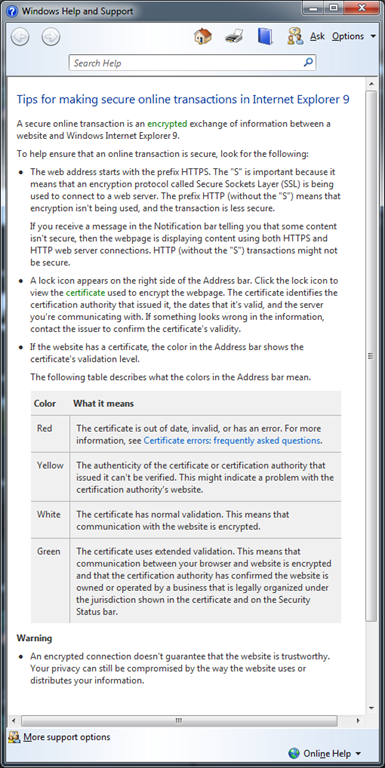
- N (Necessary) has been applied – previously this was a blocking model UI, which the user was forced to deal with to continue working. Today it shows discreetly with at the bottom and only if the user needs to work with this they have to, otherwise ignoring it.
- E (Explained) has had been done with the What’s the risk? – which shows the dialog below. It is not perfect as it hasn't followed SPRUCE fully but it is a good improvement.
- A (Actionable) has been applied – previously you had both a yes & no, now we have one action that can be done. Close or ignore and nothing happens.
- T (Tested) there is some weird language issues with the old one especially if English isn’t your primary language because of the yes/no not being perfectly clear. The new dialog has a single very clear labelled button!
Takeaways
Now that we have looked at how it can help you and how to do it, attached is a nice simple 3 page document with more details and reminders about this. GO IMPROVE YOUR APPLICATIONS!
You do what at your job?
 I tweeted yesterday that my job can be a little weird because I had to sit in the kitchen at the BBD office and watch a TV for a while. This generated some confused discussion, so what was I doing?
Our team is experimenting with the idea of putting screens around the company to share content and information and I had to sit in the kitchen to make sure it worked by watching loop the content for a bit 
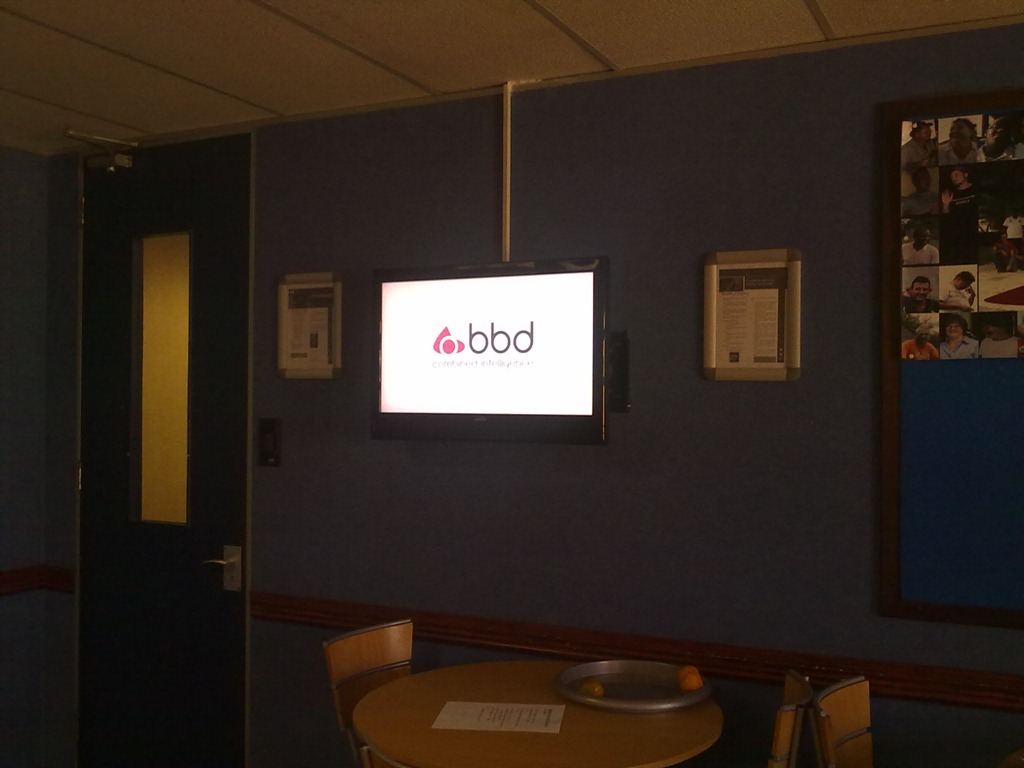
This is also a great opportunity to share some learning's from this with you:
TightVNC is still the best VNC option
Remote Desktop from Microsoft is THE best way to remote onto another machine but it has one downside, it locks other user out. For out screen we can’t have the login shown, and I don’t even know where it is to login manually – we need to see the content on the machine so we dropped to an older technology: VNC.
There is a lot of options in the VNC space, but ended on TightVNC as it actually runs as a service on a Windows 7 machine where other VNC clients run in the user space.
Auto Login to Windows
The login screen is also an issue with the machine when it boots and I don’t want to remote in every time to login – so we configured Windows to auto login to a specific account. This is thanks to the folks at Channel9 in particular Sarah Perez & Bradley Ward:
- Change the following registry key to 1: HKEY_LOCAL_MACHINE\SOFTWARE\Microsoft\Windows NT\CurrentVersion\Winlogon\AutoAdminLogon
- This enables the feature to be surfaced in Windows.
- Then run the following command: control userpasswords2
- In this UI you can UNTICK the option Users must enter a user name and password to use this computer and click OK
- It will then prompt you for the username & password to use and done! Note this is a bad security and so not recommended, but sometimes it is needed.
Open & Play slideshow
We are using Microsoft PowerPoint for the content and needed to auto run a slideshow at login, so we created a shortcut to run PowerPoint with the /S switch (see this for info on switches) and the filename: PowerPnt.exe /S c:\demo.pptx
That opens PowerPoint and starts the presentation!
Insert web content into PowerPoint
Lastly we wanted include some live web pages in it, which PowerPoint doesn’t support out of the box. MVP’s to the rescue! Some MVP’s created an add-in that allows it: http://skp.mvps.org/liveweb.htm
Really awesome!
Convert VirtualBox (vmi) to real disk?
It is often the case I need to setup training machines and a sometimes I get VirtualBox images which I need to deploy to the machines. I tend to avoid virtualisation on the training machines because of driver related issues, especially with graphic cards and things like WPF (which powers Visual Studio). If you have a good graphics card & good drivers then you can get a decent perf improvement with WPF apps, but unfortunately some virtualisation drivers are too poor.
So how can I take an virtual hard disk created in VirtualBox and easily convert it to physical disk so it can just run?
Process:
It is possible but it is not easy to a real disk but it is not easy.
- Step 1: You need to use a tool from Microsoft called SysPrep to unload the drivers. Basically this means that it strips all the driver info out, and puts the image in a clean state so that the next time it boots Windows searches for the hardware again. If you do not do that Windows will freak out because the hardware it expects does not exist.
- Step 2: Then you use a tool designed for disk imaging to create an image. Tools like Norton Ghost (paid) or CloneZilla (free) are designed for this purpose and the image they create is portable unlike the vmi (VirtualBox hard drive) format which can't do this well.
- Step 3: You then restore that image to the real disk using the same tool and you are done.
Slightly more work than you would expect, but that is a solution which always works.
Caveats:
I have not tried this with Hyper-V or VirtualPC disks (vhd) yet, but I suspect VirtualPC will work fine. Hyper-V has an additional Hypervisor layer and I suspect that SysPrep will not remove that and the restoring process will fail.
Finally you also want to be careful with SysPrep as it can have some undesired effects with certain software, for example SQL Server. There are specific steps to go through if you want to use SysPrep & SQL Server: http://msdn.microsoft.com/en-us/library/ee210754.aspx
So make the time to have the first few attempts fail and learn the nuances of the software you work with.
BBD Software: The Illustrated Story
For DevDays, BBD Software arranged a special video to be created to tell the story of the company and why it is such a special place to be.
Pity they didn’t mention the free vending machines or the bar we have or the great parties – but at least they focused on the important one the awesome people 
It's official: Pepper uses Azure
Bruce Kyle, a Microsoft evangelist, wrote an article recently about the “Powered By Microsoft Windows Azure” logo and how you can earn the right to display that.
That may sound odd to some people – why can’t you say you use Azure if you do? Of course you can, but if you jump a few hoops with Microsoft you can use the official logo 

But that is not all! Doing this also helps towards an ISV competence with Microsoft which gets you great assistance and free software from Microsoft, the opportunity to get $250 for marketing and also some other pieces of useful tidbits. One of those tidbits is a press release template, which is so odd for me too see as I am not in marketing, press or anyone else who does those – so lower down you can find mine 
So about those hoops, you maybe wondering how hard or easy this is? I took Pepper through the testing for both SQL Azure & Windows Azure and it took about 30min, reading Bruce’s article & watching a video. It is RIDICULOUSLY easy to do once you have your application built – SO GO. DO IT. BE POWERED BY WINDOWS AZURE!
Enjoy reading my first press release 
For Release 22:00 SAST
4 May 2011
Robert MacLean Becomes a “Front Runner” With the Release of Its Latest Application, Pepper
Johannesburg, South Africa — 4 May 2011 — Robert MacLean today announced it will launch a new application using the Windows Azure Platform. Pepper in combination with the Windows Azure platform helps enable customers to backup, share and synchronize your Visual Studio 2010 settings between multiple machines from directly inside Visual Studio 2010 without any costs or requirements for you. The Windows Azure platform, Microsoft’s cloud services platform, provides Pepper with the ability to build, manage, and deploy cloud based applications.
“Thru the technical and marketing support provided by the Front Runner program, we are excited to see the innovative solutions built on the Windows Azure platform by the ISV community,” said Doug Hauger, general manager for Windows Azure Microsoft Corp. “The companies who choose to be a part of the Front Runner program show initiative and technological advancement in their respective industries.”
“Windows Azure platform provides greater choice and flexibility in how we develop and deploy applications to all developers, both on-premises or in the cloud” said Robert MacLean, Developer of Pepper.
Pepper automates critical processes such as synchronization and backup of settings to the cloud, eliminating the need for local storage and lowering the chances of losing them.
#########
Product or service names mentioned herein are the trademarks of their respective owners.
For more information, press only:
Robert MacLean, [email protected]
Social everywhere doesn't work


Not being on a social network is like having a company which doesn’t appear in your favourite search engine - it is just a requirement of being online in our era and for a long time I have tried to get to the utopian world of an integrated social experience where everyone was everywhere and my updates, posts, pictures etc… trickled across all social networks, so no matter what you did you could hear what I had to say or was doing etc…
This was a stupid idea and I thought I would share my learning’s about that process.
Problem 1 – He with the most friends wins
With Facebook I feel into the trap of accepting every friend request, loading my address book into it and basically any other “tricks” I could to increase my friend count. This meant that logging on to Facebook was a stream of conscience from people I really didn’t care about and so overtime I moved away from Facebook as the value I took out of it was low.
The solution to this was to create a set of guides for people to be my friends on Facebook. I am not going to cover all of them, I’ll just focus on two of them but I had about 5 or 6 which I use to decide who to keep or accept requests from:
- Time span rule – if I have seen you or had more than a Christmas email for 5 years or more, you are out.
- Override – I can keep anyone for any reason breaking any other rule

Using my rule set I trimmed from over 300 friends to less than 90 and Facebook is now a daily visit site because I do care about the thoughts of those 90 people.
Summary: Be very selective of who you follow on your social networks.
Problem 2 – The right tool for the the right job
 One of the problems with Facebook friends, is that many of the those people were “frendors” or people who I just saw in the passages at work. Facebook isn’t meant for great communication around work however there is better choices for them:
- LinkedIn – This is great for business partners, frendors, business contacts and key direct co-workers. This ensures that the value of the conversation is higher because it is more business focused and people do care deeply about their careers on there.
- Yammer – This is for people I work with, regardless of anything else. This is also great because it is a walled garden so we can have those private conversations that are company/team specific.
- Twitter – We met at an event, you want to hear from me or want me to hear from you but we don’t care about much else Twitter makes a great place to put people while I evaluate their value and should I try and add them to other networks. Many people start off here and move to the others.
Sure there are a few people who are on more than one network, but those are exceptions to the rule. Most people end up in one place.
Summary: Facebook for friends & family, LinkedIn for your professional career, Yammer for co-workers & Twitter for all else.
Problem 3 – Auto post is not your friend
I personally spend more time in Twitter than any other network, and I eventually had it setup that every tweet went to Facebook & LinkedIn too. The problem is Twitter is really unfiltered and I do post a lot of jokes or half baked ideas which detract from my professional value on LinkedIn or are so technical that my friends & family on Facebook scratched their heads with confusion.
Thankfully this can be fixed: Don’t auto post. LinkedIn supports this with a setting you must enable, Yammer does this by default and for Facebook don’t use the standard Twitter app rather use the Selective Tweets app. All these require you tag a tweet with a special tag, for it to auto post, i.e. Facebook it is #fb, Yammer is #yam & LinkedIn is #li
So if I post something on Twitter and want it on Yammer & LinkedIn I append the tags and it is on all three networks but not on Facebook!
Summary: Post selectively to the right social networks.
Introducing BBD
 Any day I open my email and see an email from Peter Searle (the BIG boss at BBD, where I work) in there, I wonder if a trip to HR is in my near future
  , today though is something far more awesome and rather that tell you myself I thought I would share Peter’s words because it is just fantastic:
More than 25 years ago Barone, Budge and Dominick, also known as BB&D, was begun by a group of people dedicated to delivering software solutions to clients. Initially, the work was done in an attic, and those people were Sandra Barone, Tom Budge and Ralf Dominick.
The current corporate identity was created in the eighties with the founding of the company.
BB&D now employs more than 400 software professionals. We are South Africa’s largest independent custom software development company, and we serve customers in both South Africa and internationally.
In moving forward, we will never forget where we’ve come from. On the contrary, we will even further imprint the attitudes and values that have made BB&D what it is today.
We are taking the core values, achievements and expectations that have become so entrenched into the company’s make-up and are transitioning them into a fresh new identity that resonates with the next generation of the new BBD.
We are now BBD. And our brand line is – combined intelligence.
BBD work together with our clients, sharing knowledge and ensuring we can deliver solutions that improve their business. This meeting of minds, connecting and building on each other’s brilliance enables us to design solutions for them that mark the way forward.
In essence, we are more than the simple sum of our parts. Our combined intelligence is the greater whole.
Very proud to be a BBDer 
Lions Rugby starting to get it right
 Little off the usual but as a fan of the Lions Rugby team I thought I would share this great news. One of the biggest complaints people have with Lions Rugby is going to Ellis Park for the game, once there it is great but driving through some of the worst parts of Johannesburg is a major put off and then there is the serious lack of parking.
Well it seems they have taken that to heart and have not only four dedicated parking areas they have also arranged a park & ride facility! This should hopefully bring in the fans.
Official Press Release:
15 March 2011: The Lions will be playing Western Force this Saturday, 19 March 2011 at Coca-Cola Park.
Lions Professional Rugby invites Lions supporters to get to Coca-Cola Park early and to make a day out of it.In addition to the match, this weekend will see the launch and introduction of the Lions pre and post game stadium parking and braai activities.
Gates will open at 1pm and Supporters Club Members and Season Ticket Holders will be welcomed into the exclusive MTN Supporters Arena where they can enjoy live entertainment by Jaco Dennis, big screens and the Coca-Cola Gig-Rig. Refreshments aplenty will be available for purchase in the arena which will open from 1pm.
The Bulls vs. Stormers match will be shown on the big screens after the Lions match in the MTN Supporters Arena which will close at 10pm.
Expanded bar facilities for the general public will be situated next to the MTN Supporters Arena.
Plenty of family orientated activities are planned ranging from Park & Braai through to extensive children’s activities.
The NEW Lions Kiddies Entertainment Corner (west of the turnstiles) will be open from 2pm and will have face painters, jumping castles and tattoo artists applying rub off tattoos to the youngsters. In addition balloon makers and stilt walkers will be aplenty. Mufasa will be making an appearance to hand out some goodies.
Children are encouraged to visit the MTN World of Rugby area(the grassed area on the north of the stadium) to test their rugby skills, make some new friends and enjoy a unique rugby experience.
Prior to kick-off, supporters are in for a treat with some dynamic in-stadium entertainment. Chinese Lion dancers will dazzle supporters with their skills and some other exciting well known entertainers are in the pipeline.
Parking tickets for the following areas are available from Computicket:
- Beeld (South)
- Johannesburg Stadium B Field
Parking is also available in the following areas and tickets can be purchased from the Coca-Cola Park Ticket Office:
- Ellis Park Stadium Arena (formerly Standard Bank Arena)
- Cricket Oval grounds
These parking tickets cost just R50 each. Parking tickets will also be sold match day by vendors wearing orange bibs for the Beeld, Ellis Park Stadium Arena and the Cricket Oval grounds at R50 each.
The two new parking areas specifically orientated toward allowing spectators to Park & Braai (Gas only) have been made available for this match.
Platinum parking will be available for season ticket holders only and is situated on North Park Lane just 40 meters outside the stadium.
Silver parking tickets for the JHB Stadium Athletics track(150 meters from the stadium entrance) are available to all Lions supporters.Parking tickets in both areas cost R100 each and are only available from the Coca-Cola Park Ticket Office on a first come first serve basis.
The Park & Ride from Mugg & Bean Cresta and will also be running and for just R60.00 per person you will get a return bus trip,safe parking and a complimentary bottomless coffee or lemonade from Mugg &Bean. Busses depart from Cresta from Entrance 3 (Cnr of Judges and Republic Roads) from 2pm and will leave Coca-Cola Park 30 minutes after the final whistle. Remember to take your Park & Ride ticket to Mugg & Bean after the match for your complimentary drink.
"The Lions Den will never again be the same as the Lions will now be catering for families young and old. The entertainment before and after will be top drawer. The Lions sportainment is here for all. Come and support our young team against the Western Force this Saturday", Lions Shareholder Robert Gumede said
Supporters are encouraged to come early to the match and enjoy the MTN Supporters Arena and Kiddies Corner and to support the Golden Lions as they face the Sharks at 2:40pm. TAU rugby – where enthusiastic eight year olds will take to the field – will be played from 1pm to1:40pm.
For the perfect family outing, get to Coca-Cola Park on Saturday where there will be activities and entertainment catering for all ages.
For more information visit www.lionsrugby.co.za
StackExchange Flair
For a while the flair on my site has included my stats from StackOverflow, ServerFault and SuperUser. In my article on it, I mentioned I used the iFrame but I stopped that a few months ago and switched to getting the JSON data for my accounts directly and parsing that. I did this as it was order of magnitudes faster than loading via the iFrame.
For those who attended my DevDays talks, they would recognise that code as it is the same as I used in my demos.
Then recently an email arrived:

Damn, my jQuery magic was about to end so what could I do but change? When I started looking at the new flair I noted that StackOverflow wanted me to hotlink the image, i.e. have my visitors get it from their server, but the performance for pulling the image was still poor compared to my own website (or so the Firebug tool says). So what could I do to improve this?
What I did was to use wget, which is a Linux tool (I’m hosted on a Linux box) for downloading files, and put that in a schedule to once a day download my StackExchange flair and store it on my website, which means it gets served faster. As my numbers won’t change heavily day to day, (I’m not Skeet) once a day is enough balance between keeping it fresh and making it cachable.
The only downside is that my flair uage stats on StackExchange will likely drop, but I don’t really care about that.
The wget command is:
wget http://stackexchange.com/users/flair/1c5ab06b9a844e49b817e7eeb31977e0.png –O <path>/files/stackexchange.png
