
TechEd Africa 2013: What's new in .NET 4.5 & Visual Studio 2012!
Today I presented at TechEd Africa 2013 the first of my talks which is a massive two hour overview of what is new in .NET 4.5 & VS 2012! If you click more (below) you will be able to grab the slides, demos & my demo script if you are wanting to see what I was doing.
For those who could not attend, part one is very similar to this presentation what I did last year!
Windows Store app Development Snack: Stop asking for the SMS code when going to the dashboard
For more posts in this series, see the series index.
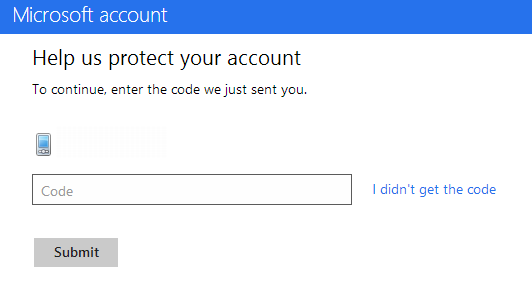 When you get to publishing you may find it annoying to go to the dashboard as you are often being asked to put in a SMS code for verification. The cause here is your browser is seen as insecure and thus you must confirm the login. So what is the solution?
- Step 1: Make sure you login to Windows 8 with the same credentials as you use in the store.
- Step 2: When you added you Microsoft Account to Windows 8, it would’ve emailed you a link to verify the computer. Make sure you have clicked that link.
- Step 3: Use IE 10 and login to the dashboard.
And problem solved, now it will only ask you to login & confirm the login when the session expires!
Where do I start to learn Windows 8?
I have been asked at the talks I do, where can I go to learn Windows 8? What material is available? There is a LOT of content available for Windows 8. For me personally I learnt initially from the Windows 8 Camp in a box and building my own test apps. However the ever amazing Bruce Nicholson provided me with a fantastic list recently (so go thank him):
- Designing Apps with Metro Principles and Windows Personality: http://channel9.msdn.com/Events/TechEd/NorthAmerica/2012/DEV351
- Building Windows 8 Metro style UIs: http://channel9.msdn.com/Events/TechEd/NorthAmerica/2012/DEV354
- Building Metro style Apps with XAML: What .NET Developers Need to Know: http://channel9.msdn.com/Events/TechEd/NorthAmerica/2012/DEV353
- Windows 8 Touch Language: Covered in Build 2011 session “Designing Metro style apps that are touch-optimized” (http://channel9.msdn.com/events/BUILD/BUILD2011/APP-391T) , and MSDN deign guidance document “Touch interaction design (Metro style apps)” (http://msdn.microsoft.com/en-US/library/windows/apps/hh465415)
- Declaring capabilities: Covered in Build 2011 session “How to declare your app’s capabilities” (http://channel9.msdn.com/Events/BUILD/BUILD2011/APP-398T)
- AppBar: Covered in MSDN design guidance document “Commanding design for Metro style apps” (http://msdn.microsoft.com/en-us/library/windows/apps/hh761499.aspx), and
- Search - Covered in Teched 2012 session “Integrating with Windows 8 Experiences” (http://channel9.msdn.com/Events/TechEd/NorthAmerica/2012/DEV356 )
- Live tiles – Covered in Webcast “Bring Your Windows 8 Metro Style Apps to Life with Tiles and Notifications” (http://channel9.msdn.com/Events/Windows-Camp/MSDN-Webcast-Series-Building-Windows-8-Metro-Style-Apps/Bring-Your-Windows-8-Metro-Style-Apps-to-Life-with-Tiles-and-Notifications)
- Async programming in C# 5.0 – Covered in Teched 2012 session “Async Made Simple in Windows 8, with Visual C# and Visual Basic” (http://channel9.msdn.com/Events/TechEd/NorthAmerica/2012/DEV332)
- HTML5/JS discussion – Covered in Teched 2012 sessions “Building Metro style Apps with HTML and JavaScript” (http://channel9.msdn.com/Events/TechEd/NorthAmerica/2012/DEV366)
- “A Lap Around Microsoft Expression Blend for HTML” (http://channel9.msdn.com/Events/TechEd/NorthAmerica/2012/DEV368)
- Networking – MSDN documentation: “Networking (Metro style apps)” (http://msdn.microsoft.com/en-us/library/windows/apps/xaml/hh452751(v=win.10).aspx)
- External data – MSDN article: “Accessing data and files (Metro style apps using C#/VB/C++ and XAML)” (http://msdn.microsoft.com/en-us/library/windows/apps/xaml/hh758319.aspx)
- Settings – MSDN guidance documents “Guidelines for app settings (Metro style apps)” (http://msdn.microsoft.com/en-us/library/windows/apps/hh770544.aspx), and “Managing application data (Metro style apps using C#/VB/C++ and XAML)” (http://msdn.microsoft.com/en-US/library/windows/apps/xaml/Hh465099(v=win.10) )
- Sharing – Content is covered in Teched 2012 session “Integrating with Windows 8 Experiences” (http://channel9.msdn.com/Events/TechEd/NorthAmerica/2012/DEV356)
- PLM – MSDN guidance documents “Launching, resuming, and multitasking (Metro style apps using C#/VB/C++ and XAML)” (http://msdn.microsoft.com/en-us/library/windows/apps/xaml/Hh770837(v=win.10).aspx)
- SDK sample pack: http://code.msdn.microsoft.com/windowsapps/Windows-8-Modern-Style-App-Samples
- Guidance for porting IOS and Web applications
- Design case study: iPad to Metro style app: http://msdn.microsoft.com/en-US/library/windows/apps/hh868262
- Design case study: Website to Metro style app: http://msdn.microsoft.com/en-US/library/windows/apps/hh868264
- Deploying apps in the enterprise without using the Windows Store (how to) http://technet.microsoft.com/en-us/library/hh832040#BKMK_SideLoad
- Printing from a Metro Style app – Build session “Building Metro style apps that print” (http://channel9.msdn.com/events/BUILD/BUILD2011/PLAT-679T)
JSinSA 2012

 This past weekend was the ever fantastic JavaScript in South Africa (JSinSA) conference. This year focus was on HTML 5, JavaScript & CSS 3 – easily some of the MOST important topics for developers regardless of platform to know about.
It was it’s second year and while I was very lucky to go to it as an attendee in the first year, this year I was even more lucky to be a presenter at the conference. I was also very lucky to present on a topic I am passionate about: Windows 8.
The talk provided an introduction to Windows 8 & how development works, and in the 45mins I was done, we built an application which could take a photo from a web cam and send it to Twitter (the actual photo is to the right).
You can get the slides and bits from the talk below.
Community night in September 2011 - IMPORTANT INFO
Community Night, the best way to meet, mingle and learn (if you don’t know about it – read here) happens on the second Tuesday of the month… except in September due to an event at the venue on the Tuesday which can’t be moved.
So for September it will take place the Monday before, in other words Monday the 12th September. Please help get the word out to the various user groups and communities!
See you there!
Community night in August
Important Notice for August 2011
Community night is normally the second Tuesday of the month, however since that is a public holiday it has been moved to Monday the 15th of August!
What is community night?
For those who do not know this is a FREE event that happens monthly where a variety of user groups get together at Microsoft's offices. User groups are not influenced by Microsoft, they just use the facilities. User groups that are there on a regular basis:
- Information Worker: Technical focused SharePoint & Office
- Business User Workshops: User group that looks at the issues that face power users in enterprises. This month the understanding where a portal ends and CRM begins.
- Game Dev: One of the biggest with plenty of game developers & artists getting together.
- JavaScript: For all you JS fixes
- Mobi: My good friend Rudi Grobler hosts this group focused on mobile (iPhone, Android, Symbian and Windows Phone)
- UX: For those who understand there is more than 16 colours
- Architecture: For architects of any IT systems!
- Languages: For developers who are interested in learning the pros & cons of other languages.
- SQL: The fantastic Gail Shaw runs the best SQL user group anywhere!
There is also FREE beer, cool drinks & pizza!
Where is Microsoft’s offices?
Microsoft Bryanston Office
3012 William Nicol Drive
Bryanston
2191 Johannesburg
South Africa
Click here for map and more details.
Times?
Various user groups starts at different times. I think the first UG kicks off at 16:00 and it can run to 21:00.
However depends if you attend multiple UG, stay for passage conversation, etc…
So up to you, I have nights where I arrived after 17:30 and other times left at 18:00, no pressure!
Presentation Dump - Mid 2011: Windows 7 API CodePack, Development for Nokia, Mercurial, VS Tools, AOP, Multitasking, Cloud
The fact we half way through the year snuck up on me this morning, so it is time again to share some of the presentations I have done in the last 6 months! For those new to the presentation dump, every 6 months or so I share all the slides I can (some I can’t because they contain NDA info, like the one about Microsoft’s Project Double Rainbow) so that you can take these slides and work with them yourself!
So what is included in this dump:
- Windows 7 API Code Pack: This was a very fun session to do since it was showing off a bunch of cool Windows 7 features.
- Development for Nokia: This is maybe one of the best looking slides, but one of the worst timed sessions since shortly after it Nokia announced their move to WP7 so not much could be taken away from this

- Mercurial: This is a difficult session, because the demo’s are so boring (how do you make source control sexy?) – however a ridiculous amount of animation about process made this entertaining to create and present.
- Visual Studio Productivity Tools: This one started off from the idea of answering the question CodeRush vs. Resharper – which is a bit of religious debate more than a this one wins. It includes a bunch of other interesting content about other extensions too. For non-South African’s “Braai Rules” is the same as saying “BBQ Rules” or “Pub/Bar Rules”
- Aspect Orientated Programming: This is a big one for me as I see general development using more of this and the frameworks, like .NET, moving to it more and more in future. Good to get an early look into it.
- Multitasking in applications: This session looks at one of the themes of .NET 4 – TASKS. Why should you care, because multi threading is complex, but multi tasking gives the same benefits with less complexity.
- WebMatrix: Microsoft’s new tool for hobbyist web developers. What is included in that tool? This presentation tells you.
- Welcome to the cloud: I had a great opportunity to present at Tswane University of Technology with Rudi Grobler on the cloud & mobile. This was a very fun session and allowed me to also talk about why BBD is such an awesome place to work.
Slides available in the post! Click below for more
Windows 7 API Code Pack
Development for Nokia
Mercurial
Visual Studio Productivity Tools
Aspect Orientated Programming
Multitasking in applications
WebMatrix
Welcome to the cloud
Security is hard for users, so let us clean up with NEAT & SPRUCE
Microsoft used to be a horrid company with regards to their security, then they sat down and made security a quality gate – we do not ship if security is wrong. How do they know what is wrong? A 24 page guideline with 68 bullet points?! Perfect holiday reading 
The security development lifecycle team has recently tried to help us developers improve our applications so we not the next company with a bad security issues with two acronyms which will improve security notices to our users: NEAT & SPRUCE
What is NEAT?
- N: Necessary – Only show messages that you need. If you can take a safe action automatically or defer the message, do that!
- E: Explained – If you do interrupt the user, explain in everything to the user. EVERYTHING?! Yes, and the SPRUCE acronym will help explain what everything is.
- A: Actionable – A message should only be presented to the user if there is steps the user can take to make the right decision.
- T: Tested – A security message needs to be tested. TDD, Usability Testing, Visual Inspection, every test.
So, we need to show the message now – what do we put in there? SPRUCE:
- S: Source – Why are we showing this message? Did a website do something or a file or a user action? Tell the user.
- P: Process – Give the user the steps they need to go through to make sure they make the right decision.
- R: Risk – Explain what the consequences of getting the decision wrong.
- U: Unique – If your software knows everything, do the right thing automatically. So if you are showing the message, it means the user has unique information that is needed to make the decision. Explain what information is needed (slightly similar to P).
- C: Choices – Show the user all the options and recommend the safer one.
- E: Evidence – Provide any additional information that the user may need to make the decision.
Now that the training is done, let’s look at real implementations:
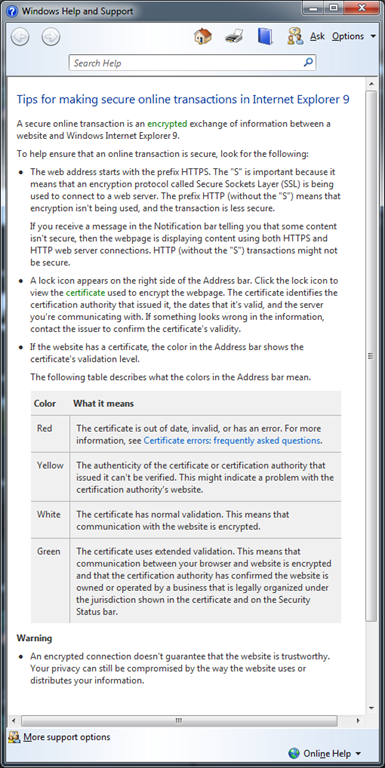
A web page contains secure & nonsecure content
Here is what the dialog looked like in the bad old days of IE6:
![11[2]](https://www.sadev.co.za/files/112.jpg "11[2]")
In IE 9 where this logic has been applied:

Let’s look at the differences:
- N (Necessary) has been applied – previously this was a blocking model UI, which the user was forced to deal with to continue working. Today it shows discreetly with at the bottom and only if the user needs to work with this they have to, otherwise ignoring it.
- E (Explained) has had been done with the What’s the risk? – which shows the dialog below. It is not perfect as it hasn't followed SPRUCE fully but it is a good improvement.
- A (Actionable) has been applied – previously you had both a yes & no, now we have one action that can be done. Close or ignore and nothing happens.
- T (Tested) there is some weird language issues with the old one especially if English isn’t your primary language because of the yes/no not being perfectly clear. The new dialog has a single very clear labelled button!
Takeaways
Now that we have looked at how it can help you and how to do it, attached is a nice simple 3 page document with more details and reminders about this. GO IMPROVE YOUR APPLICATIONS!
Community Night: BE THERE
 Tomorrow is another community night, and I realised that there is MANY people who do not know about this fun event. This is a gathering of communities (or user groups or interest groups if you prefer) who meet on a regular basis. This is a totally free event which takes place the 2nd Tuesday of every month at Microsoft’s offices in Bryanston.
*Yawn* another Microsoft marketing session? WRONG! This is run by communities and Microsoft has NO say in the content or agenda, unless a community allows them  Microsoft is really trying to help all communities by providing the facilities – not the content!
 To give a concrete example MobiZA, a user group focused on mobile development is doing a session on Android! talk about not Microsoft marketing there!
There is also a variety of communities in a attendance so you can also see things you would not have seen before, for example the business user group or the game developer group! And of course there is plenty of corridors for interesting discussions and some even contain food & drinks!
Hopefully I have given you a taste of what is in store and why you should attend and you can find more details on the DPE team blog.
 Finally, if you have a user group maybe you should think of joining us at community night? Free venue, projectors, seating, food & drink. Plus plenty of people attend, could be a great way to grow your group. I would personally love to see some Linux & PHP groups there because it would allow those who have not had a chance to see the non-Microsoft world an opportunity and hopefully learn that it isn’t so cut & dry out there.
Remember, tomorrow 12th April 2011 @ Microsoft (map to the left) from first sessions kick off at 16:30 and second sessions get started between 17:30 & 18:00!
DevDays - The event for Microsoft Developers
 It’s that time of year again, it is DevDays time again which is the premier conference from Microsoft for developers! This year it is a very different beast from previous years:
- Cost: For the second year, you’ll need to pay. This year it is R350 and that is excellent value for the event.
- Cape Town first: It kicks off in Cape Town this year on May 24th and then moves to Johannesburg after that on may 26th!
- Johannesburg new venue: We are at Gallagher Estate this year! Very excited about the venue!
- No Durban

- Hash tag from day one! See complaining to Cliff on Twitter does work so now we can all hash with #DevDaysSA!
- No SharePoint – I can’t remember a DevDays without SharePoint, but we have so many other awesome SharePoint options now (Information Worker, SharePoint Saturdays etc…) it is good to have some balance.
There is three tracks so you may want to brush up on how to pick good sessions (short answer, mine  ) plus their is special slots for student & community sessions which really excites me to see new presenters getting big stage time!
I am also very glad that BBD Software (previously known as BB&D) is a major sponsor this year!
You can signup, get more details and engage on the official site at: http://www.microsoft.com/southafrica/devdays/
Agenda:
- End-to-end software testing with Team Foundation Server and Visual Studio
- Level: 200
Speakers: Ahmed Salijee & Colin Dembovsky
Visual Studio 2010 offers a wide range of software testing capabilities: manual testing, automated UI testing, database testing, low-level unit testing and even performance testing tools capable of simulating thousands of active users. It also provides support for test case management, defect tracking as well as configuring and running your tests in virtual and physical environments. But how do you know which tools to choose for your project? This session will, via a demo scenario, walk you through the various testing capabilities to assist you with the most effective use of Visual Studio 2010's testing capabilities. This session will be useful to developers as well as various tester roles including functional, performance and automation.
- Level: 200
- An end-to-end experience of Windows Phone 7 development
- Level: 200
Speaker: Rudi Grobler
An end-to-end walk through for developing Windows Phone 7 applications using Silverlight
- Level: 200
- Blend: Wiring it all together
- Level: 400
Speaker: Shane Morris
- Level: 400
- A lap around Internet Explorer 9 for web developers
- Level: 200
Speaker: Simon Wilkinson
Internet Explorer 9 adds new support for HTML5, CSS3 and many other new web standards, and this is the place to find out all about them. Not only will we learn about those, but we'll take a dive into the work the engineering team has done to make the browser faster through it's new JavaScript engine, the work they've done to ensure that the same mark-up works across all browsers and how hardware acceleration will make your site run faster, without any changes to your code!
- Level: 200
- Azure: Development from scratch
- Level: 200
Speaker: Gareth Jane
The Windows Azure platform is a flexible cloud-computing platform which allows developers to rapidly create highly scalable software applications. This session will introduce developers to the various services and components of the Windows Azure Platform. We will create a very simple application on this platform, especially focusing on the areas which distinguish development on Azure from traditional application development
- Level: 200
- ASP.NET web development with MVC
- Level: 400
Speaker: Brent Samodien
Join us in this session and discover the new features in ASP.NET MVC3 and what scenarios you can target with it. Learn more about the improved HTML Helpers and the new updates to Controller/Action/Method that make your code cleaner. Also, explore the richer URL routing and URL route mapping. We will also show how you can use alternative View Engines, including Razor.
- Level: 400
- A website's life: From sketch to publishing
- Level: 200
Speaker: Simon Wilkinson
WebMatrix is a new, free, fully featured, easy to install web development tool that helps you build ASP.NET and PHP websites and perform validation, SEO optimization and one-click publishing. My favourite feature however is a new script syntax for ASP.NET called Razor, which will help you create dynamic websites incredibly easily. We will spend some time sketching/wireframing our website, doing visual design work in Expression Design and then experiencing the rich development toolset in WebMatrix.
- Level: 200
- Let's get ready for the cloud: Building your applications so they
are cloud ready- Level: 400
Speaker: Robert MacLean
In a world where you hear people talking about the cloud, here are some guidelines on how to start building and structuring applications that will be easy to migrate to the Azure platform.
- Level: 400
- Code First in entity framework
- Level: 200
Speaker: Brent Samodien
Code First has been a great success with customers, and in this talk, we'll take a deep dive into how it works and talk about its upcoming RTM (Q1 2011). You'll see how Code First uses convention over configuration to improve developer productivity. Its flexibility allows for either automatic database provisioning or the ability to work with an existing database. We'll be demoing features beyond the initial RTM, such as Migrations support, and we'll also talk about the roadmap for Code First going forward
- Level: 200
- Silverlight 5: The Future
- Level: 200
Speaker: Shane Morris
- Level: 200
- Exploring Windows Azure storage
- Level: 400
Speaker: Gary Hope
Examine each of the foundation storage capabilities of Windows Azure, Blobs, Tables and Queues. Discover how to create storage accounts; upload and retrieve blobs and blob metadata; create, update and query tables; and create a simple service that uses a message queue for communication
- Level: 400
- LightSwitch basics: Building your first LightSwitch application
- Level: 200
Speaker: Robert MacLean
Visual Studio LightSwitch is the simplest way to build business applications for the desktop and cloud. LightSwitch simplifies the development process by letting you concentrate on the business logic, while LightSwitch handles the common tasks for you. In this demo-heavy session, you will see, end to end, how to build and deploy a data-centric business application using LightSwitch. After that you will discover what is under the hood to better understand the architecture of a LightSwitch application. Finally you will learn how you can use Visual Studio 2010 Professional and Expression Blend 4 to customize and extend its UI and Data layers for when the application's requirements grow beyond what is supported by default
- Level: 200
- Kung Fu Silverlight: Tips and architectural patterns and practices
- Level: 400
Speaker: Dave Russell
Learn about the rewards of using RIA Services together with development patterns, such as the Service Providers, Single Responsibility pattern, Commanding, user Interactions, Messaging, ChildWindows, Design Time Data, Testing, and developing using Model-View/View- Model (MVVM) pattern, to build Silverlight and Windows Phone apps. Hear the top tips you need to know for building data driven Silverlight apps that solve real world problems.
- Level: 400