Pulled Apart - Part I: Introduction
Note: This is part of a series, you can find the rest of the parts in the series index.
 I have needed software which the available implementations of that type of software doesn’t solve (due to cost, features, experience etc…) thankfully I like to write code and I like to share. This means I am often writing small applications to solve problems. My current one is a podcatcher, it is a program which downloads podcasts, called Pull.
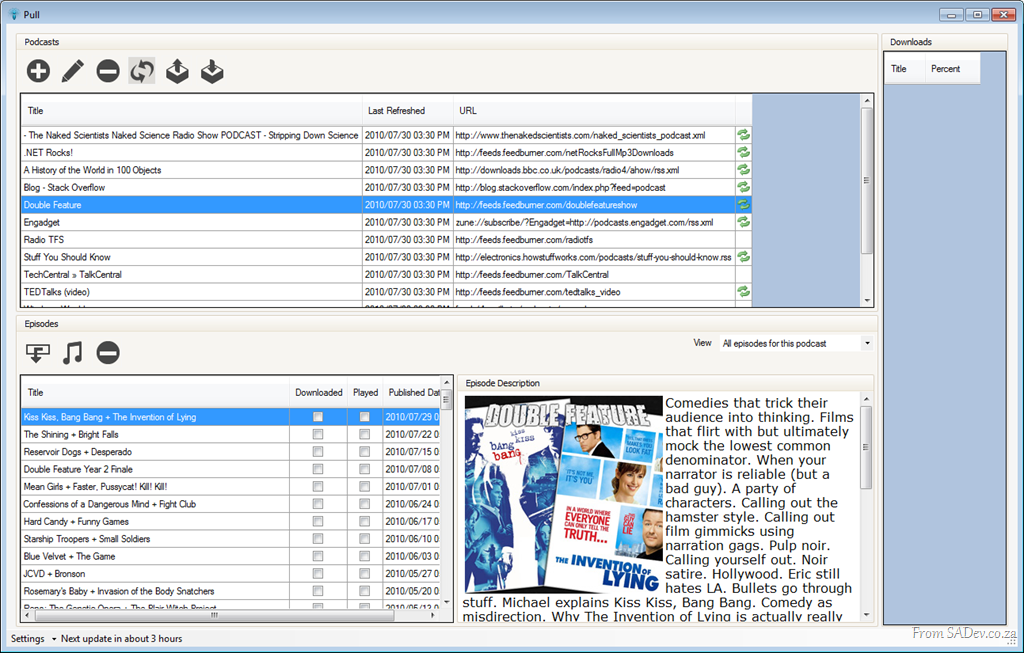
Pull is designed with the idea of being just a podcatcher, because all the media players out there with bundled podcatchers are either VERY heavy or just crap, so my solution to that is just be a tool which does one thing, and does it well.
The second major design feature is that it must be portable – assuming .NET 4 is installed then it should just run without an install. 
Lastly it should be quiet and just get on with the job of pulling down podcasts. I do not need to be annoyed with pop-ups and sounds all the time. My view is that I will deal with you when I have the time, else sit in the corner and do your job.
I thought I would blog a series of some aspects of the development both code and technology as I have learnt a ridiculous amount during the initial development. Check the series index at the top for a preview of what I have in mind or to find more parts in this.
Visual Studio and/or Test Manager corrupt licensing?
 At the Visual Studio & TFS event we had a few machines complaining that the Test Manager license was invalid and a new one was needed. Those same machines also said Visual Studio’s license was corrupted and that Visual Studio needed a re-install.
To make this more odd, we were using virtual machines so every machine was identical yet only some machines had this problem.
The cause was the host OS date was wrong (the year was 2008) and so the virtual machines were set to 2008. In the eyes of the virtual machine this meant that the license was installed magically in the future.
We turned off the VM, deleted the state, fixed the date and started again and it was solved!
Pulled Apart - Series Index
This post provides a way for you to find more posts in this series. If there is a component in Pull which is not covered, and you would like it to be covered, please contact me.
- Part I – Introduction
- Part II – What? You’re not using TFS!
- Part III – Get on the bus!
- Part IV – Talking to myself, using memory mapped files for communication.
- Part V – You are a DB server with SQLite
- Part VI – A simple download manager
- Part VII – PLINQ, not as easy as first assumed
- Part VIII – Protocol handlers
- Part IX – Windows User Account Control
- Part X – Visual Studio Rulesets
- Part XI – Talking to yourself is ok, answering back is a problem. Why IMPF destroyed CPUS?
- Part XII - Parsing feeds (ATOM & RSS) in .NET
- Part XIII - IMPF revised, again.
- Part XIV - DevExpress
- Part XV - Understanding usage with Runtime Intelligence
Resolving "Could not load type Microsoft.ApplicationServer.Caching.DataCacheSessionStoreProvider"
If you are using AppFabric and decide to swop out the ASP.NET standard caching with it you may run into the error:
Could not load type "Microsoft.ApplicationServer.Caching.DataCacheSessionStoreProvider”
The error will be pointing to the type of the custom session (line 5 below):
<sessionState mode="Custom" customProvider="AppFabricCacheSessionStoreProvider">
    <providers>
        <!-- specify the named cache for session data -->
        <add name="AppFabricCacheSessionStoreProvider"
             type="Microsoft.ApplicationServer.Caching.DataCacheSessionStoreProvider"
             cacheName="TailSpin" sharedId="TailSpinTravelId"/>
    </providers>
</sessionState>
The cause is that the application can’t find that class. To help it find it you need to add the following to the Configuration –> System.Web –> Compilation –> Assemblies:
<add assembly="Microsoft.ApplicationServer.Caching.Client, Version=1.0.0.0, Culture=neutral, PublicKeyToken=31bf3856ad364e35"/>
<add assembly="Microsoft.ApplicationServer.Caching.Core, Version=1.0.0.0, Culture=neutral, PublicKeyToken=31bf3856ad364e35"/>
Why I like Visual Studio 2010? Undock Windows
 Visual Studio 2010 has the ability to undock code windows by clicking and dragging on the code window tabs. This is a great feature and it is often touted for multi-monitor setups where you may want to have the form on one window and code on another window, or maybe two different code files open at the same time.

That is very useful, however that is not why I like this feature. I like the ability to undock the windows because it lets me view two different parts of the same file at the same time. Visual Studio 2010 and earlier have supported this using the split view option ( ) but that means you lose half of your screen (like below).
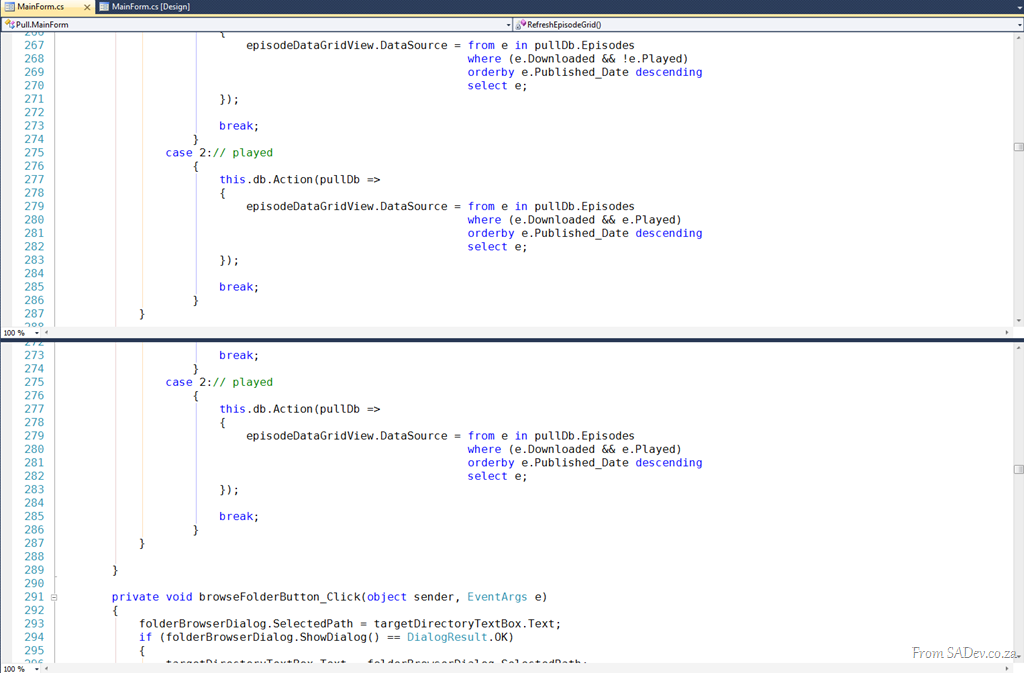
Using the undock windows in 2010 you can use the Windows –> New Window option to duplicate the current window.


Then you can drag the second (or third, or forth) windows out and get a full screen side by side view which is GREAT for comparing code.

Cannot open VS project if Blend is used?
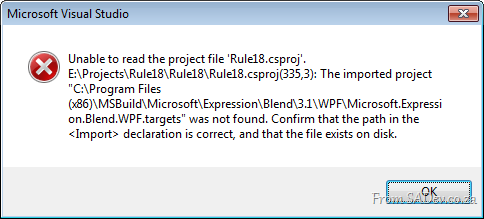 I ran into an issue recently after reinstalling my laptop, where I couldn’t open a C# (WPF) project in Visual Studio 2010. Every time I tried it just grimaced at me and said:
Unable to read the project file 'Rule18.csproj'.
E:\Projects\Rule18\Rule18\Rule18.csproj(335,3): The imported project "C:\Program Files (x86)\MSBuild\Microsoft\Expression\Blend\3.1\WPF\Microsoft.Expression.Blend.WPF.targets" was not found. Confirm that the path in the <Import> declaration is correct, and that the file exists on disk.
Part of the cause is that previously I had Blend installed, and I had used it on this project to do some fairly complex things, in particular Font Embedding. However since reinstalling I had not installed Blend again.
This is caused the build target file not to be installed, and that caused the error.
How do you get around this?
The best solution is to install the FREE Blend SDK because that will put the build targets on the machine. Links for the SDKs:
- Blend 4 .NET SDK: http://www.microsoft.com/downloads/details.aspx?displaylang=en&FamilyID=75e13d71-7c53-4382-9592-6c07c6a00207
- Blend 4 Silverlight SDK: http://www.microsoft.com/downloads/details.aspx?displaylang=en&FamilyID=d197f51a-de07-4edf-9cba-1f1b4a22110d
However I didn’t have time to do this, so as a temporary solution (and definitely not a recommended solution): I opened the project file, and right near the bottom I found the Import for CSharp and Blend. I removed the Blend one, saved and reloaded and worked.

VirtualBox UUID already in use
I am playing around with using VirtualBox to run virtual machines and I ran into an issue trying to use a clone (copy) of a VDI file. The VDI file is the hard disk drive and it has a unique identifier in it it (UUID) and so trying to use a clone of one gives you the error: UUID of the hard disk is already exist in the media registry.
To solve it you need to run the following command to change the UUID of the file:
VBoxManage.exe internalcommands sethduuid [VDI file]
Example:
"c:\Program Files\Oracle\VirtualBox\VBoxManage.exe" internalcommands sethduuid
AppFabric.vdi
Announcing new sponsor for Visual Studio and TFS hands on lab event: Devexpress
 I’m sure you know that in a week 50 talented and interested people will be getting together for a day of FREE hands on labs focused on Visual Studio 2010 and TFS 2010! If you didn’t know, have a look here.
Today I am very proud to announce we have another sponsor for the event – Devexpress! Devexpress are makers of some FANTASTIC addon’s for Visual Studio and development.
So what are they sponsoring? TWO licenses for their Visual Studio productivity add-on: CodeRush!
These two licenses will be given away as prizes to two lucky people at the event (you must be there to win).
ALM in 2010
Here is the slides from my talk on Application Lifecycle Management in 2010 which I did for the Information Worker user group.
Here is the blurb for the session
You can download the slides and the white paper from the IW site.Development is not just about writing code and pressing compile. It is a process, which starts long before code is written and extends long after the compile is done and this process includes a lot of management - this process is called Application Lifecycle Management (ALM).
SharePoint development is not immune to this and this presentation looks at what the landscape and tools are like for ALM in 2010 and how it relates to SharePoint development.
Free Visual Studio 2010 and TFS 2010 training!
Update 13 July 2010: The event is fully booked now! If you want to add yourself to the waiting list in case a spot becomes free, please contact me.
![trainingpic[1]](https://www.sadev.co.za/files/trainingpic1.png "trainingpic[1]") I am very excited to announce that Zayd Kara, fellow Visual Studio ALM MVP, and myself have arranged a free hands on labs training for Visual Studio 2010 and TFS 2010. This is your opportunity to get some time learning about the new features in these products.
I am very excited to announce that Zayd Kara, fellow Visual Studio ALM MVP, and myself have arranged a free hands on labs training for Visual Studio 2010 and TFS 2010. This is your opportunity to get some time learning about the new features in these products.
The event will take place on Saturday, 31st July 2010 and will run from 9am to 1:30pm and is completely free, but it is limited to 50 people!
You will be able to do the following labs:
- Authoring and Running Manual Tests using Microsoft Test Manager 2010
- Branching and Merging Visualization with Team Foundation Server 2010
- Code Discovery using the Architecture Tools in Visual Studio 2010 Ultimate
- Debugging with IntelliTrace using Visual Studio 2010 Ultimate
- Introduction to Coded UI Tests with Visual Studio 2010 Ultimate
- Introduction to Test Case Management with Microsoft Test Manager 2010
- Planning your Projects with Team Foundation Server 2010
- Understanding Class Coupling with Visual Studio 2010 Ultimate
- Using the Architecture Explorer in Visual Studio 2010 Ultimate to Analyze Your Code
Click here for more details and registration form.
I would also like to take this opportunity to thank our sponsors for making this possible:
 &
&