
MVP's @ TechEd Africa 2013

 With TechEd fast approaching, I have been asked a few times who are interesting presenters to see. That is always a tough problem to answer since it depends on what you like. One group of people who are always great are Microsoft MVPs, although I maybe biased, and there are a few presenting at TechEd.
(Click the names – they take you to their TechEd profiles which has, links to blogs etc… & a list of their talks)
- Almero Steyn - Identity Management
- Colin Dembovsky – ALM
- Hilton Giesenow – SharePoint
- Nicolas Blank - Exchange
- Robert MacLean - ALM
- Rudi Grobler - was Windows Phone
- Peter Willmot - was SQL
Rapid Business Development: LightSwitch vs. Dynamics CRM vs. SharePoint vs. ASP.NET MVC
Over a year ago I wrote a post where I compared four technologies that can be used to build business applications rapidly. The original post was inspired by how similar a number of products have become over the last few years and more importantly how Visual Studio LightSwitch, which is a specialized rapid business tool development platform built on top of Visual Studio, is going to affecting the development eco-system. That post was written in the LightSwitch Beta 2 timeframe and the world has changed a lot since then – LightSwitch has shipped, not once but TWICE! So it is about time it got a refresh.
As with the previous post I am going to compare LightSwitch against Dynamics CRM, SharePoint & ASP.NET MVC Scaffolding. If you are not aware of these different products see my older post for a brief overview of them.
I think the differences between these four are very interesting and while each has its strong & weak points, this should definitely not be looked at as a pick one only post. There are many scenarios where you want to combine them for even better experiences.
To be clear that ASP.NET MVC is greater than ASP.NET MVC Scaffolding – you can do almost anything with MVC, however for this article we are looking at the concept of rapid development and comparing MVC with MVC scaffolding, scaffolding will give you a more rapid development with trade-offs. An example of this is databases supported, where MVC supports anything .NET does but scaffolding is a subset of databases.
I have broken down the issues into twenty two (!) aspects (key points we can compare them against each other) which are grouped into six scenarios to make it easier to digest. Each scenario starts with a list of the aspects and a brief description followed by a comparison table of those aspects. All the aspects are numbered so you can easily scan the table & if there are notes available the information will give you the relevant note numbers (see image below for more info).

Starting
- Ready to go out of the box: Once installed, can it do anything? Seems silly, but quick turnaround at the start, even if actual development is longer is important as it helps with prototyping, shows some rapid development and hints at how hard it is to learn (for me at least, if it does something I find I can experiment and learn quickly). Important to note, we are not looking at making it align with your company needs here, we just want it to do something. Eating CPU cycles & RAM is not something either.
- Northwind Style Sample development costs: This aspect looks further than the above aspect and looks at how much more would it take to get it tailored for a company, like the fictional Northwind, to have a XRM type system as it can be done across all four. Fewer $ signs means less time and/or resources for the functionality.
| LightSwitch (LS) | Dynamics CRM | SharePoint 2010 (SP) | ASP.NET MVC | My Notes | |
| Aspect 1 Ready to go out of the box | Medium (see note 1) | Fastest (see note 2) | Fast | Slowest (see note 1) |
|
| Aspect 2 Northwind Style Sample development costs | $ (see note 2) | $$ | $$ | $$$ (see note 1) |
|
Finishing
- Cost for on-premise deployments: This looks at the money cost for licensing to get the solution up and running on premise (i.e. in your company). Licensing is, of course, flexible and this will vary based on who you are – so this is not indicative for all. It does not include such things as server hardware or common costs, for example operating system licensing.
- Deployment Complexity: Getting a solution up and running shouldn’t be difficult for an organization and a lot of time can be lost (and costs incurred) changing, upgrading and troubleshooting systems that do not want to be deployed.
- Deployment Documentation: When it happens that you need to deploy, having a wealth of documentation (be that video’s, best practice guides, troubleshooting material) is vital and plays a large part in getting a solution up that works every time.
| LightSwitch (LS) | Dynamics CRM | SharePoint 2010 (SP) | ASP.NET MVC | My Notes | |
| Aspect 1 Cost for on premise deployments | $$ Visual Studio licenses. No per user costs. (see note 2) | $ to $$$ Cost per user & cost per server. Visual Studio only if you are doing integrations or custom workflows. (see note 1) | $$$$ to $$$$+ Cost per user & cost per server. Visual Studio licenses for any serious work. | $$ Visual Studio licenses. No per user costs. (see note 2) |
|
| Aspect 2 Deployment Complexity | Easy (see notes 1 & 2) | Hard (see note 1) | Hardest (see note 1) | Easiest (see notes 1 & 3) |
|
| Aspect 3 Deployment Documentation | Yes (see note 2) | Yes (see note 2) | Yes (see note 2) | Yes (see note 1 & 2) |
|
User Experience
- Front End Technology: A good looking, feature rich UI can seriously ease adoption, and what we are looking at here is the richness level of technology used for the out of the box front end user interface.
- How good the standard UI looks: Completely subjective and really this is based on what I think looks best.
- Flexibility of out of box front end: In this aspect we are concerned about how easy it is to adjust and tweak the out of the box front end.
- Themability: Corporate branding is massive business and making sure the application out of the box looks like it is part of your business is important. It is important to note that both CRM & SharePoint can have custom front ends built which enable this scenario, but that requires extra development, and we are focusing on the out of the box options here and assuming you have the theme built already.
| LightSwitch (LS) | Dynamics CRM | SharePoint 2010 (SP) | ASP.NET MVC | My Notes | |
| Aspect 1 Front End Technology | Silverlight. Supports out of browser (desktop) & in browser (see note 1) | Web Just ASP.NET | Web ASP.NET under the covers with sprinklings of Silverlight | ASP.NET (see note 2) |
|
| Aspect 2 How good the standard UI looks (very subjective) | Medium (see note 2) | Medium (see note 3) | Today: Very Low Future: Medium (see note 1) | Depends on your web designer (see note 3) | This is the most subjective aspect:
|
| Aspect 3 Flexibility of UI development in the tool | High (see note 1) | Medium (see note 2) | Medium (see note 2) | High (see note 1) |
|
| Aspect 4 Themability | Today: High Future: Highest (see notes 1, 2 & 3) | Low (see note 4) | Medium (see note 3) | Highest (see note 1) |
|
Extensibility
- API for integration: In the short term having an API means it is easy to get data into your new solution, in the medium term it means more ways to sync data and mash up your systems and in the long term it gives you a way to get your data out. It is vital to have an API.
- Marketplace: Apple kicked the idea of having an AppStore into reality for many of us and now having a marketplace to get extensions, customisations or themes is an important aspect. I am ignoring public sites, like Codeplex for example, and only focusing on an official marketplaces. Galleries are just marketplaces with no vetting, which means they are bigger but the quality bar is not guaranteed.
- Additional Authentication Options: Only your employees or customers (which may be everyone if you are lucky enough) should access your solutions. What do we get out of the box to limit access to the system? All four systems support Windows & Forms based authentication so I am only listing other options which are available.
- Permission Structure (Authorisation): Being able to control what parts of a solution you can access, once you have logged in is also vital and having a lot of flexibility in this space is also important as very seldom will one structure work for everyone.
| LightSwitch (LS) | Dynamics CRM | SharePoint 2010 (SP) | ASP.NET MVC | My Notes | |
| Aspect 1 API for integration | Yes (see note 2) | Yes (see note 3) | Yes - at least 5 of them. (see note 3) | Yes (see note 1) |
|
| Aspect 2 Marketplace | Gallery available (see note 3) | Yes (see note 1) | Nope (see note 2) | Gallery available (see note 3) |
|
| Aspect 3 Additional Authentication Options | Anonymous, Custom, Windows Authentication (AD) & Forms based. (see notes) | Claims based authentication via STS | Anonymous and more available through custom development (e.g. Windows Live). Claims based authentication (custom development required). | Anonymous and more available through custom development (e.g. Windows Live). Claims based authentication (custom development required). | LS makes use of ASP.NET Authentication Provider so it fits nicely into the technologies developers already know. |
| Aspect 4 Permission Structure (Authorisation) | Very complete model for permissions. Minor coding required. (see note 2) | Fantastic out of the box option, plus plenty of extensibility if needed. (see note 3) | Good structure with many levels of customisation. Out of the box is very simple. (see note 3) | Basic support for it but can be extended through development. A lot of XML work though may be needed. (see note 1) |
|
Information Worker Features
- Offline support: Being able to work when you are not in the office is a vital need for many people. So how do these platforms enable that scenario? In theory it is always possible to build this, so we are just looking at the out of box offering. This scenario is focused on offline with a laptop, not a tablet or mobile phone.
- Easily Import Data: How do we get information into the solution, besides the API? Does the product make this easy with out of the box tooling?
- Printing: Despite the promise of a paperless office, it still is not the case and being able to print is important, even if it is just to XPS or PDF for invoicing.
- Office Integration: Integration into Microsoft Office products (i.e. Word, Excel, Outlook, PowerPoint, Access, Publisher, and InfoPath & OneNote) means that your IW’s will be able to work in the tools that they are comfortable with, easing adoption and productivity.
- Mobile Device Support: Information workers are increasingly mobile and having good mobile device support is a critical feature. When I look at this I am not just thinking about the simple, does it support it but also how well it supports mobile devices.
| LightSwitch (LS) | Dynamics CRM | SharePoint 2010 (SP) | ASP.NET MVC | My Notes | |
| Aspect 1 Offline support | No (see notes) | Yes (see notes) | Yes (see notes) | No (see notes) | Being able to work offline is important if you are a roaming user. LS & MVC offer nothing in this space while CRM & SP both offer offline via Outlook. |
| Aspect 2 Easily Import Data (out of the box) | Nope (see notes) | Yes, from CVS. (see notes) | Yes. Multiple options. (see notes) | Nope (see notes) | In all cases there are tools and other ways to import data (for example LS has the http://officeintegration.codeplex.com extensions) but CRM & SP have an out of the box options. |
| Aspect 3 Printing (out of the box) | Nope (see note 1) | Yes (see note 4) | Yes – Poor (see note 3) | Browser Level (see notes 1 & 2) |
|
| Aspect 4 Office Integration | Low One way export to Excel in out of browser mode only. Others can be custom developed or use the OfficeIntegration extensions (http://officeintegration.codeplex.com) | Medium One way to Excel. Mail merge with Word & Outlook. Deep integration with Outlook is available too. | High Only Publisher doesn’t have some integration with SharePoint. Every other Office product does, some like Excel are one way while others like Access are two way. SP internally has features that understand Office files too, for example PowerPoint Libraries show thumbnails. | None Can be custom developed. | |
| Aspect 5 Mobile Device Support | Today: Limited Future: Fantastic (see note 1) | Good (see note 2) | Okay (see note 3) | Fantastic (see note 4) |
|
Other
- Databases Supported: Where the data can come from for your application is a critical piece of the puzzle because it means the difference between building ETL solutions to handle moving it around if the source is supported or having it just work.
- Minimum Skills for Tailoring: Tailoring is what I refer to when I think of customisation of a system, without the need for a programming language. At some point you will need a developer but how far away that is and what can be done by a analyst or super user early on is important from a time to solution and cost perspective. Lower is better here.
- Can run in the cloud? If you not thinking about how you can leverage the cloud, then you are not thinking. Making sure the solutions can cater for the cloud is an important consideration. All four solutions can run in the cloud but how do they run is also important
- ALM Experience: How does this tool work with a full ALM experience? Can I unit test it easily? Will it go into source control easily and what happens when multiple developers are updating the same files? How about build server and development tool integration? All important questions in understanding a complete picture of that these tools cost or what you sacrifice with some of them.
- Requires Silverlight: Despite decent market penetration and ease of deployment in corporate scenarios, the requirement for Silverlight can be a deterrent to business, especially those where the CEO uses an iPad. This is not answered in the table as only LightSwitch requires Silverlight today (in the future it will support HTML). CRM has no dependencies, SharePoint has a fall back mode and if you used Silverlight with MVC it would be possible to have a fallback mode, provided you developed it.
- Data performance: This is also not in the table since it only applies to LightSwitch. For CRM, MVC & SharePoint I assume your front end (web) is always close enough, for example the same LAN, to the database but in LightSwitch you can really separate them. Here it is important to note LightSwitch is NOT great with data performance between backend & frontend out of the box, however with careful tailoring of data sources & screens you can greatly improve it. It sends massive amounts of data around. In my view it really does not feel optimised for low bandwidth WAN scenarios.
| LightSwitch (LS) | Dynamics CRM | SharePoint 2010 (SP) | ASP.NET MVC | My Notes | |
| Aspect 1 Databases Supported | Out of the box:
| SQL Server | SQL Server normally. With advanced skills can use external data sources with BDC. External content types can also be used in place of BDC with a lower skill set (power users) but at a smaller feature set supported. | For scaffolding anything supported by LinqToSQL or Entity Framework. | |
| Aspect 2 Minimum Skills For Tailoring | Low (see note 3) | Lowest (see notes 1 & 3) | Low (see note 1) | Highest (see note 2) |
|
| Aspect 3 Can run in the cloud? | Platform as a service using SQL Azure for database & compute instances for front end. Also supports the new Azure Websites options. | Software as a service: Can get it from Microsoft & Partners at a cost per user per month. | Software as a service: Can get it from Microsoft (Office 365) & Partners at a cost per user per month. | Platform as a service using SQL Azure for database & compute instances for front end. Also supports the new Azure Websites options. | |
| Aspect 4 ALM Experience | Medium (see note 3) | Low (see note 3) | High (see note 2) | Highest (see note 1) |
|
Finally
A post like this is not possible to do without some amazing people providing feedback and I want to say a special thanks to:
SharePoint and protocol-relative URL's
Introduction to protocol-relative URL’s
Recently I learnt an amazing new trick, the protocol-relative URL where the scheme of a URL (the http bit) can be dropped and your browser will use the same scheme as the page’s URL uses. This is very useful for when you have a website on http & https. For example you can set a image URL to be
//demo.com/horse.png and if you browse to http://www.demo.com then it will load the image from http://demo.com/horse.png, but if you got to https://www.demo.com then it will load the image from https://demo.com/horse.png – and this works with CSS & JavaScript too!
This is not some odd browser trick, this is in the standard for how URL’s work!
To be clear this is similar, but not the exact same as absolute & relative URLs.
SharePoint
SharePoint (and for this post, this has only been checked with 2010 so your mileage may vary on newer/older versions) does not follow this standard and actually breaks protocol-relative URL’s in two ways.
Front End
If you are working on the SharePoint UI and putting content in a content editor web part or an text column in a list and you edit the HTML and put in a protocol-relative URL SharePoint and hit save SharePoint will “fix” it by putting the current scheme in for you! So no matter what you do, on the front end you are completely stuffed.
Example
You put in <img src=”//sharepoint/horse.png”/> SharePoint will change it to <img src=”http://sharepoint/horse.png”/> (assuming your page is on a http scheme).
Back End
The other scenario is you are working with the SharePoint web services, for example the list service, and setting the HTML that way – SharePoint once again will try and “fix” things. Interesting it does something completely different to the front end. I guess the front end uses JavaScript and the back end uses some other code. It removes the attribute completely from the HTML.
Example
You put in <img src=”//sharepoint/horse.png”/> SharePoint will change it to <img /> – yip the src attribute is gone.
SharePoint Saturday: Lab Rooms

 Next weekend (15th Oct) Cape Town is hosting the SharePoint Saturday conference and myself and fellow BBDer Rudi Grobler will be there and will be and we are running a very special event in conjunction with the main event: Lab Rooms!
There will be two special rooms available and in one Rudi will presenting and training on Windows Phone 7 and in the other I will be presenting and training on the Windows Azure Platform!
The cost for this? FREE! It is being sponsored by BBD & the SharePoint Saturday event 
Space in both rooms is VERY VERY limited, so you need to register NOW!
Windows Phone Registration: http://wp7camp.eventbrite.com/
Windows Azure Registration: http://windowsazurecpt.eventbrite.com/
Community night in September 2011 - IMPORTANT INFO
Community Night, the best way to meet, mingle and learn (if you don’t know about it – read here) happens on the second Tuesday of the month… except in September due to an event at the venue on the Tuesday which can’t be moved.
So for September it will take place the Monday before, in other words Monday the 12th September. Please help get the word out to the various user groups and communities!
See you there!
Are you using the .NET name correctly & other interesting brand info
Not talking about the technology but various identifiers in the .NET world are often abused. I know this is SUPER pedantic of me, but it is something I come across watching lots of presentations. Getting this right shows a level of polish and knowledge, and getting it wrong shows that either you not paying attention, don’t know what you are talking about or just don’t care.
So here are some brand/naming problems I see:
- .NET – I often see people use .net or .Net, the correct capitalisation is ALL caps. There is NO excuse for this one, just do it right.
- .NET Framework 4 – With .NET 4, the marketing people dropped the .0 like we had with 2.0 or 3.5, so stop saying four-oh, it’s just 4.
- Windows Phone 7 – It is Windows Phone 7, not Windows Mobile 7 (no such product) or Windows 7 Phone.
- Microsoft Visual C♯ 2010 – I make this one often and call it C♯ 4, it is actually Microsoft Visual C♯ 2010.
- Should you use ♯ or # with C♯ – either is acceptable. However Microsoft recommends the “Music Sharp Sign” for marketing material.
- Microsoft Visual Studio 2010 Ultimate – That is the full product name. The issue I see often is people putting .NET in there, ala Microsoft Visual Studio .NET 2010. There is NO .NET in the name. There was a release in 2002 called Visual Studio .NET, but that was a specific release and is not the product name.
- Microsoft SharePoint Server 2010 – A lot of people are using the term MOSS to describe SharePoint Server. It is not MOSS in 2010. In 2007 it was Microsoft Office SharePoint Server, but the Office part was dropped for the 2010 release and the MOSS acronym along with it.
- Microsoft SharePoint 2010 Foundation – Like MOSS above people love to use WSS for SharePoint Foundation. It’s not called that in 2010…. there isn’t even a W in the whole name now.
- Microsoft Visual Studio 2010 Documentation – There is a very bad habit (I do it too) to call this MSDN. MSDN is not the help that is install on your machine with Visual Studio! MSDN is a website Microsoft runs for developers which has help on it and also a subscription service where you can get Microsoft software legally and cheap for development purposes. So while it is two things on the Internet, it is NOT on your machine.
- MacLean – Thought I would just throw this one in, it’s my surname. It has a ‘a’ in the second position and a capital L. It is not Mclean, McLean, Maclean or ‘Hey you, stop kicking my dog…’

Community night in August
Important Notice for August 2011
Community night is normally the second Tuesday of the month, however since that is a public holiday it has been moved to Monday the 15th of August!
What is community night?
For those who do not know this is a FREE event that happens monthly where a variety of user groups get together at Microsoft's offices. User groups are not influenced by Microsoft, they just use the facilities. User groups that are there on a regular basis:
- Information Worker: Technical focused SharePoint & Office
- Business User Workshops: User group that looks at the issues that face power users in enterprises. This month the understanding where a portal ends and CRM begins.
- Game Dev: One of the biggest with plenty of game developers & artists getting together.
- JavaScript: For all you JS fixes
- Mobi: My good friend Rudi Grobler hosts this group focused on mobile (iPhone, Android, Symbian and Windows Phone)
- UX: For those who understand there is more than 16 colours
- Architecture: For architects of any IT systems!
- Languages: For developers who are interested in learning the pros & cons of other languages.
- SQL: The fantastic Gail Shaw runs the best SQL user group anywhere!
There is also FREE beer, cool drinks & pizza!
Where is Microsoft’s offices?
Microsoft Bryanston Office
3012 William Nicol Drive
Bryanston
2191 Johannesburg
South Africa
Click here for map and more details.
Times?
Various user groups starts at different times. I think the first UG kicks off at 16:00 and it can run to 21:00.
However depends if you attend multiple UG, stay for passage conversation, etc…
So up to you, I have nights where I arrived after 17:30 and other times left at 18:00, no pressure!
Security is hard for users, so let us clean up with NEAT & SPRUCE
Microsoft used to be a horrid company with regards to their security, then they sat down and made security a quality gate – we do not ship if security is wrong. How do they know what is wrong? A 24 page guideline with 68 bullet points?! Perfect holiday reading 
The security development lifecycle team has recently tried to help us developers improve our applications so we not the next company with a bad security issues with two acronyms which will improve security notices to our users: NEAT & SPRUCE
What is NEAT?
- N: Necessary – Only show messages that you need. If you can take a safe action automatically or defer the message, do that!
- E: Explained – If you do interrupt the user, explain in everything to the user. EVERYTHING?! Yes, and the SPRUCE acronym will help explain what everything is.
- A: Actionable – A message should only be presented to the user if there is steps the user can take to make the right decision.
- T: Tested – A security message needs to be tested. TDD, Usability Testing, Visual Inspection, every test.
So, we need to show the message now – what do we put in there? SPRUCE:
- S: Source – Why are we showing this message? Did a website do something or a file or a user action? Tell the user.
- P: Process – Give the user the steps they need to go through to make sure they make the right decision.
- R: Risk – Explain what the consequences of getting the decision wrong.
- U: Unique – If your software knows everything, do the right thing automatically. So if you are showing the message, it means the user has unique information that is needed to make the decision. Explain what information is needed (slightly similar to P).
- C: Choices – Show the user all the options and recommend the safer one.
- E: Evidence – Provide any additional information that the user may need to make the decision.
Now that the training is done, let’s look at real implementations:
A web page contains secure & nonsecure content
Here is what the dialog looked like in the bad old days of IE6:
![11[2]](https://www.sadev.co.za/files/112.jpg "11[2]")
In IE 9 where this logic has been applied:

Let’s look at the differences:
- N (Necessary) has been applied – previously this was a blocking model UI, which the user was forced to deal with to continue working. Today it shows discreetly with at the bottom and only if the user needs to work with this they have to, otherwise ignoring it.
- E (Explained) has had been done with the What’s the risk? – which shows the dialog below. It is not perfect as it hasn't followed SPRUCE fully but it is a good improvement.
- A (Actionable) has been applied – previously you had both a yes & no, now we have one action that can be done. Close or ignore and nothing happens.
- T (Tested) there is some weird language issues with the old one especially if English isn’t your primary language because of the yes/no not being perfectly clear. The new dialog has a single very clear labelled button!
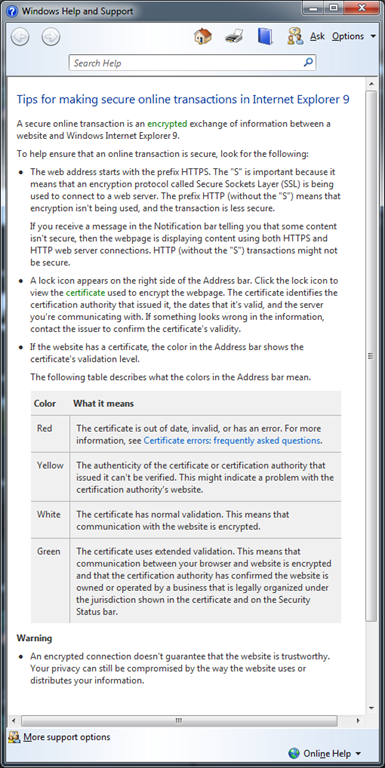
Takeaways
Now that we have looked at how it can help you and how to do it, attached is a nice simple 3 page document with more details and reminders about this. GO IMPROVE YOUR APPLICATIONS!
Rapid Business Development: Lightswitch vs. Dynamics CRM vs. SharePoint 2010 vs. ASP.NET MVC 3
In this post I am going to look at comparing four technologies that can be used to build business applications easily. This post was inspired by how similar a number of products have become over the last few years and more importantly how the new kid on the block Visual Studio Lightswitch, which is a specialised rapid business tool development platform built on top of Visual Studio, is going to affect this eco-system. It is important to also remember that this is being written in the Lightswitch Beta 2 timeframe, so some details may change by launch.
Lightswitch feels very similar to me, to another product I have worked with in the past: Dynamics CRM, which is a Customer Relationship Management tool from Microsoft. CRM does very well in the xRM (x = extensible) scenario, where I think it will come up against Lightswitch a lot. I haven’t had an opportunity to use the latest CRM release yet, so I have had to rely on the help of experts to fill in my gaps!
SharePoint 2010 is another product I have worked with, can of course be used for building business applications quickly cause it is the “operating system of the enterprise” and has good features for these types of applications.
Finally, while watching Scott Hanselman do the ASP.NET MVC 3 demo in the MIX 11 Keynote, I was struck with how that is very close to a rapid business user development tool with all the new scaffolding features. ASP.NET MVC is a real outsider in this group because it is first a development toolset for web development and, maybe a rapid tool second where the rest are rapid development platforms or tools first.
I think the differences between these four are very interesting and while each has it’s strong & weak points, this should definitely not be looked at as a pick one only post. There are many scenarios where you want to combine them for even better experiences.
I have broken down the issues into twenty one(!) aspects (key points we can compare them against each other) which are grouped into six scenarios to make it easier to digest. Each scenario starts with a list of the aspects and a brief description followed by a comparison table of those aspects.
Starting
- Ready to go out of the box: Once installed, can it do anything? Seems silly, but quick turn around at the start, even if actual development is longer is important as it helps with prototyping, shows some rapid development and hints at how hard it is to learn (for me at least, if it does something I find I can experiment and learn quickly). Important to note, we are not looking at making it align with your company needs here, we just want it to do something. Eating CPU cycles & RAM is not something either.
- Northwind Style Sample development costs: This aspect looks further than the above aspect and looks at how much more would it take to get it tailored for a company, like the fictional Northwind, to have a XRM type system as it can be done across all four. Fewer $ signs means less time and/or resources for the functionality.
| Lightswitch (LS) | Dynamics CRM | SharePoint 2010 (SP) | ASP.NET MVC | My Thoughts | |
| Ready to go out of the box | Fast | Fastest | Fast | Slowest | LS & MVC need development, while SP needs at least 5min of tailoring. CRM, is ready to go once installed. |
| Northwind Style Sample development costs | $ | $$ | $$ | $$$ | ASP.NET MVC has the highest development costs as so little is out of the box. Lightswitch excels in this scenario. |
Finishing
- Cost for on-premise deployments: This looks at the money cost for licensing to get the solution up and running on premise (i.e. in your company). Licensing is, of course, flexible and this will vary based on who you are – so this is not indicative for all. It does not include such things as server hardware or common costs, for example operating system licensing.
- Deployment Complexity: Getting a solution up and running shouldn’t be difficult for an organisation and a lot of time can be lost (and costs incurred) changing, upgrading and troubleshooting systems that do not want to be deployed.
- Deployment Documentation: When it happens that you need to deploy, having a wealth of documentation (be that video’s, best practice guides, troubleshooting material) is vital and plays a large part in getting a solution up that works every time.
| Lightswitch (LS) | Dynamics CRM | SharePoint 2010 (SP) | ASP.NET MVC | My Thoughts | |
| Cost for on premise deployments | $$$ Unknown. Likely cost per developer seat. No per user costs. | $ to $$$ Cost per user & cost per server. Visual Studio only if you are doing integrations or custom workflows. | $$$$ to $$$$+ Cost per user & cost per server. Visual Studio licenses for any serious work. | $$ Visual Studio licenses.No per user costs. | CRM on the small scale with low development is very cheap but since you pay per user can get expensive. LS & MVC only have development software costs, which is more expensive up front but do not increase as you add users to the system. |
| Deployment Complexity | Medium | Hard | Hardest | Easy | LS, CRM & SP all have requirements that they need to work, in increasing deployment complexity, but CRM & SP are significantly harder than LS though due to their more complete product nature. MVC is easy because there is no constraints from it (other than a web server). |
| Deployment Documentation | Yes | Yes | Yes | No | Only MVC has no official documentation, which makes sense as it is a development tool. All four have GREAT communities to help as well! |
User Experience
- Front End Technology: A good looking, feature rich UI can seriously ease adoption, and what we are looking at here is the richness level of technology used for the out of the box front end user interface.
- How good the standard UI looks: Completely subjective and really this is based on what I think looks best.
- Flexibility of out of box front end: In this aspect we are concerned about how easy it is to adjust and tweak the out of the box front end.
- Themability : Corporate branding is massive business and making sure the application out of the box looks like it is part of your business is important. It is important to note that both CRM & SharePoint can have custom front ends built which enable this scenario, but that requires extra development, and we are focusing on the out of the box options here and assuming you have the theme built already.
| Lightswitch (LS) | Dynamics CRM | SharePoint 2010 (SP) | ASP.NET MVC | My Thoughts | |
| Front End Technology | Silverlight. Supports out of browser (desktop) & in browser | Web Just ASP.NET | Web ASP.NET under the covers with sprinklings of Silverlight | ASP.NET | LS clearly best here, since it will give the richest UI out of the box. ASP.NET MVC out of the box scaffolding isn’t pretty but can easily be improved. |
| How good the standard UI looks (very subjective) | Low | Medium | Very. Low | Depends on your web designer | This is the most subjective aspect: LS & SP both have a fairly plain out of the box UI but SP has a bad UX to go with it. CRM is much better out of the box and if you are going down the MVC route you will likely be taking advantage of the best UI thanks to the complete flexibility – but that depends on how good your designers are. |
| Flexibility of UI development in the tool | High | Medium | Medium | High | MVC & LS can almost do anything on the front end, especially if you combined MVC with Silverlight. SharePoint & CRM too have lots of options and work with Silverlight. |
| Themability | Medium | Low | Medium | High | The flexibility of MVC is highest as it is a pure programming, with LS following up thanks to it’s strong theme support. SharePoint can be themed but not the same level as LS. CRM will always look like CRM! |
Extensibility
- API for integration: In the short term having an API means it is easy to get data into your new solution, in the medium term it means more ways to sync data and mash up your systems and in the long term it gives you a way to get your data out. It is vital to have an API.
- Marketplace: Apple kicked the idea of having an AppStore into reality for many of us and now having a marketplace to get extensions, customisations or themes is an important aspect. I am ignoring public sites, like Codeplex for example, and only focusing on an official marketplaces. Galleries are just marketplaces with no vetting, which means they are bigger but the quality bar is not guaranteed.
- Additional Authentication Options: Only your employees or customers (which may be everyone if you are lucky enough) should access your solutions. What do we get out of the box to limit access to the system? All four systems support Windows & Forms based authentication so I am only listing other options which are available.
- Permission Structure (Authorisation): Being able to control what parts of a solution you can access, once you have logged in is also vital and having a lot of flexibility in this space is also important as very seldom will one structure work for everyone.
| Lightswitch (LS) | Dynamics CRM | SharePoint 2010 (SP) | ASP.NET MVC | My Thoughts | |
| API for integration | Yes | Yes | Yes - at least 5 of them. | N/A | In MVC you could build one, oData for instance, but it doesn’t have one out of the box. LS creates a WCF RIA Service for us. CRM & SP both have API’s, but SP is more complex as it supports so many different API’s with different subsets of features supported. |
| Marketplace | Once it is released a gallery will exist. | Yes | Nope | Gallery available | CRM leads here in a big way with a REAL marketplace. ASP.NET MVC has it’s own gallery plus a strong 3rd party marketplace ecosystem. |
| Additional Authentication Options | Anonymous and more available through custom development (e.g. Windows Live). Claims based authentication(custom development required). | Claims based authentication via STS | Anonymous and more available through custom development (e.g. Windows Live). Claims based authentication(custom development required). | Anonymous and more available through custom development (e.g. Windows Live). Claims based authentication(custom development required). | |
| Permission Structure (Authorisation) | Very basic and really just a half a step ahead of editing XML that MVC needs. | Fantastic out of the box option, plus plenty of extensibility if needed. | Good structure with many levels of customisation. Out of the box is very simple. | Basic support for it but can be extended through development. A lot of XML work though may be needed. | LS & MVC are the lightest here, both supports authorisation options but enforcing it is up to the developer to implement. LS is better slightly better at guiding the developer and needs no XML editing. SP authorisation is as varied & powerful as what CRM offers. However SP can easily get messy, users can break permission inheritance, while CRM enforces authorisation all the time and makes for a better structured environment. |
Information Worker Features
- Offline support: Being able to work when you are not in the office is a vital need for many people. So how do these platforms enable that scenario. In theory it is always possible to build this, so we are just looking at the out of box offering.
- Easily Import Data: How do we get information into the solution, besides the API? Does the product make this easy with out of the box tooling?
- Printing: Despite the promise of a paperless office, it still is not the case and being able to print is important, even if it is just to XPS or PDF for invoicing.
- Office Integration: Integration into Microsoft Office products (i.e. Word, Excel, Outlook, PowerPoint, Access, Publisher, InfoPath & OneNote) means that your IW’s will be able to work in the tools that they are comfortable with, easing adoption and productivity.
| Lightswitch (LS) | Dynamics CRM | SharePoint 2010 (SP) | ASP.NET MVC | My Thoughts | |
| Offline support | No | Yes | Yes | No | Being able to work offline is important if you are a roaming user. LS & MVC offer nothing in this space while CRM & SP both offer offline via Outlook. |
| Easily Import Data (out of the box) | Nope | Yes, from CVS. | Yes. Multiple options. | Nope | In all cases there are tools and other ways to import data but CRM & SP have an out of the box options. |
| Printing (out of the box) | Nope | Yes | Yes – Poor | Browser Level | LS & MVC can have custom development solutions for printing, other than that they both offer nothing out of the box. As browser printing has improved MVC has a slight advantage being HTML based normally. SP has printing, but it is very poor. CRM leads the way here with a great print scenario. |
| Office Integration | Low One way export to Excel. Others can be custom developed | Medium One way to Excel. Mail merge with Word & Outlook. Deep integration with Outlook is available too. | High Only Publisher doesn’t have some integration with SharePoint. Every other Office product does, some like Excel are one way while others like Access are two way. SP internally has features that understand Office files too, for example PowerPoint Libraries show thumbnails. | None Can be custom developed. |
Other
- Databases Supported: Where the data can come from for your application is a critical piece of the puzzle because it means the difference between building ETL solutions to handle moving it around if the source is supported or having it just work.
- Minimum Skills For Tailoring: Tailoring is what I refer to when I think of customisation of a system, without the need for a programming language. At some point you will need a developer but how far away that is and what can be done by a analyst or super user early on is important from a time to solution and cost perspective. Lower is better here.
- Can run in the cloud?: If you not thinking about how you can leverage the cloud, then you are not thinking. Making sure the solutions can cater for the cloud is an important consideration. All four solutions can run in the cloud but how do they run is also important
- ALM Experience: How does this tool work with a full ALM experience? Can I unit test it easily? Will it go into source control easily and what happens when multiple developers are updating the same files? How about build server and development tool integration? All important questions in understanding a complete picture of that these tools cost or what you sacrfice with some of them.
- Requires Silverlight: Despite decent market penetration and ease of deployment in corporate scenarios, the requirement for Silverlight can be a deterrent to business, especially those where the CEO uses an iPad2
 . This is not answered in the table as only Lightswitch requires Silverlight. CRM has no dependencies, SharePoint has a fall back mode and if you used Silverlight with MVC it would be possible to have a fallback mode, provided you developed it.
 - Data performance: This is also not in the table since it only applies to Lightswitch. For CRM, MVC & SharePoint I assume your front end (web) is always close enough, for example the same LAN, to the database but in Lightswitch you can really separate them. Here it is important to note Lightswitch is NOT great with data performance between backend & frontend. It sends massive amounts of data around. In my view it really does not feel optimised for WAN scenarios.
| Lightswitch (LS) | Dynamics CRM | SharePoint 2010 (SP) | ASP.NET MVC | My Thoughts | |
| Databases Supported | SQL Server, SQL Azure, SharePoint or anything supported by WCF RIA services. | SQL Server | SQL Server normally. With advanced skills can use external data sources. | For scaffolding anything supported by LinqToSQL or Entity Framework. | LS & MVC feel very close here, however LS has it’s own OM which MVC uses established ones meaning more options in the MVC camp. |
| Minimum Skills For Tailoring | Intermediate | Lowest | Low | Highest | Being able to tailor with less skill is a big plus for CRM & SP. MVC doesn’t have tailoring as it is all development. LS really stuck in the middle ground here – for setting it up I suspect nothing more than power user but that ends much sooner and moves to needed a developer than with CRM and SharePoint. |
| Can run in the cloud? | Platform as a service using SQL Azure for database & compute instances for front end. | Software as a service: Can get it from Microsoft & Partners at a cost per user per month. | Software as a service: Can get it from Microsoft & Partners at a cost per user per month. Recently launched in beta with Microsoft. | Platform as a service using SQL Azure for database & compute instances for front end. | |
| ALM Experience | Medium | Low | High | Highest | ASP.NET MVC is a pure development experience and so works well with ALM. SP2010 plus VS2010 is a great ALM experience (although mocking is difficult). LS & CRM are oddly very similar with customisations in XML though so expect some source control pain. Plugin’s for CRM and LS Extensions are a great ALM scenario. CRM falls short in the unit testing scenario though. |
Special Thanks
A post this in depth could not have been done without input from my “brain trust”, and I thank each one of you for your help:
- Bruce Nicholson
- Michael o’ Donovan
- Adam Cogan
- Zlatan Dzinic
- George Doubinski (he has an awesome site, just go an admire the work he put in it)
Community Night: BE THERE
 Tomorrow is another community night, and I realised that there is MANY people who do not know about this fun event. This is a gathering of communities (or user groups or interest groups if you prefer) who meet on a regular basis. This is a totally free event which takes place the 2nd Tuesday of every month at Microsoft’s offices in Bryanston.
*Yawn* another Microsoft marketing session? WRONG! This is run by communities and Microsoft has NO say in the content or agenda, unless a community allows them  Microsoft is really trying to help all communities by providing the facilities – not the content!
 To give a concrete example MobiZA, a user group focused on mobile development is doing a session on Android! talk about not Microsoft marketing there!
There is also a variety of communities in a attendance so you can also see things you would not have seen before, for example the business user group or the game developer group! And of course there is plenty of corridors for interesting discussions and some even contain food & drinks!
Hopefully I have given you a taste of what is in store and why you should attend and you can find more details on the DPE team blog.
 Finally, if you have a user group maybe you should think of joining us at community night? Free venue, projectors, seating, food & drink. Plus plenty of people attend, could be a great way to grow your group. I would personally love to see some Linux & PHP groups there because it would allow those who have not had a chance to see the non-Microsoft world an opportunity and hopefully learn that it isn’t so cut & dry out there.
Remember, tomorrow 12th April 2011 @ Microsoft (map to the left) from first sessions kick off at 16:30 and second sessions get started between 17:30 & 18:00!