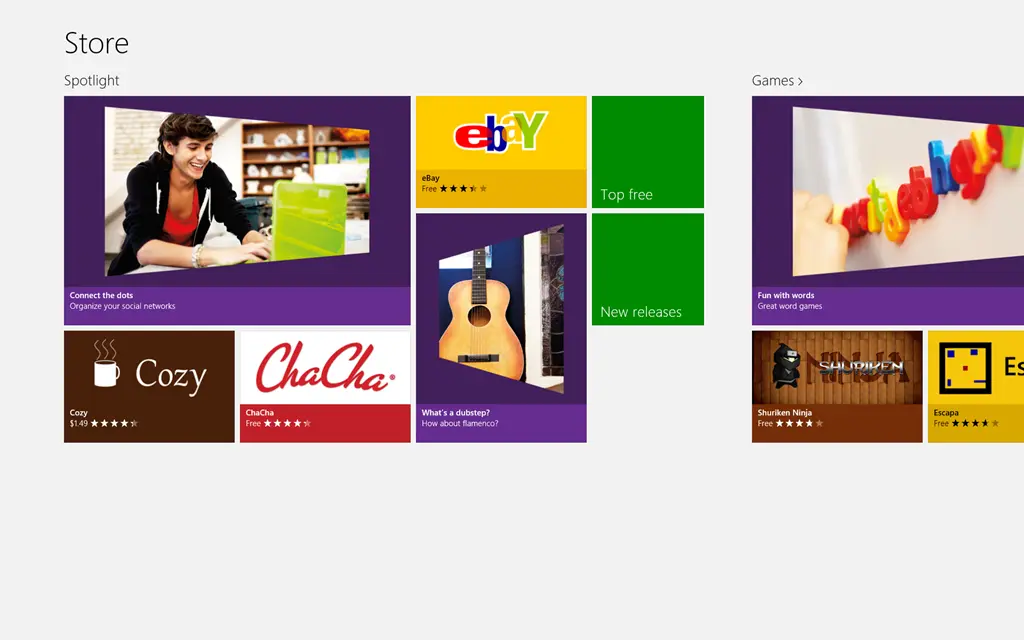
To the right is a screenshot from the Windows 8 Store app on my machine. Note the app called Cozy—and in particular, its price: it’s in dollars… and I live in South Africa, where we use rands. :/
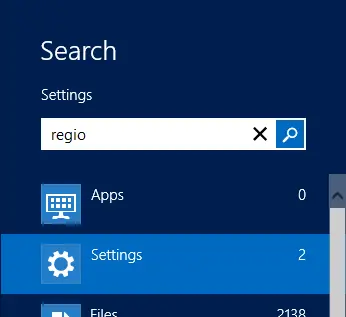
The store settings are controlled by the Windows Region settings, so to fix this, you need to change those settings. Search for region:
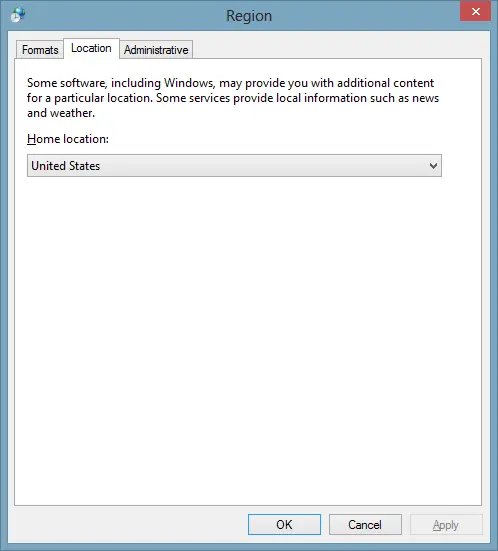
Once in the Region app, go to Location and change it from United States to South Africa, or wherever you are:
Next time you launch the store (you may need to reboot), it will show the correct country! 😊
For more posts in this series, see the series index.
I’ve been talking a lot about Windows 8 recently, and my slides have used the architecture images Microsoft released at Build 2011—as well as that awesome one Doug Seven** created. However, even those don’t fully address the latest discussions, and they’re showing their age.
I recently created a new one to tackle these issues:
Age: DirectX can now be used by VB/C# (in addition to C++).
Age: How does Windows Phone 8 fit in? (Note: This may change—it’s based on my assumptions and the limited info we’ve received so far.)
Discussion: Is WinJS = WinRT?
Discussion: Is .NET = WinRT?
Discussion: Can I use my own JavaScript libraries like jQuery?
Discussion: Can I use WinJS on the web?
Discussion: Can I build desktop apps on Windows 8?
Discussion: Can desktop apps run on Windows 8 ARM CPUs?
Discussion: How does language projection fit in?
Since this wouldn’t fit in a single image, I’ve put together a slide deck with:
A high-level overview image, and
A step-by-step breakdown that builds the architecture incrementally—hopefully answering all these questions along the way.
This page is a list of the blog posts in my series of small articles related to things I am learning while building Windows Store apps. Existing snacks are listed below:
This post is a departure from my usual technology-filled posts; it is rather a personal story that affects many people that I think is worth sharing my experience. It is about these SMS subscription services where people sign up for a service, receive content via SMS, and then get billed monthly through their cellphone provider. I was signed up without my knowledge, billed, and this is how I found out about this scam industry and got my money back from them.
The Story
It starts
The first indication I had was the odd appearance of “Content Charge” on my July invoice from MTN (my service provider). MTN uses such complicated names for services that it could mean anything, but something told me I should find out what it was. I called MTN and was told it was for a subscription service! I told the call center agent that I had never signed up and wanted my money back. Unfortunately, MTN couldn’t help me—they only canceled it that day and gave me the details of who to contact about this.
The interesting thing about this is that to run a subscription service in South Africa, you must be a member of WASPA, the Wireless Application Service Providers' Association. WASPA has excellent rules about what is allowed and what is not allowed, and the company MTN told me to call about a refund is thus a WASPA member—that company is called Opera Interactive. (I am not linking to these companies not because I do not want you to know exactly who they are, but because I do not want to give them any search engine love.)
I phoned and spoke to Opera’s call center (by now the 25th of July) and they told me they could not help—as they only handle billing. All they could do was cancel the service and give me the actual company’s details. That’s right: Opera is not the company; they are a middleman and, from what I understand, let non-WASPA members “pretend” to be them, handle the interaction for billing with the service providers, and take a cut of the profit.
Opera then told me to contact Mobmatic, who were incredibly rude and told me to email them because they do not help over the phone with refunds. Although they have a South African phone number, they are based in the UK—eventually, they just hung up on me after I asked to speak to a manager. So I emailed them and immediately logged a complaint with WASPA.
Lies, damn Lies
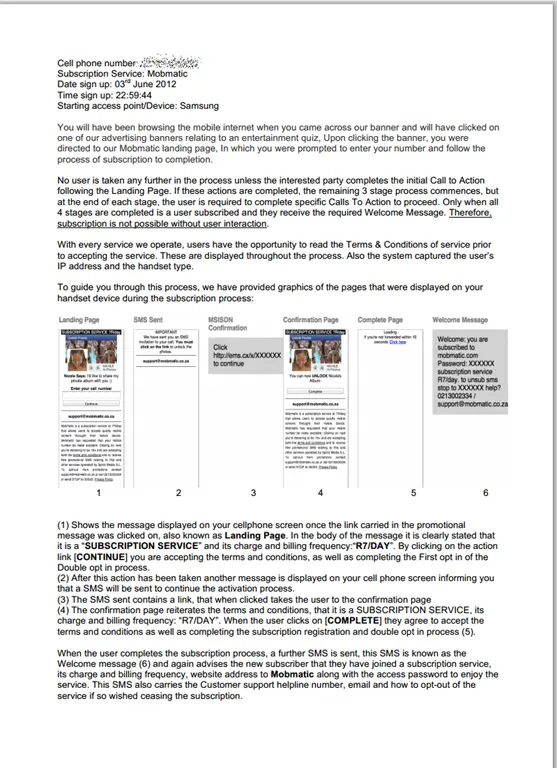
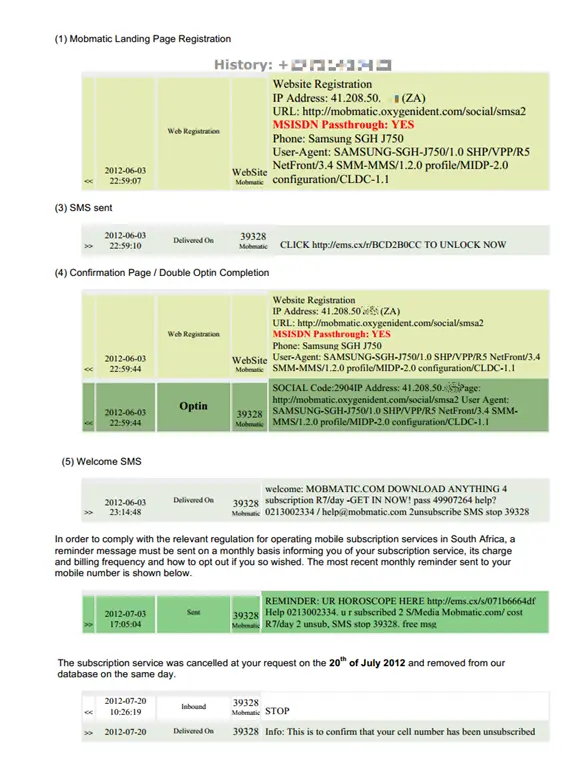
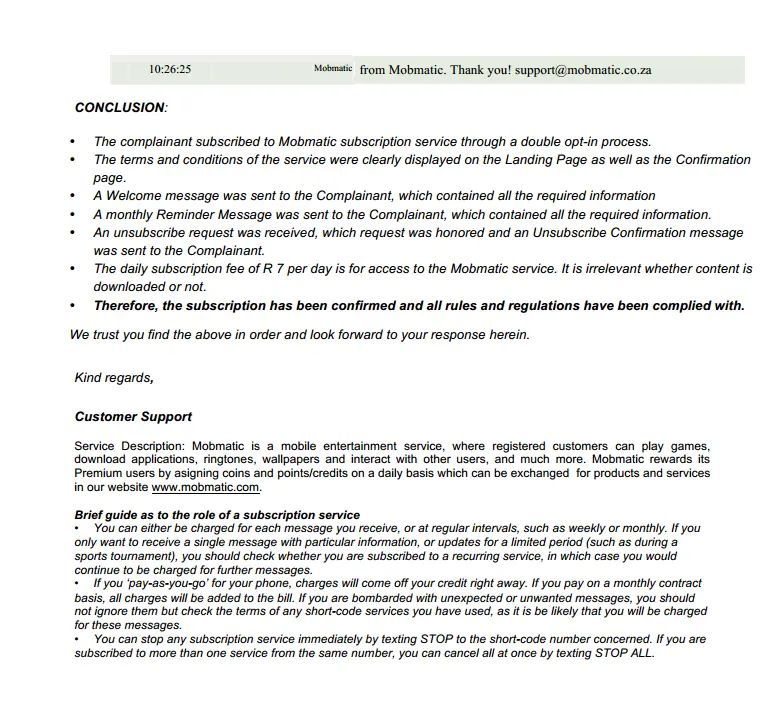
Nothing until the 31st of July, when Mobmatic emailed me a document (below) as proof I had signed up and told me they wouldn’t refund me. So I looked it over and checked the details:
I checked my SMS logs on my phone to see if there were any at the dates/time specified. There was only one from the 3rd of July, but since I had never signed up, I ignored it as it seemed like a scam. However, the key confirmation signups were not there.
The phone model and even the browser string features did not match my phone.
I responded again with that information and asked for a refund.
Then, nothing—no one responded until the 2nd of August, when WASPA said they had proof of me signing up from a company called Sprint (note: not Mobmatic). They had asked for the service to be canceled and then closed the case. Despite my asking for a refund, they ignored it—it really felt like WASPA had an automated system. I contacted them again and said I suspected the "proof" was the same as sent to me, outlined the error in the "proof," and asked for a refund.
The scary part of the WASPA reply was, “Since your unsubscribe request was not resolved using the informal process”—informal?! What is informal about logging requests, getting reference numbers, and so on? It just led to more proof that WASPA operates in an automated process.
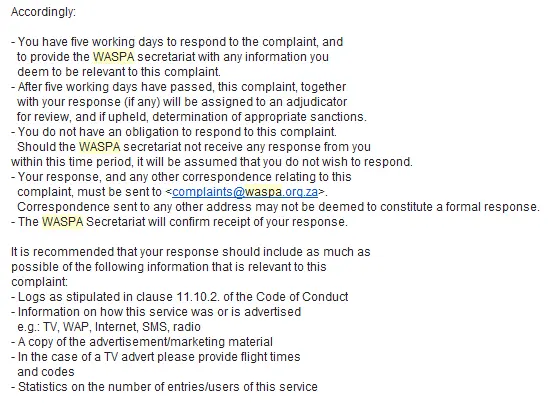
WASPA contacted Sprint again with the details I sent them and told them they had to provide significant data in their response or they would have to go before an adjudicator.
The fight back
Oddly, within 3 days of this, I was phoned and offered a full refund. They told me I would be emailed and could respond with my details. I got the email the next day (below), and it was almost identical to what they had said—except for a clause protecting themselves from any legal action if I accepted the refund.
I gave them the details and got my refund! WASPA contacted me a week later to confirm, and I held off responding for another 3 days until the money actually arrived in my account (10 full days after I had spoken to them—what is this, the 1980s?). I told WASPA it was sorted out but urged them to launch an investigation into the companies and structures. That was a few weeks ago, and nothing has happened since.
Final Thoughts
Hopefully, this shows you that it is possible to fight these people who are screwing the man in the street and gives you some idea of what to do. Here’s a short list of things to remember:
Your mobile provider can’t do much—so don’t fight with them. Be kind and get them on your side to get as much information as possible.
Keep a log of all interactions, including names, reference numbers, times, etc.
Once you’ve tried the direct route with the companies, contact WASPA immediately. While they seem like a checkbox organization, you’ll still need their help.
When you get “proof,” go through it in detail. I would have likely agreed with them that maybe it was a mistake, but the wrong phone model and suspicious ISP gave me confidence that I was right. These aren’t simple things to check, so maybe get your favorite geek to help.
Do not give up—if you’re right, there are plenty of routes. From speaking to MTN during this, if WASPA fails, you can still escalate to the consumer commission, which gives you a lot of power to fight them.
While WASPA is a good idea, it seems underfunded and employs everything it can to automate the system and deal with the load as much as possible. It’s clear that the requirement for a double opt-in exists, but the opt-in system doesn’t need to be on the device and thus can be forged. This is just a sign that while the good idea is there, they can’t keep up with the techniques bad companies use to steal money.
Hopefully, you never have this happen to you, and if you do, I hope this helps you fight these scammers!
If you develop using XAML and you are using .NET 4.5 (i.e., WPF or Windows 8), then there is a feature that will make you smile a bit: _CallerMemberName_.
XAML developers often implement INotifyPropertyChanged to enable updating of data-bound fields. If you're smart, you often wrap the raising of the event into a simple method you can call—for example:
publicvoidRaisePropertyChange(string propertyName)
{
if (PropertyChanged != null)
{
PropertyChanged(this, new PropertyChangedEventArgs(propertyName));
}
}
This leads to code that looks like this:
privateint ticks;
publicint Ticks
{
get { return ticks; }
set
{
if (ticks != value)
{
ticks = value;
RaisePropertyChange("Ticks");
}
}
}
There are some problems with this:
Refactoring – If you rename the Ticks property, even using the VS refactoring tool, it won’t find the string in the method call.
Magic strings – It’s just a string, so there’s nothing to ensure that you spelled "Ticks" in the string the same as in the property name.
Copy & Paste – If you copy & paste another property, you must remember to rename this string too.
The Solution: CallerMemberName
.NET 4.5 includes a new parameter attribute called System.Runtime.CompilerServices.CallerMemberName, which will automatically place the name of the calling member (i.e., method or property) into the parameter. This enables us to change the method signature to:
Note: The attribute is applied to the parameter, and we’ve also given it a default value—when using this attribute, your parameter must have a default value.
Now we can change the calling definition to:
privateint ticks;
publicint Ticks
{
get { return ticks; }
set
{
if (ticks != value)
{
ticks = value;
RaisePropertyChange(); // No argument needed
}
}
}
Now we’ve solved all the problems with the string in the method call! Go and enjoy!
Over a year ago, I wrote a post where I compared four technologies that can be used to build business applications rapidly. The original post was inspired by how similar a number of products have become over the last few years—and more importantly, how Visual Studio LightSwitch, a specialized rapid business tool development platform built on top of Visual Studio, is affecting the development ecosystem. That post was written during the LightSwitch Beta 2 timeframe, and the world has changed a lot since then—LightSwitch has shipped, not once but twice! So, it’s about time for a refresh.
As with the previous post, I’ll compare LightSwitch against Dynamics CRM, SharePoint, and ASP.NET MVC Scaffolding. If you’re not familiar with these products, see my older post for a brief overview.
I think the differences between these four are very interesting. While each has its strengths and weaknesses, this should definitely not be looked at as a "pick one only" post. There are many scenarios where you want to combine them for even better experiences.
To be clear, ASP.NET MVC (not just scaffolding) is greater than ASP.NET MVC Scaffolding—you can do almost anything with MVC. However, for this article, we’re focusing on the concept of rapid development and comparing MVC with scaffolding (which offers rapid development with trade-offs). For example, supported databases: MVC supports anything .NET does, while scaffolding is limited to a subset.
I’ve broken down the comparisons into twenty-two (!) aspects, grouped into six scenarios for easier digestion. Each scenario starts with a list of aspects, a brief description, and a comparison table. All aspects are numbered for easy scanning, and notes are linked when available.
Starting
Ready to go out of the box: Can it do something after installation? Even if actual development takes longer, quick turnaround helps with prototyping, rapid development, and learning. (We’re not aligning it with company needs—just whether it works at all.)
Northwind-style sample development costs: How much effort is needed to tailor it for a company (e.g., a fictional Northwind XRM system)? Fewer costs = less time/resources.
LightSwitch (LS)
Dynamics CRM
SharePoint 2010 (SP)
ASP.NET MVC
My Notes
Aspect 1
Medium(note 1)
Fastest(note 2)
Fast
Slowest(note 1)
LS & MVC need development; SP requires at least 5 minutes of tailoring.
CRM is ready to go post-install.
Aspect 2
$(note 2)
$$
$$
$$$(note 1)
ASP.NET MVC has the highest costs due to its low out-of-the-box features.
LightSwitch excels in rapid development.
Finishing
Cost for on-premise deployments: Licensing expenses for running the solution internally (not including hardware/OS costs).
Deployment Complexity: How difficult is it to get a solution running? Time and costs can balloon during deployment, upgrades, and troubleshooting.
Deployment Documentation: Availability of guides, videos, or troubleshooting resources is critical for smooth deployments.
LightSwitch (LS)
Dynamics CRM
SharePoint 2010 (SP)
ASP.NET MVC
My Notes
Aspect 1
$$(note 2)
$ to $$$
$$$$ to $$$$+
$$(note 2)
CRM is cheap for small-scale use but scales with users.
LS & MVC have upfront software costs but no per-user fees.
Aspect 2
Easy(notes 1 & 2)
Hard(note 1)
Hardest(note 1)
Easiest(notes 1 & 3)
LS, CRM, and SP have increasing deployment complexity; CRM and SP are harder due to completeness.
LS has a built-in deployment system.
MVC is easiest—no constraints, and Web Deploy helps admins.
Aspect 3
Yes(note 2)
Yes(note 2)
Yes(note 2)
Yes(notes 1 & 2)
ASP.NET MVC benefits from Web Deploy tooling and documentation.
All have strong communities!
User Experience
Front-end technology: How rich is the out-of-the-box UI?
How good the standard UI looks: Subjective—but based on my opinion.
Flexibility of the out-of-box front-end: How easy is it to adjust?
Recently I learnt an amazing new trick, the protocol-relative URL where the scheme of a URL (the http bit) can be dropped and your browser will use the same scheme as the page’s URL. This is very useful when you have a website on both http & https. For example, you can set an image URL to be:
//demo.com/horse.png
If you browse to http://www.demo.com, then it will load the image from http://demo.com/horse.png, but if you go to https://www.demo.com, then it will load the image from https://demo.com/horse.png—and this works with CSS & JavaScript too!
SharePoint (and, for this post, this has only been tested with 2010—your mileage may vary on newer or older versions) does not follow this standard and actually breaks protocol-relative URLs in two ways.
Front End
If you’re working on the SharePoint UI—putting content in a Content Editor Web Part or a text column in a list—and you edit the HTML and include a protocol-relative URL, SharePoint will "fix" it by inserting the current scheme. So no matter what you do, on the front end, you’re completely stuck.
Example
You put in:
<imgsrc="//sharepoint/horse.png"/>
SharePoint will change it to:
<imgsrc="http://sharepoint/horse.png"/>
(assuming your page is on an http scheme).
Back End
The other scenario is if you’re working with SharePoint web services—for example, the List Service—and setting HTML that way—SharePoint will once again "fix" things. Interestingly, it does something completely different from the front end. I guess the front end uses JavaScript, while the back end uses some other code. It removes the attribute entirely from the HTML.
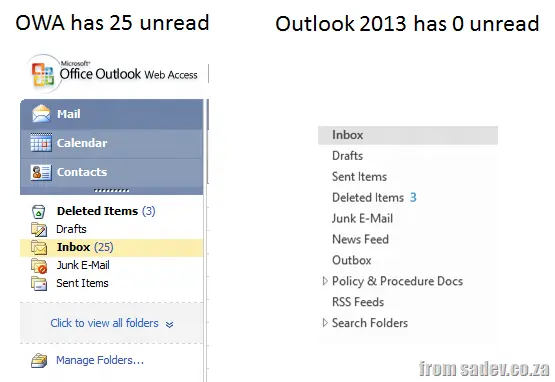
Office 2013 is available in preview, and as the fan boy researcher I am, I’m running it. In the last week, I’ve had an odd problem—it started when someone told me they had emailed me, but I never received it. I logged a call with the IT desk at work, and they found it in OWA (Outlook Web Access). Suddenly, it appeared in Outlook too. "I am overworked and tired—maybe I just missed it," was my thought, so I left it and carried on, believing I needed a holiday.
Then yesterday, I was in OWA and saw I had 25 unread emails, while Outlook showed 0. I am not crazy.
I logged a call again with the IT desk and received some awesome feedback—though it’s still too early to say it’s fixed, I’ll update this post as I learn more.
I’m not entirely sure what it does, but I trust patches bring their own kind of magic (a key trait of fan boys). Notably, Windows Update doesn’t push this patch out—so you must apply it manually.
One of those issues is about caching, which brings me to…
Caching in Outlook 2013 is Very Different
Before 2013, Outlook would fetch all mail from the server and store it locally in an OST file, giving you an offline copy of everything. Starting with Outlook 2013, this changed—by default, only the last 12 months are cached.
To revert to the old behavior:
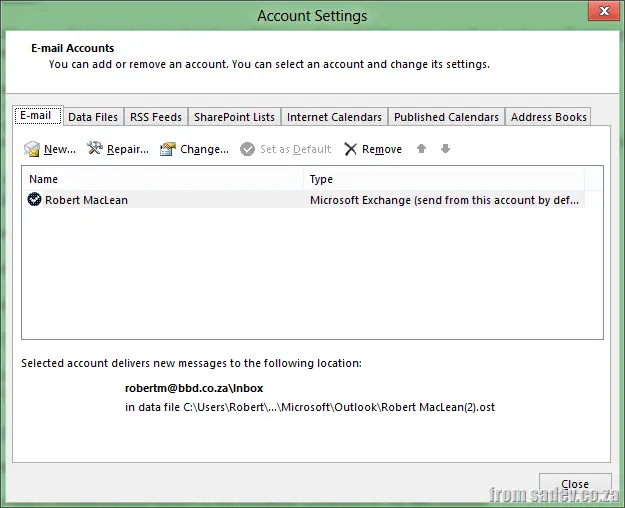
Click File, then Account Settings, then Account Settings again.
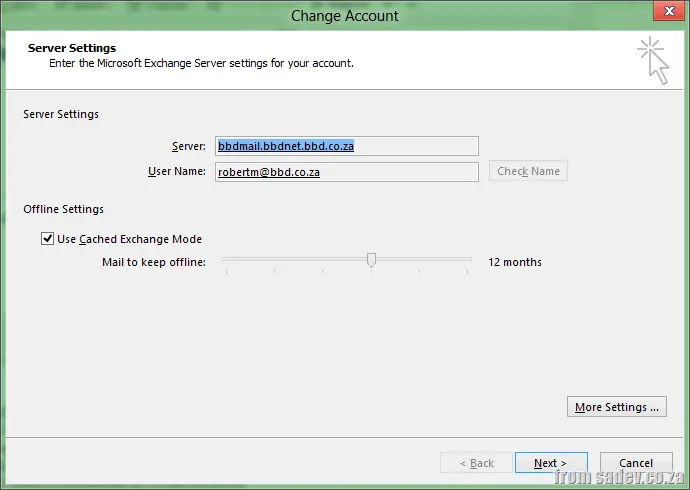
Double-click on your Exchange account.
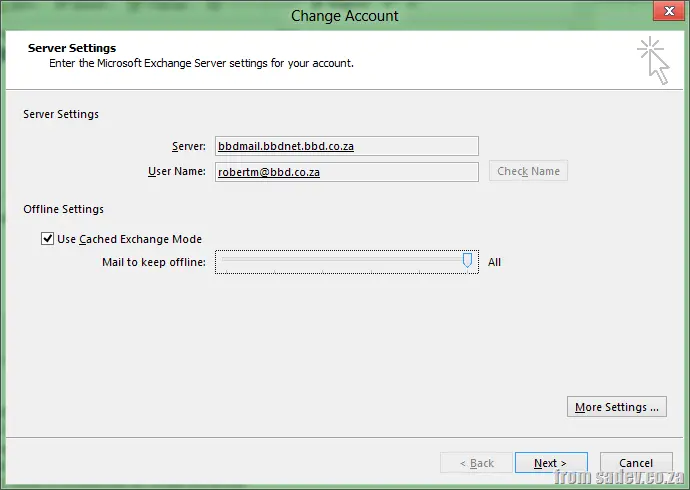
Here, you’ll find the "Mail to keep offline" slider.
Drag it all the way to the right to select "ALL", then restart Outlook.
Finally, wait for it to update.
It’s a Preview
Lastly, a personal note—this is a preview, not a final release. After great preview experiences with Windows 8 and Visual Studio 2012, I forget how fragile previews can be. It’s crucial to always have a backup and a way to verify functionality. For me, that means checking OWA daily now.
Another in my theme of investigating claims that to me sound wrong, this time that arrays should be chosen over other collections because only arrays can be serialized (or put differently, no other collection can be serialized).
For this, I’m assuming serialized means to XML, and it also means serialized easily. In theory, anything can be serialized—it’s just a concept—but I’m assuming easily, i.e., no custom code outside invoking built-in framework serialization.
Serialization with XmlSerializer
privatestaticstringSerialise<T>(T o)
{
var serializer = new XmlSerializer(typeof(T));
var memoryStream = new MemoryStream();
serializer.Serialize(memoryStream, o);
memoryStream.Position = 0;
using (var reader = new StreamReader(memoryStream))
{
return reader.ReadToEnd();
}
}
With the above code, you can pass in an array and it spits out XML. It also works perfectly with ArrayList and List<T>. This does fail with LinkedList<T> and Dictionary<T, K>, which is annoying.
Serialization with DataContractSerializer
The myth, I think, comes from a lack of knowledge of what’s in the .NET Framework—in this case, thinking there’s only one way to serialize something when the framework ships with many of them. So let’s use DataContractSerializer this time and see:
privatestaticstringSerialise2<T>(T o)
{
var serializer = new DataContractSerializer(typeof(T));
var memoryStream = new MemoryStream();
serializer.WriteObject(memoryStream, o);
memoryStream.Position = 0;
using (var reader = new StreamReader(memoryStream))
{
return reader.ReadToEnd();
}
}
Using this, arrays, ArrayList, List<T>, LinkedList<T>, and Dictionary<T, K> are all serialized!
Myth Outcome
BUSTED! There’s a simple way to serialize collection classes in the framework—so arrays are not the only thing that can be serialized!
Code now available at https://github.com/rmaclean/ArrayFighter. If you wish to suggest a flaw or make a suggestion to improve it, please create a pull request OR give me a detailed comment explaining what is needed, why it will help/hinder, etc. Ideally with links.
The myths I want to tackle are:
Arrays are not collections
Arrays are faster than collections
These are two statements I’ve heard recently and I initially felt were wrong, so I decided to research this myth myself. I am assuming when people say "collections," they mean classes in System.Collections or System.Collections.Generic.
Arrays are not collections
In computer science, an array type is a data type that is meant to describe a collection of elements.
The first aspect is what interfaces are implemented in each. Both arrays and List<T> implement the same interfaces for collections and lists. Note that since List<T> is generic, it implements both generic and non-generic interfaces.
Where does List<T> store data? In an internal field: _items, which is just an array of T.
So List<T> is just an array? Yup! How does it handle inserting new items? It increases the array size when needed by creating a new array and copying pointers to the items into it.
Complexity of the operations
Add: O(1) operation. If the capacity needs to increase, it becomes O(n), where n is Count.
Let me warn you about ArrayList: if you are using .NET 2.0 or higher and this class, I have the full right to smack you across the face with a glove. There is no reason to use it anymore! Use List<T> instead—it is faster and safer.
What it implements
Both Array and ArrayList implement interfaces for collections and lists:
Yup—because they’re virtually the same. The only core difference is internal storage: object[] vs. T[]. Side effects include Add accepting object vs. T, but that’s it.
Now we’re onto something different. Arrays (and ArrayList, List<T>) assign a continuous block of memory (number of items × item size), storing items at offsets.
This is great for reading—for example, to get item 6, you calculate 6 × item size + start of array. But when space runs out, List<T> and ArrayList must allocate a new, larger array and copy all items. The cost is high: two arrays, copying, cleanup.
LinkedList<T> works differently. It tracks the first item (head), which holds a reference to the next item, and so on. This allows infinite growth—just append to the last node. Inserts are faster too: no need to shift elements like in arrays. Instead, adjust neighboring node references.
But reading is slower. To get item 6, you traverse from head to item 1 → 2 → 3 → 4 → 5 → 6. No direct access. Backward movement, however, is faster because each node has a Previous pointer. Arrays, by contrast, require recalculating offsets from the start.
Performance depends on direction: sometimes arrays win; other times, LinkedList<T> excels.
What it implements
Both arrays and LinkedList<T> implement collection-related interfaces (but not all list interfaces):
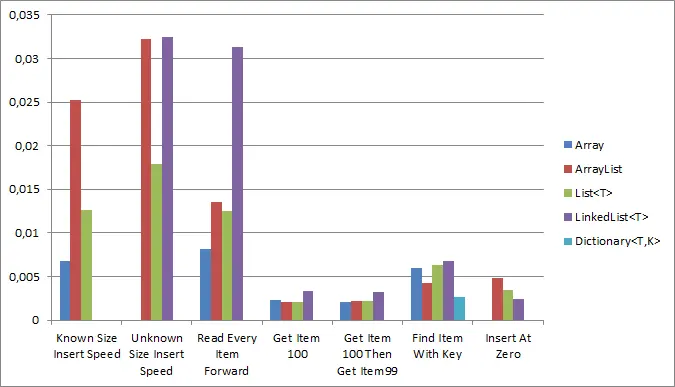
Winner: ArrayList. Arrays were close, but results were noisy.
Disqualified: Dictionary<T,K> (key requirement).
Get items 100 then 99?
Winner: Array. LinkedList<T> should’ve won but was outperformed due to noise.
Disqualified: Dictionary<T,K> (key requirement).
Key-based lookup?
Winner: Dictionary<T,K> (by design).
Insert at position 0?
Winner: LinkedList<T> (ideal for this case).
Disqualified: Array (no mid-insertion), Dictionary<T,K> (key requirement).
Raw Numbers
Test
Array
ArrayList
List
LinkedList
Dictionary<T,K>
Known Size Insert Speed
0.0067952
0.0251845
0.0125625
-
-
Unknown Size Insert Speed
-
0.0322676
0.0178365
0.0324339
-
Read Every Item Forward
0.0081916
0.0135402
0.0124702
0.03132
-
Get Item 100
0.0023351
0.0021007
0.0021014
0.0033034
-
Get Item 100 Then Item 99
0.0020214
0.0021889
0.002163
0.0032026
-
Find Item With Key
-
-
-
-
0.0026851
Insert At Zero
-
0.0047753
0.0034568
0.0024224
-
Myth Outcome?
BUSTED! Arrays are fast—winning half the speed tests—but they’re not universally the fastest. Other options (like Dictionary<T,K> for lookups or LinkedList<T> for inserts at position 0) excel in specific scenarios. Performance differences are often negligible, so functionality should drive choice over speed alone.