Workflow doesn't work, Imports never happen, emails don't flow and Outlook clients cannot connect
- An easier way exists to do this now. See Workflow doesn't work, Imports never happen, emails don't flow and Outlook clients cannot connect - Reloaded
- Another issue causing the same problems has been found and solved. See: Request IP Address has different address family from network address.
The discovery service is a web service which gives back the real URL to the web services in MSCRM, so if you changed IIS it still gives back the old ones. There is also a bug in the RTM of MSCRM 4.0 which causes it to use the machine name instead of the host header after upgrades. So you go to http://<nice name> and the discovery service gives back to http://<machine name>/mscrmservices/2007/crmservice.asmx which doesn't exist since yourhost headers should have it as http://<nice name>/mscrmservices/2007/crmservice.asmx
You can pick this up using fiddler on the email server or desktop machine when trying to configure the email router or outlook client respectively. So I went though this with Microsoft PSS and they came back with a SQL command you can run to fix this.
NOTE: As this is a DB change it is unsupported. If you are a little worried about the impact do backups then try it. If you are very worried contact PSS directly for help.
USE MSCRM_CONFIG
Update DeploymentProperties SET NVarCharColumn = '<server>:<port>' WHERE ColumnName= 'AsyncSdkRootDomain'
Update DeploymentProperties SET NvarCharColumn = '<server>:<port>' WHERE ColumnName = 'ADSdkRootDomain'
Update DeploymentProperties SET NvarCharColumn = '<server>:<port>' WHERE ColumnName = 'ADWebApplicationRootDomain'
Example, if your server is called: myserver and runs on port 50000
USE MSCRM_CONFIG
Update DeploymentProperties SET NVarCharColumn = 'myserver:50000' WHERE ColumnName= 'AsyncSdkRootDomain'
Update DeploymentProperties SET NvarCharColumn = 'myserver:50000' WHERE ColumnName = 'ADSdkRootDomain'
Update DeploymentProperties SET NvarCharColumn = 'myserver:50000' WHERE ColumnName = 'ADWebApplicationRootDomain'
Once done do an IISReset and restart the Async service and everything should start to work fine! As I said before this came from PSS (in particular Justin Thorp)and I would really like to thank him for the hard workand great responses I got on it.
Not have enough privilege to complete Create operation for an Sdk entity.
0x80040256
Not have enough privilege to complete Create operation for an Sdk entity.
Platform
You get this error during an attempt to register a workflow activity or plug-in into MSCRM 4.0, and you may think that to do this customisation you need atleast the System Customizer role. Well you are wrong, you need higher than that. In fact the highest role for an organisation (System Administrator) isn't even enough. You need to be Deployment Administrator. This role is assigned on a server level, in the Deployment Manager tool and gives that user full powers on all organisations!
The reason I think this is badly thought out, is three fold. Firstly, I do not want to enable developers to see certain things in MSCRM in live enviroments (thus the great System Customizer role) but I want them to do the customisations. The second is if I have a developer working in a certain division or group company with it's own MSCRM organisation, I really don't want to let that developer loose on other organisations on the server (security and stability reasons). Lastly I don't want to have to give access to the server to more people than absolutely needed, and as I now need to be able to set people up to be Deployment Administrators from time to time it means extending that group of people. Anyway heres hoping MSCRM 5.0 will fix it ;)
How to debug workflow assemblies and plug-ins in MSCRM 4.0
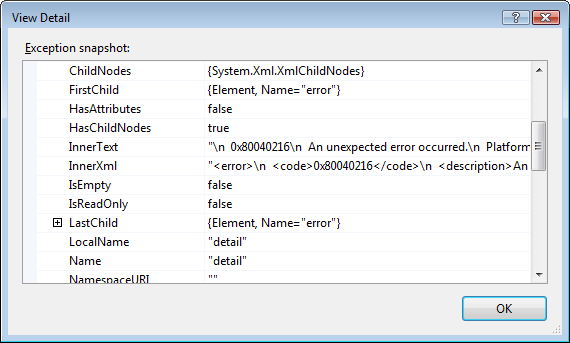
Remote debugging sounds like the title to a book but it isn't - in truth, I have never used remote debugging because haven't needed to. In MSCRM 3.0 the exceptions bubbled up nicely in workflow and I could do a lot on my own machine. However in MSCRM 4.0, those exceptions don't bubble up nicely :( All you get is something like this:

Beside's adding logging to your assembly (which you should do anyway), what's a dev to do now? You can now debug your plug-in's and custom workflow activities using the remote debugging facility in Visual Studio and that's what I hope to show in the next 9 easy steps!
- On your machine you'll find a folder <system drive>\Program Files\Microsoft Visual Studio 9.0\Common7\IDE\Remote Debugger (assuming you installed Visual Studio 2008 to the default location) which contains an x86 folder. Copy that to the MSCRM server and run the msvsmon.exe file.
- Now click Tools -> Permissions and give yourself access to it.
- Now load you plug-in or custom workflow activity (when I refer to plug-in for the rest of the document it means both, unless otherwise stated) using the *cough*annoying*cough* plug-in registration/developer tool.
- Next copy the PDB file for your assembly to the <system drive>\Program Files\Microsoft Dynamics CRM\Server\bin\assembly (assuming you installed MSCRM 4.0 to the default location).
- Now to finish up the MSCRM server side do an IISReset and restart the Async Windows Service.
- Back on your machine now in Visual Studio, set a break point in your code.
- Next click Debug -> Attach to Process. The transport should be Default and the Qualifier should be <domain>\<username running msvsmon.exe on the server>@<Server name>. Note: You can get this from the Tools -> Options in msvsmon.exe. You may need to do some firewall configuration but it should be automated.
- Next select the process to attach to, for an online plug-in, attach the debugger to the w3wp.exe process on the Microsoft Dynamics CRM server. For an offline plug-in, attach the debugger to the Microsoft.Crm.Application.Hoster.exe process. For asynchronous registered plug-ins or custom workflow activity attach to the CrmAsyncService.exe process.
- Now do whatever is needed to trigger your event and watch Visual Studio on your machine do it's magic!
MSCRM 4.0 Workflow Configuration Tool for Visual Studio 2008
- Add the missing sdk proxy assembly to the files for the installer.
- Set the directory for the templates to the Visual Studio 2008 one.
- Changed the version of the assembly from 8.0 to 9.0 in the CRMWorkflowAddin.AddIn file.
- Change the title to show it is specially for Visual Studio 2008
- Changed the product ID so that it is not confused with the semi-offical one in the SDK.
You can download the actual installer files here and the updated deployment project file (in case you want to check) here.
Note: This is based on the first public release of the Microsoft CRM 4.0 SDK. If newer versions come out, you maybe better off using those versions. I'll (try) keep this one up to date.
Update 16 Jan 2008: This tool doesn't add the MSCRM workflow actvities which are available. To add those to the tool box see this post.
MSCRM 4.0 Development - Stupid Tips
They should have said if you write code in .Net 3.5 and it breaks because it's not installed and you can't figure it out, then you need to stop writing code and become a chef or something and leave the dev to the people with at least a double digit IQ.
MSCRM 4.0 Deployment Manager - Stupid tips
Two stupid tips when using it (it's duh if you think about it, but anyway I did it):
- Don't try to create a new organisation when installing Windows updates, especially if there is a SQL update in there which stops the SQL server.
- Don't run multiple copies of the deployment manager to create multiple organisations at the same time.
If I do anything else duh with the deployment manager I'll be sure to let you know.
Known issues when developing for MSCRM 4.0
-
Organization specific URL requests to CrmService.asmx are case-sensitive (32068)
- You must use all lowercase for mscrmservices in the following URL.
- http://ServerName/OrgName/mscrmservices/2007/CrmService.asmx
- PreReturnValue.Stop Callout in 3.0 does not show any error (22605)
-
Returning a Stop value from a Microsoft Dynamics CRM 3.0 callout has been deprecated and is made equivalent to returning an Abort value. Callouts returning a Stop value will result in an Abort. However, a standard error message will be displayed to the user instead of a custom message.
-
Offline plug-ins or offline SDK creating entities (10858)
-
Inside a plug-in, if an entity is created or updated, the action is recorded as offline user even though it is impersonated as SYSTEM.
- Offline plug-ins that create entities use the offline user's credentials, even if the plug-in specifies impersonation.
- Deletion of plug-ins (8574)
-
When an Asynchronous plug-in or Custom Workflow Activity is deleted, it is recommended that you stop and restart the Async Service so that entries in the Async queue are aware of the plug-in or custom workflow deletion.
-
Metadata API: Failure on update of system required attribute (32170)
-
When you try to update an attribute that is system required, an exception is thrown.
-
Workaround: Set the required level to NULL before calling update.
-
Metadata API: Unable to update the default value on the statuscode attribute (31251)
-
There is no method in the MetadataAPI that allows you to update the default value for a statuscode attribute.
-
Workaround: Use import or edit the value using the application user interface.
- Metadata API: GetValidReferencingEntities and GetValidReferencedEntities messages return results for entities that cannot be referenced from the task entity (32116)
-
The task entity cannot be a referenced or referencing entity in a custom relationship. However, the GetValidReferencing and GetValidReferenced messages return a list of possibile entities for a relationship.
-
Workaround: Use the CanBeReferenced or CanBeReferencing messages to determine if the task entity can participate in a relationship.
- Text attribute value cannot contain escape characters (2134)
-
When you create an entity instance such as an account, the name attribute value cannot contain escape characters. For example, if you create an account where the name is "Name_\r_123", after the create the actual name of the account will be "Name_\n_123".
-
Bulk Delete UI: Deleted records not shown in Bulk Record Deletion Grid (31741)
-
When executing the BulkDelete message, if the BulkDeleteRequest.RecurrenceStartTime property is set to "today", the Bulk Record Deletion grid will not show the correct number of deleted records and the number of failures for the bulk delete job.
- Lookup Type is not always populated (31612)
-
For the following attributes, the lookup type is not set when you retrieve an entity instance:
-
activitypointer.serviceid
annotation.objectid
appointment.serviceid
customeraddress.parentid
documentindex.documentid
fax.serviceid
incidentresolution.serviceid
letter.serviceid
listmember.entityid
opportunityclose.serviceid
orderclose.serviceid
phonecall.serviceid
queueitem.objectid
quoteclose.serviceid
site.createdby
site.modifiedby
task.serviceid
timezonelocalizedname.timezonedefinitionid
timezonerule.timezonedefinitionid - AssociateRequest message does not work for several relationships (28900)
-
The AssociateRequest message will fail for these relationships: systemuserroles_association and teammembership_association.
-
Workaround: Use the following specialized requests that are available for these relationships: AssignUserRolesRoleRequest and AddMembersTeamRequest.
- SPLA/IFD: Anonymous access for DiscoveryService in SPLA is not allowed on all methods (32683)
-
In some configurations, download of the WSDL will fail because anonymous access is not allowed.
-
Workaround: You can publish the Discovery service WSDL for partners/developers. You can use the static WSDL shipped with the SDK, located in the folder \SDK\WSDL.
MSCRM 4.0 Duplicate Detection Publishing Statuses
-
Unpublished: Rule has been created, but matchcodes have not yet been created.
-
Publishing: Matchcodes are in process of being created. Rule is not yet in effect. This step can take a while if you have many records.
-
Published: Matchcodes have been created for each record in the base and matching record type for the rule. Records created or updated after the rule is published will be checked against existing records.
MSCRM Requirements - Server
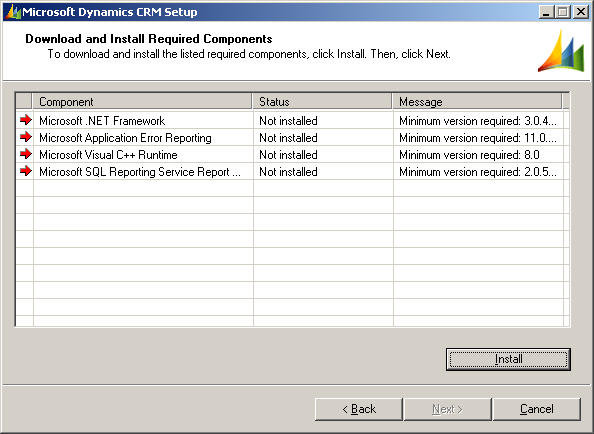
Note: This is compiled from a x86 install. The x64 install mileage may vary.
The file locations are relative to the setupserver.exe.
-
Microsoft .NET Framework
-
Download From: http://go.microsoft.com/fwlink/?LinkId=91338&clcid=1033
-
Location: DOTNETFX\dotnetfx3.exe
-
Microsoft Visual C++ Runtime
-
Download From: http://go.microsoft.com/fwlink/?LinkId=91355&clcid=1033
-
Location: VcRedist\vcredist_x86.exe
-
SQL Reporting Service Report Viewer Control
-
Download From: http://go.microsoft.com/fwlink/?LinkId=91351&clcid=1033
-
Location: ReportViewer\ReportViewer.exe
Note you find this information in the crm40srvsetup.log file in <system drive>:\Documents and Settings\<username>\Application Data\Microsoft\MSCRM\Logs
How to set all your users to use the same email handling methods
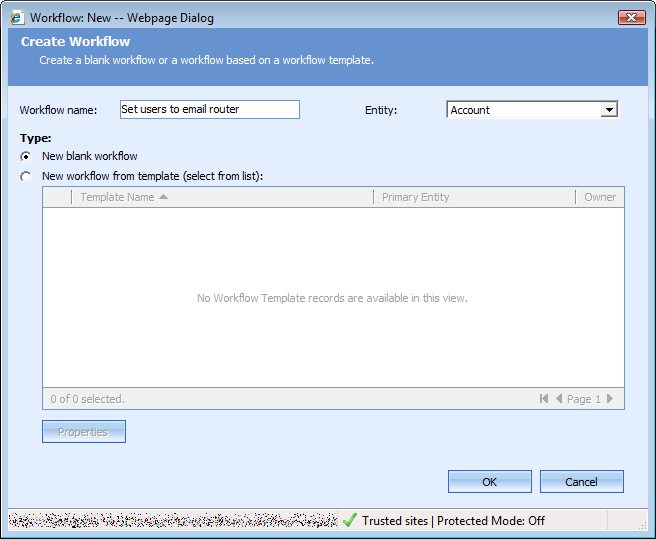
- Step 1: Create a new blank workflow and set the entity to system user (despite my picture). http://www.sadev.co.za/files/user1.png
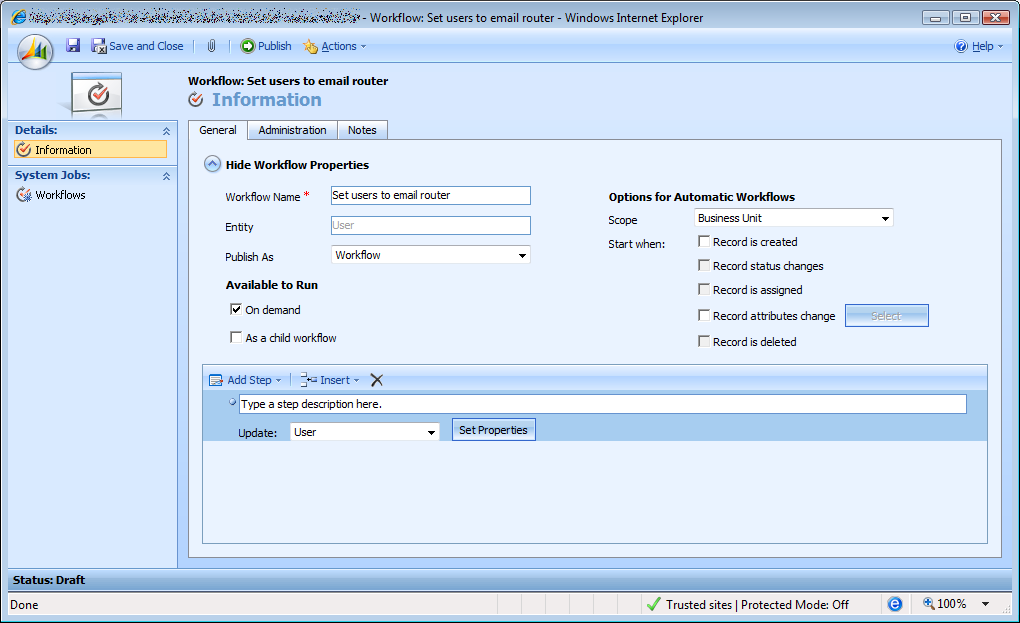
- Step 2: Turn off the automatic options (well maybe, you may want this to run on create so future users also are set right). Click "On Demand" under available to run. Add a step to update the user. http://www.sadev.co.za/files/user2.png
- Step 3: Click the set properties and update the "Email Access Configuration" to your preferred method. http://www.sadev.co.za/files/user3.png
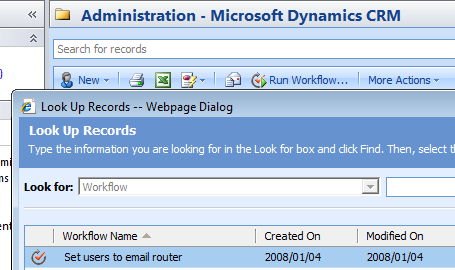
- Step 4: Save your work flow and now click the "Run Workflow" button on the user list and select your workflow and click OK. http://www.sadev.co.za/files/user4.png