
Visual Studio Extension Guide
Version: 1 – Feb 26 2013 – Current Count: 24
This page is meant to provide a one stop shop for the Visual Studio Extensions that are available for Visual Studio 2012. Included here will be only extensions from Microsoft that are available on the Visual Studio Gallery. Some maybe betas, CTPs etc… If you think I have missed any please contact me!
 Bing Maps SDK for Windows Store apps
- Bing Maps controls that provide mapping experiences for Windows Store apps.
- More information
- Download
 Color Printing
- This extension adds the capability for Visual Studio 2010 to print code files in color.
- More information
- Download
 EnterpriseLibrary.Config
- Launches the Microsoft Enterprise Library Configuration Console
- More information
- Download
 GAT 2010 for Visual Studio 2012
- The Guidance Automation Toolkit (GAT) is a Visual Studio extension that helps build guidance packages, which empower software teams to automate key development tasks (like custom templates, wizards, and code generation) inside Visual Studio.
- More information
- Download
 GAX 2010 For Visual Studio 2012
- The Guidance Automation Extensions (GAX) enables Visual Studio to run guidance packages, such as those included in Software Factories, which empower software teams to automate key development tasks inside Visual Studio.
- More information
- Download
 Highlight all occurrences of selected word
- This extends the editor to highlight all occurrences of a selected word and place a glyph on the left margin (VS2012 version).
- More information
- Download
 HTML Spell Checker
- ASP.NET/HTML Spell Checker extension
- More information
- Download
 LightSwitch Cosmopolitan Shell and Theme
- A LightSwitch shell and theme with modern and clean UI, inspired by the Silverlight Cosmopolitan theme.
- More information
- Download
 LightSwitch Metro Theme
- A contemporary theme for Visual Studio LightSwitch applications.
- More information
- Download
Microsoft ASP.NET Scaffolding
- Adds the Visual Studio user interface elements required for scaffolding.
- More information
- Download
Microsoft Parallel Visualization Pack
- A set of visualizers that allow users to view graphical representations of the data in the Parallel Watch Window.
- More information
- Download
Microsoft PlayReady Client SDK for Windows Store apps
- Microsoft PlayReady Client SDK for Windows Store apps
- More information
- Download
 Microsoft Visual Studio 2012 Feedback Tool
- Microsoft Visual Studio 2012 Feedback Tool allows users to submit feedback about Microsoft Visual Studio 2012
- More information
- Download
Microsoft Visual Studio 2012 SDK
- The Microsoft Visual Studio 2012 SDK includes project templates, tools, tests, and reference assemblies that are required to build extensions for Visual Studio 2012.
- More information
- Download
Microsoft Visual Studio Team Foundation Server 2012 Build Extensions
- The Team Foundation Server Build Extensions provide the ability to execute Ant or Maven builds from Team Foundation Server and publish the results of the build along with any associated JUnit test results back to Team Foundation Server.
- More information
- Download
Microsoft Visual Studio Team Foundation Server 2012 Update 1 Power Tools
- Power Tools are a set of enhancements, tools, and command-line utilities that increase productivity of Team Foundation Server scenarios.
- More information
- Download
 NuGet Package Manager
- A collection of tools to automate the process of downloading, installing, upgrading, configuring, and removing packages from a VS Project.
- More information
- Download
 PowerCommands for Visual Studio 2010
- PowerCommands 1.0 is a set of useful extensions for the Visual Studio 2010 IDE.
- More information
- Download
 Productivity Power Tools 2012
- A set of extensions to Visual Studio 2012 Professional (and above) which improves developer productivity.
- More information
- Download
Smooth Streaming Client SDK
- Microsoft Smooth Streaming Client SDK for Windows 8
- More information
- Download
 Storyboard Shapes Authoring Tool - RC Version
- This tool helps you make storyboard shapes that can be used with PowerPoint Storyboarding (available with Visual Studio 2012).
- More information
- Download
 Team Foundation Server Integration Tools (March 2012 Release)
- The TFS Integration Tools is a project developed by the Team Foundation Server (TFS) product group and the Visual Studio ALM Rangers to integrate Team Foundation Server with third party systems for migration and synchronization of data.
- More information
- Download
Visual Source Safe Upgrade Tool for Team Foundation Server
- The official upgrade tool to move your Visual Source Safe repositories into Team Foundation Server
- More information
- Download
Visual Studio Tools for Git
- An extension for Team Explorer to provide source control integration for Git. Enables integration with local Git repositories and provides tools to work with remote repositories.
- More information
- Download

Download the timeline in Excel: here.
Download the source code for the tool that I used to produce the HTML & data for this post: here.
Visual Studio 2012 Update Guide
Version: 2 – March 4 2013
This page is meant to provide a one stop shop for the updates that are available for Visual Studio 2012. Included here will be only updates from Microsoft. Some maybe betas, CTPs etc. If you think I have missed any please contact me!
 Visual Studio Update 1
- Released: 26 November 2012
- About: http://blogs.msdn.com/b/somasegar/archive/2012/11/26/visual-studio-2012-update-1-now-available.aspx
- Type: Stand alone installer
- Download: http://www.microsoft.com/visualstudio/eng/downloads#d-visual-studio-2012-update
 Visual Studio Update 2 CTP 4(
 NEW/UPDATED!)
- Released: 4 March 2013
- About: http://blogs.msdn.com/b/bharry/archive/2013/03/04/ctp4-march-of-vs-tfs-2012-update-2-is-available.aspx
- Type: Stand alone installer
- Download: http://go.microsoft.com/fwlink/?LinkId=273878
 Git Tooling for Visual Studio
- Released: 12 February 2013
- About: http://blogs.msdn.com/b/bharry/archive/2013/02/12/update-to-vs-git-tooling.aspx
- Type: Visual Studio Extension
- Download: http://visualstudiogallery.msdn.microsoft.com/abafc7d6-dcaa-40f4-8a5e-d6724bdb980c
 Productivity Power Tools 2012
- Released: 14 February 2013
- About: http://visualstudiogallery.msdn.microsoft.com/3a96a4dc-ba9c-4589-92c5-640e07332afd
- Type: Visual Studio Extension
- Download: http://visualstudiogallery.msdn.microsoft.com/3a96a4dc-ba9c-4589-92c5-640e07332afd
 NuGet
NuGet
- Released: 16 Feb 2013
- About: http://nuget.org
- Type: Visual Studio Extension
- Download: http://visualstudiogallery.msdn.microsoft.com/27077b70-9dad-4c64-adcf-c7cf6bc9970c?SRC=Home
 Web Essentials 2012
- Released: 18 February 2013
- About: http://vswebessentials.com/
- Type: Visual Studio Extension
- Download: http://visualstudiogallery.msdn.microsoft.com/07d54d12-7133-4e15-becb-6f451ea3bea6?SRC=Home
 ASP.NET and Web Tools 2012.2
- Released: 14 February 2013
- About: http://www.asp.net/vnext/overview/fall-2012-update
- Type: Web Platform Installer
- Download: http://go.microsoft.com/fwlink/?LinkID=275131
 Windows Azure SDK for .NET (VS 2012) 1.8.1 - February 2013
- Released: 18 February 2013
- About: http://www.windowsazure.com/en-us/develop/net/#
- Type: Web Platform Installer
- Download: http://www.microsoft.com/web/gallery/install.aspx?appid=VWDOrVs11AzurePack_1_8_1
 Microsoft Office Developer Tools For Visual Studio (NEW/UPDATED!)
- Released: 4 March 2013
- About: http://blogs.msdn.com/b/somasegar/archive/2013/03/04/now-available-office-developer-tools-for-visual-studio-2012.aspx
- Type: Web Platform Installer
- Download: http://aka.ms/OfficeDevToolsForVS2012
 Workflow Manager Tools for Visual Studio 2012
- Released: 4 October 2012
- About: http://msdn.microsoft.com/library/jj193528
- Type: Web Platform Installer
- Download: http://www.microsoft.com/en-za/download/details.aspx?id=35375
 Windows Phone SDK 8.0
- Released: 30 October 2012
- About: http://dev.windowsphone.com/en-us/downloadsdk
- Type: Stand alone installer
- Download: http://go.microsoft.com/fwlink/?LinkId=265772
 SQL Server Data Tools for VS 2012 December Update
- Released: 10 December 2012
- About: http://msdn.microsoft.com/en-us/data/tools.aspx
- Type: Web Platform Installer
- Download: http://www.microsoft.com/web/gallery/install.aspx?appid=SSDTVS2012
 WCF Data Services 5.0 for OData v3
- Released: 17 December 2012
- About: http://www.microsoft.com/en-us/download/details.aspx?id=29306
- Type: Stand alone installer
- Download: http://www.microsoft.com/en-us/download/details.aspx?id=29306
Want more extensions for Visual Studio? Check out the 31 extensions created by Microsoft for Visual Studio 2012 on the Visual Studio Gallery
Timeline (out of date)
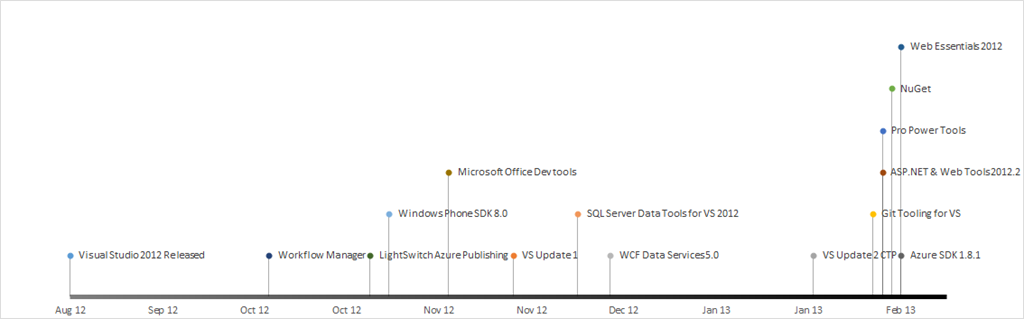
Since I like to visualise these things here is a timeline of the updates:
Is the event log (fast) enough for me?
 In a recent project I was required to come up with a suggestion for logging and while the existing view of using a text file is used by many popular applications and is well understood it felt like re-inventing the wheel.
In the past I have used the great libraries of Enterprise Library or Log4Net to ensure I didn’t need to re-invent the wheel but really only to ever write to a log file. I began to question should I use the Windows Event Log rather, since it offers a lot of other features, especially around the viewer.
The viewer can not only provide a simple view, but offers ordering, filtering, exporting, remote connections (you can open the event logs on other machines), monitoring (through tools like System Center Operations Manager) and forwarding.
The big question for me has always been, can it cope with the load I want to throw at it? So to test this I wrote a small application, which is available for you to grab or comment on at Bitbucket. The application spins up a few threads (on my machine 4 is the magic number – above that there is no major improvements) and just writes as much data as quickly as possible to an event log.
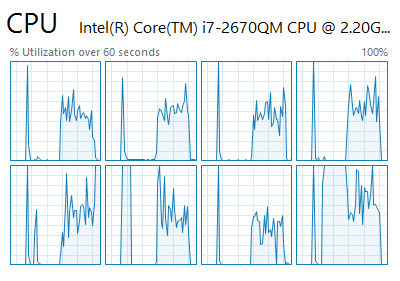
Every time I have run it I have managed to get close to 40 000 writes per second! Monitoring CPU at the time, it averages between 30% to 50%, so not minor load but considering how much is happening, understandable.

There isn’t much I have that needs that sort of speed, and if I do there is ETW, so help me chant DEATH TO THE TEXT FILE, LONG LIVE THE EVENT LOG!
Free one hour async training!
Join me on Feb 6th as I present a one hour session on the new async feature of .NET 4.5. You can expect the full run through of how to use it, limitations and pitfalls. Since many people aren’t able to move to .NET 4.5 yet, I will also be covering what you should be doing now to make sure that you can easily take advantage of it in the future.
Async allows you to write code that runs across multiple threads in intelligent ways without the pains commonly associated with it!
- Date: Feb 6th 2013
- Time: 9am to 10am (South African time - so GMT +2)
- Where: Available over YouTube
- Audience: Anyone with .NET experience
Thanks and I hope to see your (virtually) on the 6th! Please follow me on Twitter for updates and links for this session!
Dealing with off by x issues when using the TextBox
Introduction
One of the toughest problems I faced when I built Notepad Classic was an issue where many functions like Go To & Find were always off a few characters. After a bit of experimenting I noticed a pattern, it was off by the number of characters equal to the line number (0 based).
i.e.: no issues on the first line (line index 0); Off by one on the second line (line index 1); Off by two on the third line (line index 2); Off by three on the forth line etc…
Problem
It turned out that the way the string functions count a line break (i.e. \r\n) as two characters, and rightly so – it is two characters a \r & a \n. However the TextBox functions like Select treat \r\n as a single character because that is what is displayed visually – a line break is one character visually. So there is a difference between the two scenarios and thus the “off by one x line count” error I found.
Solution
The solution I used is to compensate for it by working out the number of lines to the point (i.e. count all the line breaks before the point) and adjusting the results (adding +1 for each \r\n) as needed.
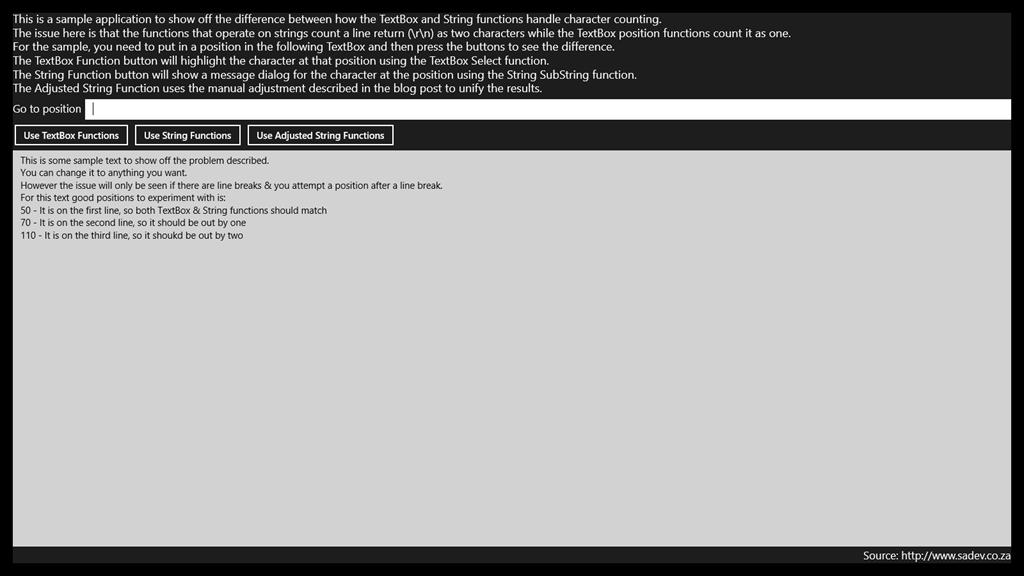
Sample application to show this problem and the solution can be found at: https://bitbucket.org/rmaclean/off-by-one-x-sample-code
How to update git-tf?
I love Git – it lets me work the way I want and where ever I may be. I love TFS – it has everything companies need for development projects. This is why I love Git-tf, it gives me git but with all the professional tooling from TFS serious development needs. However I have found that upgrading Git-tf isn’t obvious and in fact you may get it wrong without knowing!
I was doing it wrong
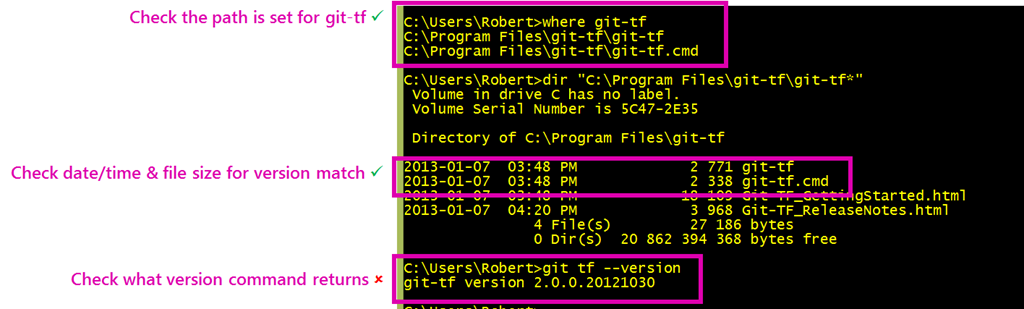
Since it is just a file copy deploy (i.e. drop files in a folder), I had assumed that you could just do a file replace of those files when a new version – however I noticed recently the version numbers after an “upgrade” didn’t match up.
Solution
The solution is to delete all the files in the folder FIRST – then you copy the files into that folder. Once you do that it just works!
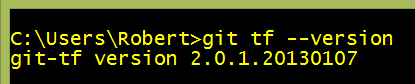
It is odd to me, but it works and that is what matters.
Special thanks to Richard Banks for pointing out this solution to me 
MVP Award Time Again
 January first - most people celebrate the ability of gravity working for another year and other physics related awesomeness at midnight however for 943 people they get a special celebration at about 5pm (SAST) when they are told they are MVPs.
For the forth time I have been honoured to be placed into that special group by being award a MVP for ALM.
Thank you to everyone who has been a part of helping me gain this award for the work I did in 2012!
NDepend + Windows Store apps = WINNING
I <3 NDepend, it is an amazingly powerful tool that is brutally honest & unforgiving, and the rewards it brings are massive. Building Windows Store apps without it has always worried me – how do I know if this is going right? Thankfully yesterday the NDepend team released 4.1 which includes support for Windows Store apps, which includes the ability to analyse the .winmd files too!
This not only means I have personal benefits, but it is a sign of something too. NDepend really is cutting edge, and so the sign that they professional tools are arriving for Windows Store apps really shows commitment from the community to the platform! This means it will get easier and better to develop Windows Store apps in the future!
You can download a trial of NDepend at http://www.ndepend.com/NDependDownload.aspx
Twitter Pro-trick: Refer to companies by stock codes
Twitter is filled with awesome little tricks, and I recently found a very cool one for referring to companies on Twitter. First though, lets see the existing two ways to refer to a company. First you can use the companies Twitter name for example:
I work for @bbdsoftware :)
— Robert MacLean (@rmaclean) November 29, 2012
Or your other option is to use a hashtag
So what is the new awesome trick? If the company has a stock ticker code, for example Microsoft has MSFT & Nokia has NOK then you can prefix that with $ on Twitter, i.e. $MSFT & $NOK.My mother is a happy #Bing user
— Robert MacLean (@rmaclean) November 29, 2012
I am hoping for a $NOK Lumia 920 phone :)
— Robert MacLean (@rmaclean) November 29, 2012
On the Twitter site you will note that $NOK is now a link to a search for all $NOK related items (it doesn't work on the embedded Tweet), which in many cases (like Nokia) can save you a little bit of text. For people monitoring companies social network this is also important as it is an another thing they need to monitor!
This feature is called a CTAG (maybe it isn’t - but that is the the source on the search).
Presenting on Windows 8 - Pro tip

This tip is aimed at presenting, but is just as useful to those who want to focus in Windows 8 without distractions!
Windows 8 is a great operating system to use, especially the background tasks system that ensures other applications are not destroying your CPU & memory. However, there is a downside to background tasks!
Previously, if I wanted to ensure no annoying Skype popups (during my talks for example) I just shutdown Skype and no popups could occur, but in Windows 8, since the application isn’t running, how do we stop the popups?
It is a simple solution, bring up the settings charm (see image on left) and in the bottom right hand corner is an option called Notifications. If you tap that, you will get options to block notifications for 1, 3 or 8 hours.
I am tending towards 3 hours for my 1 hour talks to allow for setup, clean-up etc.
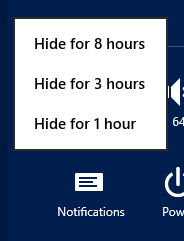
Once you have disabled it, the icon will change to show you it is disabled! If you want them back, for example when you are finished, then you can tap the icon again to enable them!

What is great is that live tiles & the background tasks still occur, just no popups anymore.