
Rapid Business Development: Lightswitch vs. Dynamics CRM vs. SharePoint 2010 vs. ASP.NET MVC 3
In this post I am going to look at comparing four technologies that can be used to build business applications easily. This post was inspired by how similar a number of products have become over the last few years and more importantly how the new kid on the block Visual Studio Lightswitch, which is a specialised rapid business tool development platform built on top of Visual Studio, is going to affect this eco-system. It is important to also remember that this is being written in the Lightswitch Beta 2 timeframe, so some details may change by launch.
Lightswitch feels very similar to me, to another product I have worked with in the past: Dynamics CRM, which is a Customer Relationship Management tool from Microsoft. CRM does very well in the xRM (x = extensible) scenario, where I think it will come up against Lightswitch a lot. I haven’t had an opportunity to use the latest CRM release yet, so I have had to rely on the help of experts to fill in my gaps!
SharePoint 2010 is another product I have worked with, can of course be used for building business applications quickly cause it is the “operating system of the enterprise” and has good features for these types of applications.
Finally, while watching Scott Hanselman do the ASP.NET MVC 3 demo in the MIX 11 Keynote, I was struck with how that is very close to a rapid business user development tool with all the new scaffolding features. ASP.NET MVC is a real outsider in this group because it is first a development toolset for web development and, maybe a rapid tool second where the rest are rapid development platforms or tools first.
I think the differences between these four are very interesting and while each has it’s strong & weak points, this should definitely not be looked at as a pick one only post. There are many scenarios where you want to combine them for even better experiences.
I have broken down the issues into twenty one(!) aspects (key points we can compare them against each other) which are grouped into six scenarios to make it easier to digest. Each scenario starts with a list of the aspects and a brief description followed by a comparison table of those aspects.
Starting
- Ready to go out of the box: Once installed, can it do anything? Seems silly, but quick turn around at the start, even if actual development is longer is important as it helps with prototyping, shows some rapid development and hints at how hard it is to learn (for me at least, if it does something I find I can experiment and learn quickly). Important to note, we are not looking at making it align with your company needs here, we just want it to do something. Eating CPU cycles & RAM is not something either.
- Northwind Style Sample development costs: This aspect looks further than the above aspect and looks at how much more would it take to get it tailored for a company, like the fictional Northwind, to have a XRM type system as it can be done across all four. Fewer $ signs means less time and/or resources for the functionality.
| Lightswitch (LS) | Dynamics CRM | SharePoint 2010 (SP) | ASP.NET MVC | My Thoughts | |
| Ready to go out of the box | Fast | Fastest | Fast | Slowest | LS & MVC need development, while SP needs at least 5min of tailoring. CRM, is ready to go once installed. |
| Northwind Style Sample development costs | $ | $$ | $$ | $$$ | ASP.NET MVC has the highest development costs as so little is out of the box. Lightswitch excels in this scenario. |
Finishing
- Cost for on-premise deployments: This looks at the money cost for licensing to get the solution up and running on premise (i.e. in your company). Licensing is, of course, flexible and this will vary based on who you are – so this is not indicative for all. It does not include such things as server hardware or common costs, for example operating system licensing.
- Deployment Complexity: Getting a solution up and running shouldn’t be difficult for an organisation and a lot of time can be lost (and costs incurred) changing, upgrading and troubleshooting systems that do not want to be deployed.
- Deployment Documentation: When it happens that you need to deploy, having a wealth of documentation (be that video’s, best practice guides, troubleshooting material) is vital and plays a large part in getting a solution up that works every time.
| Lightswitch (LS) | Dynamics CRM | SharePoint 2010 (SP) | ASP.NET MVC | My Thoughts | |
| Cost for on premise deployments | $$$ Unknown. Likely cost per developer seat. No per user costs. | $ to $$$ Cost per user & cost per server. Visual Studio only if you are doing integrations or custom workflows. | $$$$ to $$$$+ Cost per user & cost per server. Visual Studio licenses for any serious work. | $$ Visual Studio licenses.No per user costs. | CRM on the small scale with low development is very cheap but since you pay per user can get expensive. LS & MVC only have development software costs, which is more expensive up front but do not increase as you add users to the system. |
| Deployment Complexity | Medium | Hard | Hardest | Easy | LS, CRM & SP all have requirements that they need to work, in increasing deployment complexity, but CRM & SP are significantly harder than LS though due to their more complete product nature. MVC is easy because there is no constraints from it (other than a web server). |
| Deployment Documentation | Yes | Yes | Yes | No | Only MVC has no official documentation, which makes sense as it is a development tool. All four have GREAT communities to help as well! |
User Experience
- Front End Technology: A good looking, feature rich UI can seriously ease adoption, and what we are looking at here is the richness level of technology used for the out of the box front end user interface.
- How good the standard UI looks: Completely subjective and really this is based on what I think looks best.
- Flexibility of out of box front end: In this aspect we are concerned about how easy it is to adjust and tweak the out of the box front end.
- Themability : Corporate branding is massive business and making sure the application out of the box looks like it is part of your business is important. It is important to note that both CRM & SharePoint can have custom front ends built which enable this scenario, but that requires extra development, and we are focusing on the out of the box options here and assuming you have the theme built already.
| Lightswitch (LS) | Dynamics CRM | SharePoint 2010 (SP) | ASP.NET MVC | My Thoughts | |
| Front End Technology | Silverlight. Supports out of browser (desktop) & in browser | Web Just ASP.NET | Web ASP.NET under the covers with sprinklings of Silverlight | ASP.NET | LS clearly best here, since it will give the richest UI out of the box. ASP.NET MVC out of the box scaffolding isn’t pretty but can easily be improved. |
| How good the standard UI looks (very subjective) | Low | Medium | Very. Low | Depends on your web designer | This is the most subjective aspect: LS & SP both have a fairly plain out of the box UI but SP has a bad UX to go with it. CRM is much better out of the box and if you are going down the MVC route you will likely be taking advantage of the best UI thanks to the complete flexibility – but that depends on how good your designers are. |
| Flexibility of UI development in the tool | High | Medium | Medium | High | MVC & LS can almost do anything on the front end, especially if you combined MVC with Silverlight. SharePoint & CRM too have lots of options and work with Silverlight. |
| Themability | Medium | Low | Medium | High | The flexibility of MVC is highest as it is a pure programming, with LS following up thanks to it’s strong theme support. SharePoint can be themed but not the same level as LS. CRM will always look like CRM! |
Extensibility
- API for integration: In the short term having an API means it is easy to get data into your new solution, in the medium term it means more ways to sync data and mash up your systems and in the long term it gives you a way to get your data out. It is vital to have an API.
- Marketplace: Apple kicked the idea of having an AppStore into reality for many of us and now having a marketplace to get extensions, customisations or themes is an important aspect. I am ignoring public sites, like Codeplex for example, and only focusing on an official marketplaces. Galleries are just marketplaces with no vetting, which means they are bigger but the quality bar is not guaranteed.
- Additional Authentication Options: Only your employees or customers (which may be everyone if you are lucky enough) should access your solutions. What do we get out of the box to limit access to the system? All four systems support Windows & Forms based authentication so I am only listing other options which are available.
- Permission Structure (Authorisation): Being able to control what parts of a solution you can access, once you have logged in is also vital and having a lot of flexibility in this space is also important as very seldom will one structure work for everyone.
| Lightswitch (LS) | Dynamics CRM | SharePoint 2010 (SP) | ASP.NET MVC | My Thoughts | |
| API for integration | Yes | Yes | Yes - at least 5 of them. | N/A | In MVC you could build one, oData for instance, but it doesn’t have one out of the box. LS creates a WCF RIA Service for us. CRM & SP both have API’s, but SP is more complex as it supports so many different API’s with different subsets of features supported. |
| Marketplace | Once it is released a gallery will exist. | Yes | Nope | Gallery available | CRM leads here in a big way with a REAL marketplace. ASP.NET MVC has it’s own gallery plus a strong 3rd party marketplace ecosystem. |
| Additional Authentication Options | Anonymous and more available through custom development (e.g. Windows Live). Claims based authentication(custom development required). | Claims based authentication via STS | Anonymous and more available through custom development (e.g. Windows Live). Claims based authentication(custom development required). | Anonymous and more available through custom development (e.g. Windows Live). Claims based authentication(custom development required). | |
| Permission Structure (Authorisation) | Very basic and really just a half a step ahead of editing XML that MVC needs. | Fantastic out of the box option, plus plenty of extensibility if needed. | Good structure with many levels of customisation. Out of the box is very simple. | Basic support for it but can be extended through development. A lot of XML work though may be needed. | LS & MVC are the lightest here, both supports authorisation options but enforcing it is up to the developer to implement. LS is better slightly better at guiding the developer and needs no XML editing. SP authorisation is as varied & powerful as what CRM offers. However SP can easily get messy, users can break permission inheritance, while CRM enforces authorisation all the time and makes for a better structured environment. |
Information Worker Features
- Offline support: Being able to work when you are not in the office is a vital need for many people. So how do these platforms enable that scenario. In theory it is always possible to build this, so we are just looking at the out of box offering.
- Easily Import Data: How do we get information into the solution, besides the API? Does the product make this easy with out of the box tooling?
- Printing: Despite the promise of a paperless office, it still is not the case and being able to print is important, even if it is just to XPS or PDF for invoicing.
- Office Integration: Integration into Microsoft Office products (i.e. Word, Excel, Outlook, PowerPoint, Access, Publisher, InfoPath & OneNote) means that your IW’s will be able to work in the tools that they are comfortable with, easing adoption and productivity.
| Lightswitch (LS) | Dynamics CRM | SharePoint 2010 (SP) | ASP.NET MVC | My Thoughts | |
| Offline support | No | Yes | Yes | No | Being able to work offline is important if you are a roaming user. LS & MVC offer nothing in this space while CRM & SP both offer offline via Outlook. |
| Easily Import Data (out of the box) | Nope | Yes, from CVS. | Yes. Multiple options. | Nope | In all cases there are tools and other ways to import data but CRM & SP have an out of the box options. |
| Printing (out of the box) | Nope | Yes | Yes – Poor | Browser Level | LS & MVC can have custom development solutions for printing, other than that they both offer nothing out of the box. As browser printing has improved MVC has a slight advantage being HTML based normally. SP has printing, but it is very poor. CRM leads the way here with a great print scenario. |
| Office Integration | Low One way export to Excel. Others can be custom developed | Medium One way to Excel. Mail merge with Word & Outlook. Deep integration with Outlook is available too. | High Only Publisher doesn’t have some integration with SharePoint. Every other Office product does, some like Excel are one way while others like Access are two way. SP internally has features that understand Office files too, for example PowerPoint Libraries show thumbnails. | None Can be custom developed. |
Other
- Databases Supported: Where the data can come from for your application is a critical piece of the puzzle because it means the difference between building ETL solutions to handle moving it around if the source is supported or having it just work.
- Minimum Skills For Tailoring: Tailoring is what I refer to when I think of customisation of a system, without the need for a programming language. At some point you will need a developer but how far away that is and what can be done by a analyst or super user early on is important from a time to solution and cost perspective. Lower is better here.
- Can run in the cloud?: If you not thinking about how you can leverage the cloud, then you are not thinking. Making sure the solutions can cater for the cloud is an important consideration. All four solutions can run in the cloud but how do they run is also important
- ALM Experience: How does this tool work with a full ALM experience? Can I unit test it easily? Will it go into source control easily and what happens when multiple developers are updating the same files? How about build server and development tool integration? All important questions in understanding a complete picture of that these tools cost or what you sacrfice with some of them.
- Requires Silverlight: Despite decent market penetration and ease of deployment in corporate scenarios, the requirement for Silverlight can be a deterrent to business, especially those where the CEO uses an iPad2
 . This is not answered in the table as only Lightswitch requires Silverlight. CRM has no dependencies, SharePoint has a fall back mode and if you used Silverlight with MVC it would be possible to have a fallback mode, provided you developed it.
 - Data performance: This is also not in the table since it only applies to Lightswitch. For CRM, MVC & SharePoint I assume your front end (web) is always close enough, for example the same LAN, to the database but in Lightswitch you can really separate them. Here it is important to note Lightswitch is NOT great with data performance between backend & frontend. It sends massive amounts of data around. In my view it really does not feel optimised for WAN scenarios.
| Lightswitch (LS) | Dynamics CRM | SharePoint 2010 (SP) | ASP.NET MVC | My Thoughts | |
| Databases Supported | SQL Server, SQL Azure, SharePoint or anything supported by WCF RIA services. | SQL Server | SQL Server normally. With advanced skills can use external data sources. | For scaffolding anything supported by LinqToSQL or Entity Framework. | LS & MVC feel very close here, however LS has it’s own OM which MVC uses established ones meaning more options in the MVC camp. |
| Minimum Skills For Tailoring | Intermediate | Lowest | Low | Highest | Being able to tailor with less skill is a big plus for CRM & SP. MVC doesn’t have tailoring as it is all development. LS really stuck in the middle ground here – for setting it up I suspect nothing more than power user but that ends much sooner and moves to needed a developer than with CRM and SharePoint. |
| Can run in the cloud? | Platform as a service using SQL Azure for database & compute instances for front end. | Software as a service: Can get it from Microsoft & Partners at a cost per user per month. | Software as a service: Can get it from Microsoft & Partners at a cost per user per month. Recently launched in beta with Microsoft. | Platform as a service using SQL Azure for database & compute instances for front end. | |
| ALM Experience | Medium | Low | High | Highest | ASP.NET MVC is a pure development experience and so works well with ALM. SP2010 plus VS2010 is a great ALM experience (although mocking is difficult). LS & CRM are oddly very similar with customisations in XML though so expect some source control pain. Plugin’s for CRM and LS Extensions are a great ALM scenario. CRM falls short in the unit testing scenario though. |
Special Thanks
A post this in depth could not have been done without input from my “brain trust”, and I thank each one of you for your help:
- Bruce Nicholson
- Michael o’ Donovan
- Adam Cogan
- Zlatan Dzinic
- George Doubinski (he has an awesome site, just go an admire the work he put in it)
What's new in Microsoft .NET Framework 4 Platform Update 1?
 Microsoft today made me happy & sad all at once! Let’s hit the bad news bit first: (rant start) WTF is a Platform Update? The .NET Framework must be the least logically named thing ever! We have had to endure such inconsistencies major releases be a point difference release (.NET 1.0 vs. .NET 1.1 and again with .NET 3.0 vs. .NET 3.5) while other times major releases are major number differences (.NET 2.0 & .NET 4 come to mind), we've had service packs be patch updates until .NET 3.5 SP 1 which included MASSIVE new functionality and had finally .NET 4 dropped the .0 after the 4 (see how many Microsoft staff mess this up still), in contrast to every release before it! There is zero logic or pattern in this naming, which just adds to MASSIVE customer confusion. Today we are introduced to a Platform Update, and not just PU (like Poo or Pooh) but PU1… that implies more is coming… so WTF is it? Rant over, promise.
It is NOT the new name for bug fixes, the PU is in fact the best news for Workflow Foundation people as it includes some seriously powerful new features.
 We finally get a complete state machine in WF (dance):
- Entry and exit actions for a state
- Conditional and default transitions that have transition actions
- Scoped variables for a state machine
- Improved tracking support
I know this was available on Codeplex for a while (and there is still other good stuff on there for WF not included in this), but this is just awesome to get it officially as this implies to customers a seriousness & support that having on Codeplex does not.
I would be happy if it was just that but they have ALSO given us the ability to use SQL Azure as a store for WF instances!!
This is HUGE!!
Just imagine storing a workflow in the cloud until you need it later? Ideas for roaming devices, workflows that span across devices and, naturally, better usage of worker instances in the cloud themselves all are opened up by this.
Lastly (and least-ly for me) they add the CompensationExtension class, which is used if you are creating your own host and wish to enable support for compensations in workflows. Not a big deal for me, but this could bring new features into my favourite host AppFabric, but we will need to see if that happens in the future.
The update comes in three parts:
- The runtime update. You need this to do development & you need to install this on machines that make use of the new features. You can get the update at KB2478063.
- The multi-targeting update allows Visual Studio to give you the option for this in VS as a drop down (see below) you can get this from KB2495638.
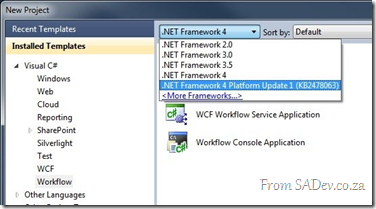
- The designer update, which does include both of the above and provides all the bits needed to make use of the new features in VS. You can get it from KB2495593

So what you waiting for?! Go and get your workflow on!
Lightswitch beta - No more files bug
 If you are working with the Visual Studio Lightswitch beta and you hit F5, you may sometimes get the USELESS error “There are no more files”.
This will appear shortly after an explorer dialog opens up showing you files. I like to think this is LS way of mocking me: “look files, now there are no more files. hahahaha”
The cause of this you have edited code and something internally gets wonky. Thankfully the workaround is just open a screen or data source and hit F5 and it will work again!
I’ve logged a bug on this, so if you have this issue too please head over there and vote on it!
UPDATED! Info below...
Got to love Microsoft, it took 18min and they responded it is a known bug! Details from them how to fix it:
This is a known issue. There is a setting on Tools|Options, Projects and Solutions, Build and Run called 'For new solutions, use the currently selected project as the startup project'. If this option is enabled when you are using a LightSwitch project, you will get the behavior you see.
The problem is that if this option is enabled when the LightSwitch project is created, the project that is associated with the code file will be used for the debugging startup project. For LightSwitch, the root project should always be the startup project.
This option is automatically enabled for the Web and Web Code VS profiles. This option is turned off by default for the General, VB and C# VS profiles.
We have a fix that will be in the RTM release where we will ignore this option when a project is created and we will use the root LightSwitch project as the startup project.
To fix existing projects, you can right click on the root LightSwitch project and select 'Set as Startup Project' in the context menu.
Community Night: BE THERE
 Tomorrow is another community night, and I realised that there is MANY people who do not know about this fun event. This is a gathering of communities (or user groups or interest groups if you prefer) who meet on a regular basis. This is a totally free event which takes place the 2nd Tuesday of every month at Microsoft’s offices in Bryanston.
*Yawn* another Microsoft marketing session? WRONG! This is run by communities and Microsoft has NO say in the content or agenda, unless a community allows them  Microsoft is really trying to help all communities by providing the facilities – not the content!
 To give a concrete example MobiZA, a user group focused on mobile development is doing a session on Android! talk about not Microsoft marketing there!
There is also a variety of communities in a attendance so you can also see things you would not have seen before, for example the business user group or the game developer group! And of course there is plenty of corridors for interesting discussions and some even contain food & drinks!
Hopefully I have given you a taste of what is in store and why you should attend and you can find more details on the DPE team blog.
 Finally, if you have a user group maybe you should think of joining us at community night? Free venue, projectors, seating, food & drink. Plus plenty of people attend, could be a great way to grow your group. I would personally love to see some Linux & PHP groups there because it would allow those who have not had a chance to see the non-Microsoft world an opportunity and hopefully learn that it isn’t so cut & dry out there.
Remember, tomorrow 12th April 2011 @ Microsoft (map to the left) from first sessions kick off at 16:30 and second sessions get started between 17:30 & 18:00!
Trying to get from the sea to the sky: Publishing to Azure via Squid

Microsoft has some awesome guidelines on how to publish directly from Visual Studio to Azure, however if your IT department has installed Squid, the open source proxy server, you may be out of luck as recent versions only support HTTP 1.0 and publishing requires 1.1.
Through some testing with the IT dept at BBD Software we have found that you need to be on Squid 3.1 or later else you are not going to be able to do it automatically*
* You can still publish to a local file, then upload via the Silverlight based admin console, but that is too close to FTP to be cool 
DevDays - The event for Microsoft Developers
 It’s that time of year again, it is DevDays time again which is the premier conference from Microsoft for developers! This year it is a very different beast from previous years:
- Cost: For the second year, you’ll need to pay. This year it is R350 and that is excellent value for the event.
- Cape Town first: It kicks off in Cape Town this year on May 24th and then moves to Johannesburg after that on may 26th!
- Johannesburg new venue: We are at Gallagher Estate this year! Very excited about the venue!
- No Durban

- Hash tag from day one! See complaining to Cliff on Twitter does work so now we can all hash with #DevDaysSA!
- No SharePoint – I can’t remember a DevDays without SharePoint, but we have so many other awesome SharePoint options now (Information Worker, SharePoint Saturdays etc…) it is good to have some balance.
There is three tracks so you may want to brush up on how to pick good sessions (short answer, mine  ) plus their is special slots for student & community sessions which really excites me to see new presenters getting big stage time!
I am also very glad that BBD Software (previously known as BB&D) is a major sponsor this year!
You can signup, get more details and engage on the official site at: http://www.microsoft.com/southafrica/devdays/
Agenda:
- End-to-end software testing with Team Foundation Server and Visual Studio
- Level: 200
Speakers: Ahmed Salijee & Colin Dembovsky
Visual Studio 2010 offers a wide range of software testing capabilities: manual testing, automated UI testing, database testing, low-level unit testing and even performance testing tools capable of simulating thousands of active users. It also provides support for test case management, defect tracking as well as configuring and running your tests in virtual and physical environments. But how do you know which tools to choose for your project? This session will, via a demo scenario, walk you through the various testing capabilities to assist you with the most effective use of Visual Studio 2010's testing capabilities. This session will be useful to developers as well as various tester roles including functional, performance and automation.
- Level: 200
- An end-to-end experience of Windows Phone 7 development
- Level: 200
Speaker: Rudi Grobler
An end-to-end walk through for developing Windows Phone 7 applications using Silverlight
- Level: 200
- Blend: Wiring it all together
- Level: 400
Speaker: Shane Morris
- Level: 400
- A lap around Internet Explorer 9 for web developers
- Level: 200
Speaker: Simon Wilkinson
Internet Explorer 9 adds new support for HTML5, CSS3 and many other new web standards, and this is the place to find out all about them. Not only will we learn about those, but we'll take a dive into the work the engineering team has done to make the browser faster through it's new JavaScript engine, the work they've done to ensure that the same mark-up works across all browsers and how hardware acceleration will make your site run faster, without any changes to your code!
- Level: 200
- Azure: Development from scratch
- Level: 200
Speaker: Gareth Jane
The Windows Azure platform is a flexible cloud-computing platform which allows developers to rapidly create highly scalable software applications. This session will introduce developers to the various services and components of the Windows Azure Platform. We will create a very simple application on this platform, especially focusing on the areas which distinguish development on Azure from traditional application development
- Level: 200
- ASP.NET web development with MVC
- Level: 400
Speaker: Brent Samodien
Join us in this session and discover the new features in ASP.NET MVC3 and what scenarios you can target with it. Learn more about the improved HTML Helpers and the new updates to Controller/Action/Method that make your code cleaner. Also, explore the richer URL routing and URL route mapping. We will also show how you can use alternative View Engines, including Razor.
- Level: 400
- A website's life: From sketch to publishing
- Level: 200
Speaker: Simon Wilkinson
WebMatrix is a new, free, fully featured, easy to install web development tool that helps you build ASP.NET and PHP websites and perform validation, SEO optimization and one-click publishing. My favourite feature however is a new script syntax for ASP.NET called Razor, which will help you create dynamic websites incredibly easily. We will spend some time sketching/wireframing our website, doing visual design work in Expression Design and then experiencing the rich development toolset in WebMatrix.
- Level: 200
- Let's get ready for the cloud: Building your applications so they
are cloud ready- Level: 400
Speaker: Robert MacLean
In a world where you hear people talking about the cloud, here are some guidelines on how to start building and structuring applications that will be easy to migrate to the Azure platform.
- Level: 400
- Code First in entity framework
- Level: 200
Speaker: Brent Samodien
Code First has been a great success with customers, and in this talk, we'll take a deep dive into how it works and talk about its upcoming RTM (Q1 2011). You'll see how Code First uses convention over configuration to improve developer productivity. Its flexibility allows for either automatic database provisioning or the ability to work with an existing database. We'll be demoing features beyond the initial RTM, such as Migrations support, and we'll also talk about the roadmap for Code First going forward
- Level: 200
- Silverlight 5: The Future
- Level: 200
Speaker: Shane Morris
- Level: 200
- Exploring Windows Azure storage
- Level: 400
Speaker: Gary Hope
Examine each of the foundation storage capabilities of Windows Azure, Blobs, Tables and Queues. Discover how to create storage accounts; upload and retrieve blobs and blob metadata; create, update and query tables; and create a simple service that uses a message queue for communication
- Level: 400
- LightSwitch basics: Building your first LightSwitch application
- Level: 200
Speaker: Robert MacLean
Visual Studio LightSwitch is the simplest way to build business applications for the desktop and cloud. LightSwitch simplifies the development process by letting you concentrate on the business logic, while LightSwitch handles the common tasks for you. In this demo-heavy session, you will see, end to end, how to build and deploy a data-centric business application using LightSwitch. After that you will discover what is under the hood to better understand the architecture of a LightSwitch application. Finally you will learn how you can use Visual Studio 2010 Professional and Expression Blend 4 to customize and extend its UI and Data layers for when the application's requirements grow beyond what is supported by default
- Level: 200
- Kung Fu Silverlight: Tips and architectural patterns and practices
- Level: 400
Speaker: Dave Russell
Learn about the rewards of using RIA Services together with development patterns, such as the Service Providers, Single Responsibility pattern, Commanding, user Interactions, Messaging, ChildWindows, Design Time Data, Testing, and developing using Model-View/View- Model (MVVM) pattern, to build Silverlight and Windows Phone apps. Hear the top tips you need to know for building data driven Silverlight apps that solve real world problems.
- Level: 400
Social everywhere doesn't work


Not being on a social network is like having a company which doesn’t appear in your favourite search engine - it is just a requirement of being online in our era and for a long time I have tried to get to the utopian world of an integrated social experience where everyone was everywhere and my updates, posts, pictures etc… trickled across all social networks, so no matter what you did you could hear what I had to say or was doing etc…
This was a stupid idea and I thought I would share my learning’s about that process.
Problem 1 – He with the most friends wins
With Facebook I feel into the trap of accepting every friend request, loading my address book into it and basically any other “tricks” I could to increase my friend count. This meant that logging on to Facebook was a stream of conscience from people I really didn’t care about and so overtime I moved away from Facebook as the value I took out of it was low.
The solution to this was to create a set of guides for people to be my friends on Facebook. I am not going to cover all of them, I’ll just focus on two of them but I had about 5 or 6 which I use to decide who to keep or accept requests from:
- Time span rule – if I have seen you or had more than a Christmas email for 5 years or more, you are out.
- Override – I can keep anyone for any reason breaking any other rule

Using my rule set I trimmed from over 300 friends to less than 90 and Facebook is now a daily visit site because I do care about the thoughts of those 90 people.
Summary: Be very selective of who you follow on your social networks.
Problem 2 – The right tool for the the right job
 One of the problems with Facebook friends, is that many of the those people were “frendors” or people who I just saw in the passages at work. Facebook isn’t meant for great communication around work however there is better choices for them:
- LinkedIn – This is great for business partners, frendors, business contacts and key direct co-workers. This ensures that the value of the conversation is higher because it is more business focused and people do care deeply about their careers on there.
- Yammer – This is for people I work with, regardless of anything else. This is also great because it is a walled garden so we can have those private conversations that are company/team specific.
- Twitter – We met at an event, you want to hear from me or want me to hear from you but we don’t care about much else Twitter makes a great place to put people while I evaluate their value and should I try and add them to other networks. Many people start off here and move to the others.
Sure there are a few people who are on more than one network, but those are exceptions to the rule. Most people end up in one place.
Summary: Facebook for friends & family, LinkedIn for your professional career, Yammer for co-workers & Twitter for all else.
Problem 3 – Auto post is not your friend
I personally spend more time in Twitter than any other network, and I eventually had it setup that every tweet went to Facebook & LinkedIn too. The problem is Twitter is really unfiltered and I do post a lot of jokes or half baked ideas which detract from my professional value on LinkedIn or are so technical that my friends & family on Facebook scratched their heads with confusion.
Thankfully this can be fixed: Don’t auto post. LinkedIn supports this with a setting you must enable, Yammer does this by default and for Facebook don’t use the standard Twitter app rather use the Selective Tweets app. All these require you tag a tweet with a special tag, for it to auto post, i.e. Facebook it is #fb, Yammer is #yam & LinkedIn is #li
So if I post something on Twitter and want it on Yammer & LinkedIn I append the tags and it is on all three networks but not on Facebook!
Summary: Post selectively to the right social networks.
Introducing BBD
 Any day I open my email and see an email from Peter Searle (the BIG boss at BBD, where I work) in there, I wonder if a trip to HR is in my near future
  , today though is something far more awesome and rather that tell you myself I thought I would share Peter’s words because it is just fantastic:
More than 25 years ago Barone, Budge and Dominick, also known as BB&D, was begun by a group of people dedicated to delivering software solutions to clients. Initially, the work was done in an attic, and those people were Sandra Barone, Tom Budge and Ralf Dominick.
The current corporate identity was created in the eighties with the founding of the company.
BB&D now employs more than 400 software professionals. We are South Africa’s largest independent custom software development company, and we serve customers in both South Africa and internationally.
In moving forward, we will never forget where we’ve come from. On the contrary, we will even further imprint the attitudes and values that have made BB&D what it is today.
We are taking the core values, achievements and expectations that have become so entrenched into the company’s make-up and are transitioning them into a fresh new identity that resonates with the next generation of the new BBD.
We are now BBD. And our brand line is – combined intelligence.
BBD work together with our clients, sharing knowledge and ensuring we can deliver solutions that improve their business. This meeting of minds, connecting and building on each other’s brilliance enables us to design solutions for them that mark the way forward.
In essence, we are more than the simple sum of our parts. Our combined intelligence is the greater whole.
Very proud to be a BBDer 
Install Tailspin Travel on Windows 7 SP1
 If you try and install the tailspin travel demo on Windows 7 with service pack 1 , it will fail saying the operating system is not supported
Thankfully this is easy to fix, in the C:\TailspinTravel\assets folder is a Dependencies.dep file. Open that in notepad (or text editor of your choice) and navigate to the <os> element. Note the buildNumber attribute is set to: 7000;7100;7600
All you need to so is change it to: 7000;7100;7600;7601
As in the screenshot above, now save and rerun setup and you will succeed!
How to attach to process before the application even starts?
There is many ways to do debugging in Visual Studio, normally you just hit F5, compile & run the code with debugging. However sometimes you need to debug an executable you have already built or debug on another machine. I have mentioned this previously you can use the Attach to Process option to do debug MSCRM assemblies that exist on other machines and/or run by a executable you do not control.
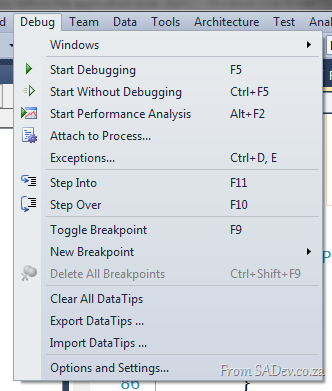
This works great but recently I had an issue where the application would start and (silently) die within seconds, but only in test (never in dev). It just happened so quickly that I could not attach the debugger in time. So how can you debug that scenario?
Thankfully this is very easy, just go to your Visual Studio project settings and switch the Start Action to Start External Program, set the path to the executable and then hit F5!
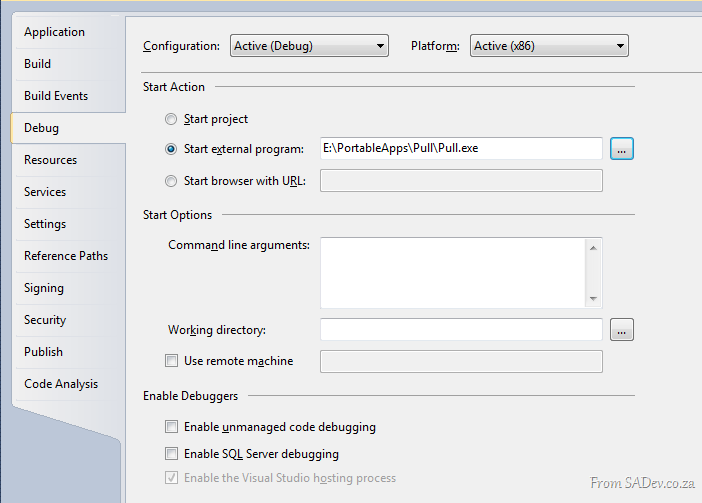
What this will do is start the executable, attach the debugger and work with your code all for you – so no more racing against the attach to debugger options 