
Installing MSMQ in Domain Mode on Windows Server 2008
Yesterday I needed to install MSMQ on my laptop which runs Windows Server 2008, which wasn’t as logical as it first appeared. I simply fired up the Server Manager tool, went to features, selected Message Queuing and clicked next. However my code kept giving me an error: “This operation is not supported for Message Queuing installed in workgroup mode.”
So I went to find out what this mean, and it turns out MSMQ has two modes workgroup and domain. Domain is the “yes you can” mode where everything works while workgroup has restrictions:
The following restrictions exist when using Message Queuing in workgroup mode:
- Computers in workgroup mode require direct connectivity with a destination computer, and only support direct message transmission. Messages sent by such computers cannot be routed.
- There is no access to Active Directory Domain Services. As such, you can create and manage private queues only on a local computer. You can view the list of private queues on another computer, and the messages in them, using the Computer Management snap-in. For information about managing queues on remote computers, see Verwalten von Warteschlangen auf anderen Computern. You cannot view or manage public queues or any other information in Active Directory Domain Services. You can, however, send messages to or retrieve messages from private queues if there is direct connectivity.
- Internal certificates cannot be used for sending authenticated messages; an external certificate must be used. For more information about user certificates, see User Certificates.
- Messages cannot be encrypted. For more information about encryption, see Encryption for Message Queuing.
- There is no support for dependent clients. For more information about restrictions on the deployment of dependent clients, see Dependent Clients.
- Cross-platform messaging is not supported. For more information, see Cross-Platform Messaging.
That is taken from the helpful TechNet page Deploying in Workgroup Mode, which also states:
The default installation setting is that the directory service Integration feature is installed
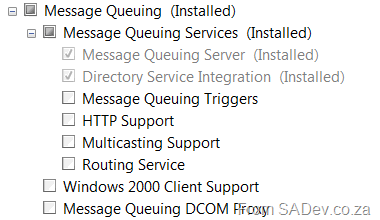
Oddly enough though that is NOT what I got, in fact when I went to check Directory Service Integration had not been installed even though I am on a domain (and was connected to the network at the time)! To fix it, I had to go back to the Server Manager Tool, Features, Message Queuing and manually select it.
TFS Branching Guidance is Out
Very late notice from me (been sitting in my inbox for 2 weeks) but the TFS branching guidance is now out on CodePlex: http://dotnet.org.za/willy/archive/2008/12/20/vsts-branching-guidance-ii-a-great-guidance-release.aspx
Interesting it’s the 25th highest download on CodePlex at the moment too! Guess it shows that it isn’t just me and Ryan spending a lot of time trying to figure out the perfect strategy!
.NET 3.5 SP 1 GDR is Out
The .NET 3.5 SP 1 GDR (General Distribution Release), basically the patch for the bugs in .NET 3.5 SP 1, is now out! Details of the patch are/will be available at KB959209
The Cat(.NET) is out of the bag
Those who know me as a developer, and those who attended the boot camp I ran for the last two weeks, have an idea that I like analysis tools (in the boot camp I present a session on my favorite 7 tools, 3 of them are analysis tools). That said I have been following a team at Microsoft for ages who have been building a tool called CAT.NET, which is another static analysis tool. This one focuses on analyzing code for security issues. I looks good, but it really doesn’t blow me away.
What’s the first thing you do when you get a new tool? Run it against your own code and then the Microsoft code ;) No where could I get this code to ever give me a security issue – which is either a good or bad thing. When it’s done it provides a report in HTML and XML which is boring as hell:
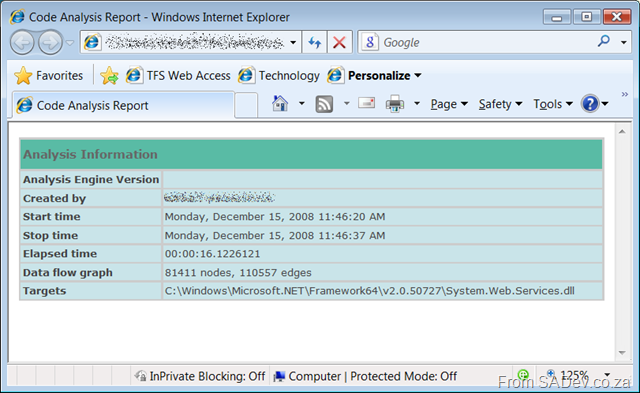
The report on System.Web.Services.dll
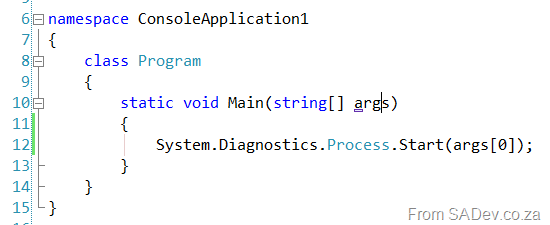
To see a problem I looked at the rules, which are defined in XML, to actually force an issue. I decided to take a stab at the process command execution rule, with the amazingly complex code like this:
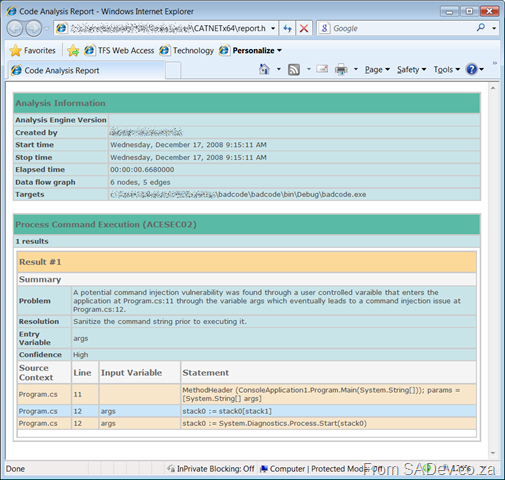
This produced a nice report like this:
That said during one of my tests with it I did get a different result, a nice crash when checking System.Data.dll
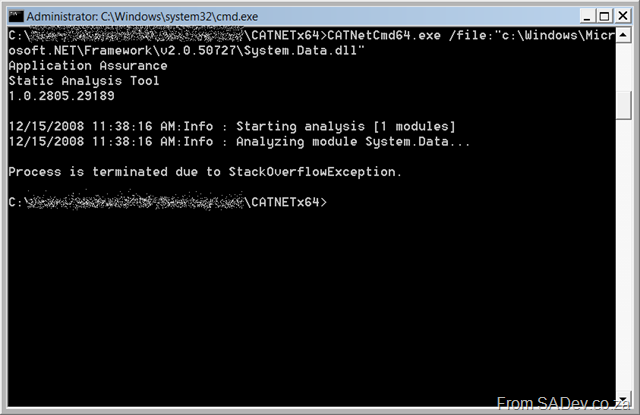
StackOverflowException in the security application.
But none of the above is the reason why it does not blow me away, it doesn’t blow me away because it’s another tool that is actually not needed. Looking at the files and code (thanks to reflector) this could have easily been built into FXCop and made that a better solution overall. It is in beta still, so hopefully this is an indication of a tool that has been grown in the dark and now that the light of the public the team will start to understand real world scenarios.
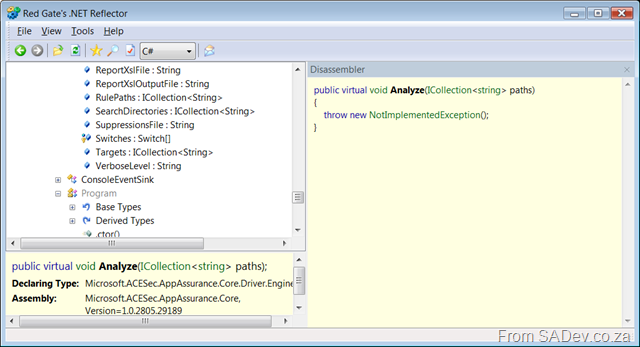
If you needed an indication of the beta status of this tool, check out how many NotImplementedExceptions are in the code still :(
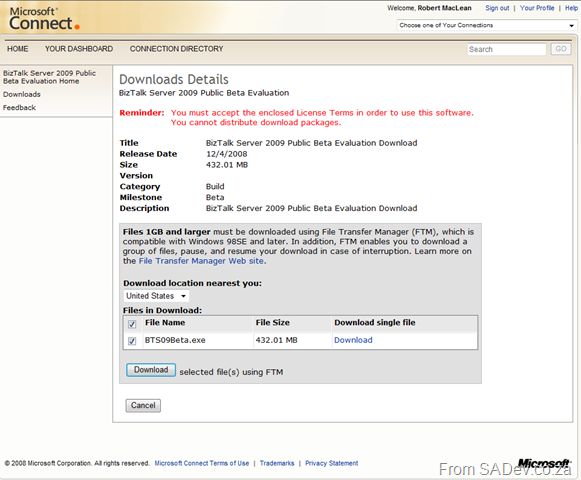
BizTalk 2009 Beta Out
Look at what I just found by searching for BizTalk on the connect site.
Scott Hanselman - Last night at Microsoft
Being on the southern tip of the world and add the slowest bandwidth anywhere (confirmed by Scott himself) we seldom get the greats like Scott Hanselman out to talk to us, let alone for free, and when he is on holiday… but that is what the S.A. Developer community got last night and what a night it was. He spoke last night on MVC and I made some notes I thought I would share.
The first concept is that
- ASP.NET > Web Forms
- ASP.NET > MVC
It’s an interesting way of thinking that ASP.NET is not Web Forms, since it is normally that we use those two interchangeable. ASP.NET is a framework for building web applications, if we use web forms on that framework is a choice not a requirement. Web forms in itself is a lie, it tries to make us believe that the web is stateful… so that we get the RAD/VB6 experience for development. The problem is that like the Matrix, the lie constrains us. MVC is the anti-RAD in a way, it opens up a lot more to the developer than Web Forms traditionally does. Knowing there is a lie, and knowing the truth can hurt you (the same way Neo knew there was no gravity, yet fell) and so MVC can hurt you. MVC is NOT a replacement for Web Forms, it is another way to solve a set of problems and some problems are better solved in web forms, and others in MVC (or ASP.NET Dynamic Data).
MVC is made up of models, viewers and controls and all of these are changeable. So the viewers uses web forms to render the HTML, but there are other options. One of those is NHaml which is a very different way to create HTML (can read about it here) and I thought that looked very interesting. Viewers should contain no logic, they should focus on rendering HTML only. What is very nice is that for the rendering side JQuery is bundled directly into MVC! It is also important to note that ascx files (ASP.NET controls) are not a
Separate from the viewers is the controls which uses the ASP.NET Routing feature of 3.5 SP 1 heavily. It is very elegant in it’s implementation and shows a forward thinking of convention over configuration. In other words it if you type in a URL like http://test/account/view, it will first check in the viewers\account folder for a view.aspx or ascx file and then in the viewers\shared folder for a view.aspx or ascx file. No config to say that this URL maps to this file. Controllers should contain the bulk of the logic but should not have any web concepts (i.e. don’t use the Request object). Obviously you could, but this breaks the important separation in the MVC design. What is nice, is that because the design of MVC is to help enforce separation, unit testing is amazingly simple and if you have the full versions of Visual Studio then it even builds unit tests for you! So while it may be very easy to put some code in a controller to check if a user is authenticated, you need to decide what level of tolerance for code smell you can handle.
Separate still from both of those is the models. Which is your data model for example LINQ to SQL. The purest form of MVC is you have your data model and then a model to talk to controllers so there is a separation in the models and everything is clean. How much benefit that has in real world is unfortunately not that much and because you have the power (you took the red pill) you can share the model from the models to the controllers.
After that Scott showed his latest project, called NerdDinner. Which is based on MVC and will be an open source solution through CodePlex one day. He showed a lot of the code and highlighted the good bits and the bad bits. This really highlighted what he was talking about and some of the problems you need to solve when working with MVC. After that was Q&A with Pizza.
Defiantly one of the best talks I have attended in a long time. He is on his way to Cape Town (taking a day out of his holiday to fly specially to CT) so if you are in CT, you must go and see him! Details can be found on S.A. Developer!
Three tweaks and a tip for getting WCF to work with Silverlight
If you create a standard WCF service it does not work with Silverlight, it needs a few tweaks to get it to work. First is that Silverlight only supports connecting to a basicHTTP service and not a wsHTTP service, so you need to enable a second service or change your primary to basicHTTP, you can find out the reasons why by reading: Accessing SOAP Services
Second you need to attribute your class with: [AspNetCompatibilityRequirements(RequirementsMode = AspNetCompatibilityRequirementsMode.Allowed)]. For example:
1: namespace SilverlightApplication1Web
2: {
3: [ServiceContract(Namespace = "")]
4: [AspNetCompatibilityRequirements(RequirementsMode = AspNetCompatibilityRequirementsMode.Allowed)]
5: public class CustomerService
6: {
7: [OperationContract]
8: public int CountUsers()
9: {
10: return 2;
11: }
The third tweak is the biggest: Normally your WCF service and Silverlight application do not sit in the web application (either in Visual Studio or on the server) and due to the security put in place to prevent cross site attacks your service calls will fail. Obviously creating a web application with everything in is a solution, but if you haven’t you must add a security file to the WCF service web application. There are two files you can create in the root of your website, the first one is a crossdomain.xml. Crossdomain.xml is a format created by Macromedia. I do not recommend this one for Silverlight scenarios as Silverlight only supports a subset of the functionality but if you need to deal with Flash based clients then this is the route you must follow. Your other option is the Microsoft way, which is to create a file called clientaccesspolicy.xml. A clientaccesspolicy.xml to allow all methods, from all clients, to all URLS looks like this:
<?xml version="1.0" encoding="utf-8"?>
<access-policy>
<cross-domain-access>
<policy>
<allow-from http-request-headers="*">
<domain uri="*"/>
</allow-from>
<grant-to>
<resource path="/" include-subpaths="true"/>
</grant-to>
</policy>
</cross-domain-access>
</access-policy>
That is not normally what you want to do in production because of the security issues, but for early development it can help. Note: You can use BOTH files to get Silverlight and Flash clients to have the best experience. More details on both those files can be found at: http://msdn.microsoft.com/en-us/library/cc197955(VS.95).aspx
The last tip is the usage of WCF in Silverlight. It is still WCF so you are required to open and close your service connection. However since Silverlight makes web calls using async methods you need to chain up commands using events. i.e. you would create a event handler for when the connection is open and then open the connection. In the open event handler you would do the work, and once that completes you close the connection.

Chaining event handlers for getting Silverlight + WCF in code and program flow.
Special thanks to Herman (the delegator) and Willy for prompting me to write this post… especially since Herman won’t blog on this.
My first love came back - and she now drives a Ferrari!
Seriously I am grinning like mad this morning, because my first development love has returned: DELPHI! Many years ago it stopped being a good choice for work, if you could get any work, but that changed recently with the announcement of Delphi Prism. DP makes use of Visual Studio to host the Delphi language, that’s right all the power and beauty of VS! The language has been enhanced to support all the cool things that C# can do (LINQ, Silverlight)! So that is very cool, and using Oxygene Compiler you can target .NET, Win32, Mono (so you can run on Linux) with full GUI support for GTK#, and Cocoa for OSX (Tiger and Leopard)!
That’s right one fully featured language targeting 4 different platforms (Old Windows (Win32); New Windows (.NET); Linux; Mac OSX) right from within Visual Studio!
In reality though it has just been press announcements and demo’s at PDC so nothing for me to truly base this on… but hopefully soon.
InfoQ has a nice into article on the subject too: http://www.infoq.com/news/2008/11/Delphi-Prism
VS2010 and SharePoint
There are three sources for information which I have found valuable for VS2010:
- First is the video from PDC about a lap around VS2010: Great high level introduction to what it will be.
- Next is Willy’s series on VSTS 2010 which he just finished.
- Last is for the SharePoint people, is the InfoQ article on it: http://www.infoq.com/news/2008/11/wss_vs2010 – which had some serious highlights:
- "These tools will replace the much-derided SharePoint Designer”
- “Visual Studio will be able to building and debug SharePoint projects. "F5 Just Works!"”
- “A new Packaging Explorer will exist that supports editing Packaging and structuring the SharePoint Features and WSP file.”
Unfortunately the VS2010 bits we have available currently (if you want a copy let me know) includes everything from the video and Willy’s posts but does not include the WSS items. In fact the forthcoming CTP will not even include them :(
Deciding what UI technology to use?
Herman, who you may know as “The man without a blog” or “The Delegator” or the guy who works over the partition from me, has released a poster detailing UI interface choices there are and what are the factors involved with choosing that. Very good to have if you trying to decide between Silverlight, Flash, Flex, ASP.NET, WinForms, WPF etc…
Download details available on Willy’s blog.
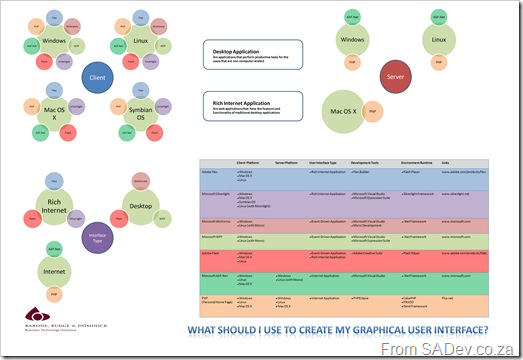
A picture of the poster… it’s much bigger when you download it.
Update 10 Jan 2011 - The link to Willy-Peter's blog no longer works.