
Specified method not supported
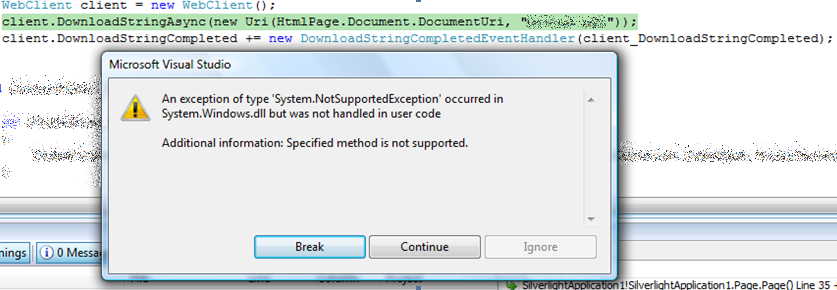
Part of that POC was to be able to have a local XML file (local as on the server) loaded when the application was open and parsed. So the only way to do that is to use the WebClient class and call the DownloadStringAsync method with the URI to the XML file and then parse that in an XDocument. Not rocket science at all, but when I tried it I kept getting a message “An exception of type ‘System.NotSupportedException’ occurred in System.Windows.dll but was not handled in user code Additional Information: Specified method not supported.”
No matter what I tried I could not get it to work :( Eventually I figured out that it only was occurring when debugging/running from within Visual Studio. Publishing it to an actual web server and running it as a user would worked perfectly. This is a big issue for me, since it makes ad-hoc testing and debugging very difficult. Thankfully for me it was just a POC, but this could be a big pain for serious projects.
Leave your toolbox at home
Well there is a solution for that now besides going to the web site and downloading them, it’s called Live! Yip, Microsoft’s hosted solutions, have the solution in two forms. Firstly there is a file listing page http://live.sysinternals.com which just lists all the files so in one click you can get the tool you need, but even better, it’s also published as a file share! So if you open \\Live.sysinternals.com\tools you can actually browse a file share for the tool you need.
IE8 - The developers best friend

Essential Developer Tools - Part 4: Static Analysis Tool
.NET Framework 3.5 - Part 3: Extensions
-
ASP.NET MVC: This model view controller (MVC) framework for ASP.NET provides a structured model that enables a clear separation of concerns within web applications, and makes it easier to unit test your code and support a TDD workflow. It also helps provide more control over the URLs you publish in your applications, and more control over the HTML that is emitted from them.
- ASP.NET Silverlight Support: With the ASP.NET 3.5 Extensions release we'll deliver support for easily integrating Silverlight within your ASP.NET applications. Included will be new controls that make it easy to integrate Silverlight video/media and interactive content within your sites.
-
ADO.NET Data Service (codename "Astoria"): In parallel with the ASP.NET Extensions release we will also be releasing the ADO.NET Entity Framework. This provides a modeling framework that enables developers to define a conceptual model of a database schema that closely aligns to a real world view of the information. We will also be shipping a new set of data services (codename "Astoria") that make it easy to expose REST based API endpoints from within your ASP.NET applications.
Now starting with Silverlight support thats a no brainer really. If your market is developers wanting great tools, then making them edit HTML to get your new platform is a little tougher than need be. The MVC is a nice thing if you believe the information on it (I haven't used it yet myself) but it basically is bringing a lot of the CCF/CAB ideas to the web in a elegant way. Lastly Astoria is a great technology (I almost built my own for a project but beta 1 came out and saved me from that) which gets your data from within the black box of servers on to the web in a way it can be consumed by client applications easily. Obviously performance doesn't compare to ADO.NET directly but if you don't have access to the server this is the way to share information.
Essential Developer Tools - Part 3: UDL Files
However there is a problem with this, in that it's open to errors during the modification (assuming you can copy and paste without error) and that there is no nice test system for your environment. Well fear not, Windows (I've known about this since Windows 2000 and can confirm it works on XP, Vista and 2003 fine) has a great feature for finding out connection strings, and testing them.
To do this you create a new empty file somewhere (desktop is good, cause you can go right click New -> Text Document). The trick is to make sure the file extension is udl (i.e. connection.udl). Now you can double click this file and using the (possibly) familiar connection wizard/odbc thing to set and test the values the values:
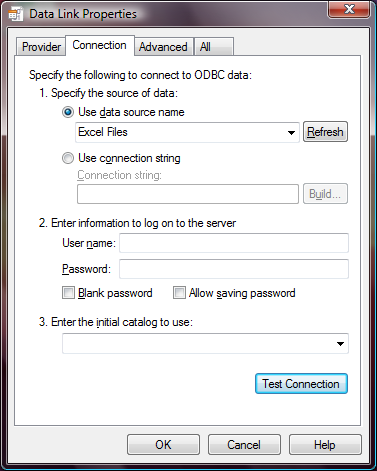
Once you click OK the window disappears.
So what good is that? Well if you now open that file in notepad you'll find the connection string in plain text right there! With all the right values for your environment! Anyway happy connecting!
Update 10 Jan 2008: If you are doing this on x64 machines and getting issues this may help: http://blogs.msdn.com/snehadeep/archive/2008/01/10/running-a-32-bit-data-link-properties-udl-in-64-bit-box.aspx
.NET Framework 3.5 - Part 2: What's new in it?
- http://dotnetwithme.blogspot.com/2007/05/what-new-in-net-35.html
- http://msdn2.microsoft.com/en-us/library/bb332048(VS.90).aspx
- http://blogs.msdn.com/tims/archive/2007/07/27/what-s-new-in-wpf-3-5-here-s-fifteen-cool-features.aspx
There is a lot of new language features in 3.5, most important to highlight for this series is LINQ. Moving along to the more shiny information there is significant work put into integration of AJAX, WPF (XBabs support in Firefox, can work with cookies now), WCF (more WS* support, general syndication support, special model for web development, and Silverlight. WCF + WF and WCF + AJAX now play very well together (lots of support for each other now). There is also support for new cryptography stuff (nice), peer to peer development. Interesting WinForms now supports the same model as ASP.NET for authentication.
Essential Developer Tools - Part 2: Microsoft patterns and practise
Being a Dot Net developer means that those giants include the Microsoft patterns and practices team. Well what do they do?
We talk with a large number of Microsoft customers, partners, and consultants to understand the commonly occurring scenarios and the technical challenges associated with them. Then we discover and harvest the solution patterns and engineering practices (including anti-patterns) that have proved successful in addressing these scenarios.
Once we understand the scenarios and technical challenges, we work with product and technology teams across Microsoft, industry experts, and with customers and partners, to build guidance that reflects both the current, practical state of the technology and that is also aligned with future Microsoft technology plans. Often, the underlying scenarios and solutions guidance ends up influencing future Microsoft product direction.
Most of our projects are conducted in CodePlex communities. This allows continuous input from the development community at large and keeps us honest. We call this approach, “customer connected engineering” and it ensures that what we deliver actually meets the needs of our customers. We also ship the source code to nearly everything we deliver, usually along with a license agreement that encourages source level adoption and customization.
From http://msdn2.microsoft.com/en-za/practices/bb969103(en-us).aspx
That's great for marketing but for developers it means that they produce tools, frameworks and documentation (guides, proven practices etc...). My personal favorite from them is a set of components called the Enterprise Library which provides amazing code for logging (log4net eat your heart out), database access, exception handling, cache handling, cryptography, policy management (ala AD policies in your app) and validation. It really is amazing stuff. Two nice examples are the database application block, you can connect to a database, run a query and get the result in result set and close the database all following best practices with a tool to change the connection string (cause it's not hard coded so your users may need it) all in 2 lines of code! The validation block provides attributes to decorate your classes with to enforce validation with no additional code. You can get all of that from http://msdn2.microsoft.com/en-us/library/aa480453.aspx and much more from http://msdn2.microsoft.com/en-za/practices/bb969097(en-us).aspx.
.NET Framework 3.5 - Part 1: Where you can find it?
C:\Program Files\Microsoft SDKs\Windows\v6.0A\Bootstrapper\Packages
BTW one nice feature of using this version, is that you have all 60Mb already downloaded. So when you launch it, and it says you need to download a bunch of data - well you give it a second cause it doesn't.
Essential Developer Tools - Part 1: Reflector Plugins
The site is: http://www.codeplex.com/reflectoraddins
Some of the nice ones there:
- Code Metrics
- Code Review Tools
- Dumping of source code to file
- Silverlight support
- SQL 2005 (for CLR integration) support
- Unit and mock testing
- BizTalk Support
- A few diagram and charting tools
- Powershell support (as a language)
There are a lot of other nice ones but those are really great.